7
INSTRUMENT CLUSTER
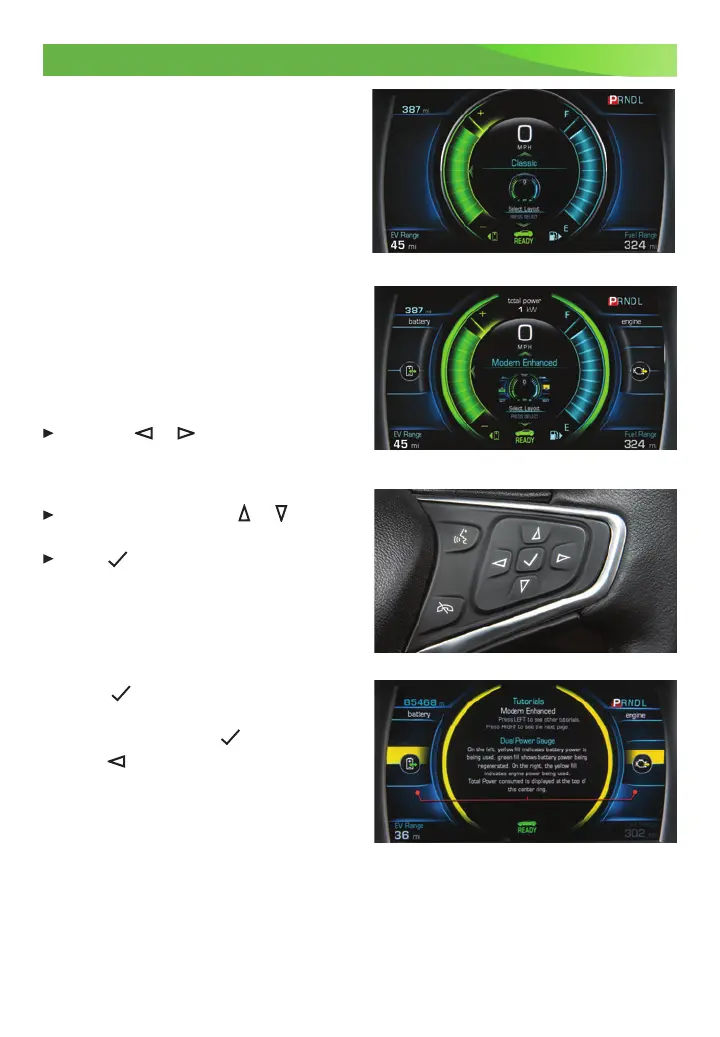
The instrument cluster features an LCD
screen that can be configured in four
different layouts.
Classic – Displays basic information on
speed, range and other operations.
Classic Enhanced – Displays basic infor-
mation plus driving efficiency and power
usage information.
Modern – Displays basic information on
speed, range and other operations along
with an efficiency ring that glows green
toyellow based on driving efficiency.
Modern Enhanced – Displays basic
information and the efficiency ring plus
additional power usage information.
CLUSTER DISPLAY ZONES
Press the or of the 5-way control
on the right side of the steering wheel
tomove between the different display
zones.
Press the 5-way control or to scroll
through the display menus.
Press
to select a highlighted item.
CLUSTER CONFIGURATIONS
1. Use the 5-way control to select the
Configurations page in the left display
zone on the cluster.
2. Scroll to highlight Display Layout;
press .
3. Scroll to highlight one of the cluster
display layouts; press .
4. Press to exit the menu.
CLUSTER TUTORIAL
To view tutorials about the features of the
instrument cluster, with the vehicle in Park,
use the 5-way control to select Tutorials
from the Settings menu.
See Instruments and Controls in your Owner’s Manual.
Classic layout
Modern Enhanced layout












 To Next Page