Operating instructions
:
1. Power-on
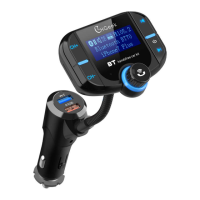
(1) When the integrated car charger into the car cigarette lighter power
supply, the device automatically working;
(2) Select any FM frequency of this device; (In order to ensure good sound
quality equipment, please select the local no radio program blank channel)
(3) Turn on the car FM stereo and select the same frequency as the
device.
2. Frequency and Volume Adjustment
(1) The device supports the frequency of 87.5-108.0MHz, can be adjusted
with the CH+ and CH- button;
(2) Adjust the volume by rotating
3. Play music from TF card
(1) Insert the TF card into the device, will automatically detect and play TF
card MP3 / WMA / WAV format music;
(2) Music selection: Press / button to switch to previous/next song.
4. Connect the Bluetooth device
(1) The device is equipped with a built-in Bluetooth chip that can be
connected to other handheld Bluetooth devices;
(2) When the device is turned on, it will automatically enter the Bluetooth
pairing state and the screen icon will flash continuously, at this time the
device named "BT70" or "CH13" is connected;
(3) The device has a memory function that automatically connects with the
stored paired Bluetooth device when powered on;
(4) If you want to delete a stored device, please delete it in your phone's
Bluetooth pairing list.


 To Next Page
 Loading...