Installation Instructions LCM1UP
7
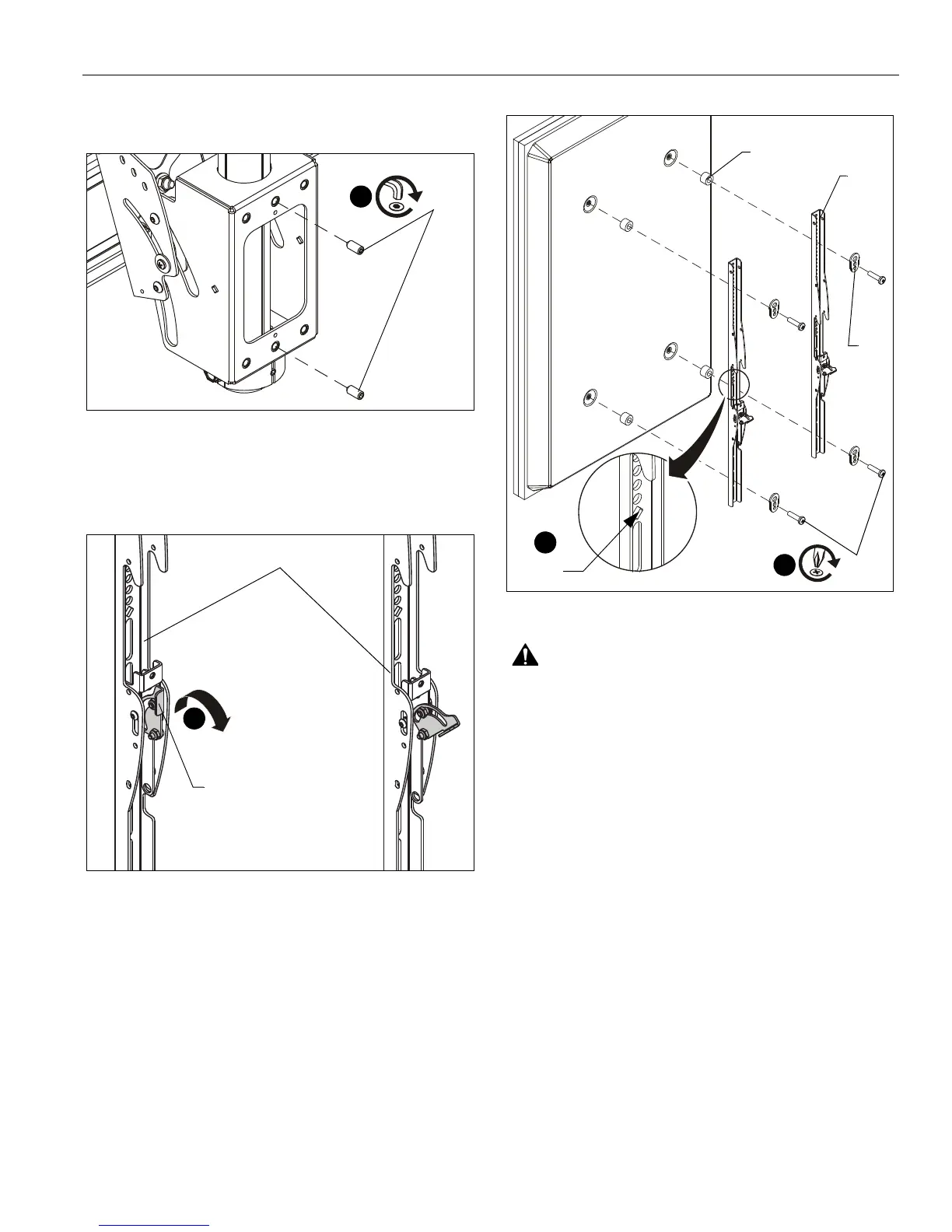
5. Install and tighten two 5/16" x 3/4" set screws (X) through
back of mount (CC) and against column. (See Figure 4)
Figure 4
Attaching Interface Brackets to Display
1. Lower the latch mechanism on each interface bracket (FF).
(See Figure 5)
Figure 5
2. Align the center of the interface bracket (FF) with center of
screen. (See Figure 6)
NOTE: The diamond-shape hole in the bracket corresponds to
the center of the mount.
Figure 6
WARNING: IMPROPER INSTALLATION CAN LEAD TO
DISPLAY FALLING CAUSING SERIOUS PERSONAL
INJURY OR DAMAGE TO EQUIPMENT! Using screws of
improper size may damage your display. Properly sized
screws will easily and completely thread into display
mounting holes. If spacers are required, be sure to use longer
screws of the same diameter.
3. Select correct screws, spacers (if necessary) and universal
washers from the hardware bag (A-N) and attach brackets
(FF) to back of screen. (See Figure 6)
Center of
bracket
(N)
(L or M)
(A-K)
(FF)
3
2



 To Next Page