

EasyManua.ls Logo

Chieftec SNT-2131 SATA - User Manual

Chieftec SNT-2131 SATA
2 pages
Print Icon
To Next Page IconTo Next Page
Loading...
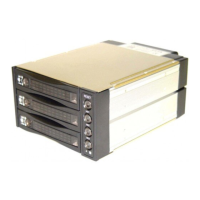
SNT-2131 SATA Back Plane
User’s Manual
Features of product ---
Aluminum Frame, Aluminum cover
Interface: Support SATA-I, SATA-II
High performance transfer rate up to 150MB/s, 300MB/s
Plug & play, hot swappable
Point to point, free from master/slave setting
SATA 15Pin & Molex 4Pin Power connectors
LED for PSU , HDD access, Fan sensor & Buzzer
Power Control Switch
Reset Switch for buzzer alarm
8cm FAN X1
Magic Handle—Auto In/Out
Color for choice: black
Dimension: 202(L) X 146(W) X 86(H) mm
Patent products with advanced structure design
Precisely connection on connector (see picture A)
---Caddy Drive Drawer Install---
Use TM#6*4 long screws to mount the drive in the drawer. (see picture C)
Question and Answer IconNeed help?

Do you have a question about the Chieftec SNT-2131 SATA and is the answer not in the manual?

Summary

Front Panel Overview

Reset Switch and Overheating LED

Describes the reset switch function for buzzer alarms and overheating alerts, including LED indicators.

Front Panel Indicators

Details LEDs for power status (Green/Orange) and HDD access, as well as fan sensor status (Green/Red).

Safety Lock Mechanism

Explains the safety lock feature that secures the hard disk position during operation.

Rear Panel Connections and Settings

Power Connectors

Details the 4-pin and 15-pin SATA power connectors and their compatibility.

Serial ATA Signal Connectors

Lists the 7-pin Serial ATA signal connectors (HD1-HD3).

Jumpers and Connectors

Describes temperature setting jumpers (IJP1), extension function jumpers (IJP3), and fan RPM options (J4).

Fan Failure and Temperature Detection

Explains fan failure detection (FLEDR, FLED+, FLEDG) and temperature detection (TLEDR, TLEDG) signals.
Chieftec SNT-2131 SATA Specifications

General IconGeneral
BrandChieftec
ModelSNT-2131 SATA
CategoryStorage
LanguageEnglish