Equip the Motorcycle Dash Cam with a Tire Pressure Monitoring
Sensor to read the real-time tire pressure and alert you with a pop
-up warning and an alarm sound when it reaches the preset value.
The pressure data can be overlaid with the video file in real time.
By installing the wireless Bluetooth OBD module, you can read real
-time engine data. OBD data can be overlaid and synchronized in
real-time to the recording file, helping you more effectively analyze
the vehicle's driving status
Tire Pressure Monitoring
OBD
09
Optional Accessories
External Tire Pressure Sensor
1year
0.01Bar
BR1225
0-8Bar
18.2x14.8mm
Battery life:
measurement accuracy:
battery replacement:
pressure measurement range:
size parameters:
Data Types Available
Wheel Speed
Engine RPM
Coolant Temperature
Throttle Position
Intake Air Temperature
OBD Module
With the CG Remote Pro installed, you can switch interfaces, select
apps, and answer calls.
Remote Controller Pro
CG Remote Pro
Mirroring mode
Short press:“ ”or“ ”Move left or right
“ ”OK,Long press return.
Short press:“ ”or“ ”Switch songs
“ ”Pause/Play.
Bluetooth mode
Video preview interface
Short press:“ ”Switch camera
“ ”Lock Video
“ ”take a picture
All Pages
Long press:“ ”or“ ”switch apps
“ ”Return.
INSTALLATION GUIDE
10
CHIGEE GO APP
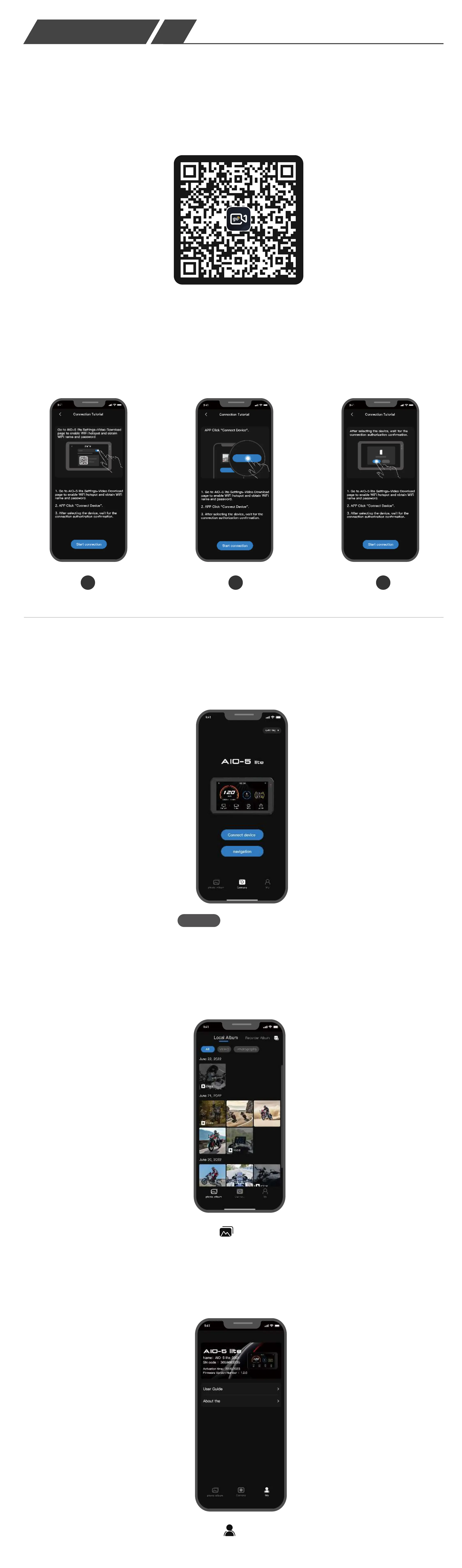
1.Download the CHIGEE GO APP from the app store.
Scan and Download Now
First connection
2.Follow the instructions in the app to operate and connect the AIO-5 lite.
1 2 3
Connect the AIO-5 lite to download video files and adjust recording
parameters.
Enter the Homepage after running CHIGEE GO
Album
Connect Devices
Connect Devices
Visit the Motorcycle Dash Cam Album or the local album. Select the clips
you need to download, and once the clips are downloaded, users can
superimpose data and edit the video themselves.
My
Access the latest version of the User Manual, Troubleshooting Guide,
and view the device code.
Album
① Local Album: Downloaded Video Clips
② Recorder Album: View Videos and
Photos Recorded on the Host
③“ ”Multi-Select: Multiple Clips Can
Be Deleted or Downloaded
④“ ”All: All Videos and Photos
⑤“ ”Videos: View Video Clips Only
⑥“ ”Photos: View Photos Only
Photos
1
2
3
4 5 6
All
Videos
Camera
① Exit
② Preview Switch
③ Resolution Setting
④ Album
⑤ Recording Switch
⑥ Dash Cam Settings
1
2
3
4
5
6
Downloaded video clips can be used to view real-time tracks or to
overlay data.
Real-time Track
Stacking
Video Editing
Export
Export
After the video is
overlaid with data,
it can be exported
to the local album
for viewing.
CG RC Original Wonderwheel Remote Control
After the CG RC module is connected to the AIO-5 Lite infotain-
ment system via Bluetooth, it enables BMW's original car knob
switch, allowing directly control of the AIO-5 Lite and various op-
erations.


 To Next Page
 Loading...