DEPTH
OF
FIELD
A zone of the picture in front of and behind
your subject will also be sharp. The depth of
this zone depends on the aperture selected.
If
you wish to know how much of an area will be
sharp in the final picture, it can be predeter-
mined in two ways:
(A)
Depth
of
Field Previewer
Slide the AUTO'MANUAL aperture opening
switch to "M"
,Manual' position. Set the
lens to the selected aperture opening of
the F stop ring. This will enable you to
preview the area of sharpness in the picture
before taking.
(6)
Depth
of
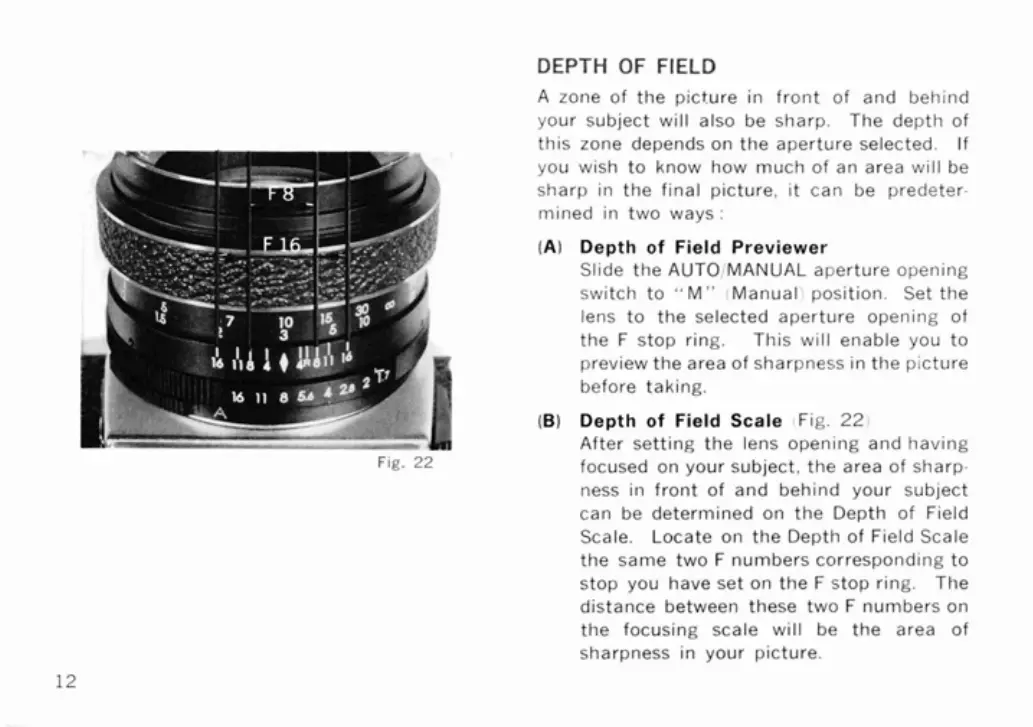
Field Scale (Fig.
221
After setting the lens opening and having
focused on your subject, the area of sharp-
ness in front of and behind your subject
can be determined on the Depth of Field
Scale. Locate on the Depth of Field Scale
the same two F numbers corresponding to
stop you have set on the F stop ring. The
distance between these two F numbers on
the focusing scale will be the area of
sharpness in your picture.



 To Next Page