EasyManua.ls Logo

Chord NU4 Series - User Manual

Chord NU4 Series
5 pages
Print Icon
To Next Page IconTo Next Page
Loading...
NU4
Quad UHF Wireless System
Item ref: 171.843UK, 171.844UK, 171.845UK
User Manual
Version 1.0
Caution: Please read this manual carefully before operating
Damage caused by misuse is not covered by the warranty

Questions and Answers

  • J
    joseph07Aug 2, 2025
    What to do if all LEDs are lit but no sound from Chord NU4 Microphone system?
    • A
      Angela WoodAug 2, 2025
      If all the LEDs are lit on your Chord Microphone system receiver but you're not getting any sound from the mic, first, ensure the receiver is properly connected to the sound system. Next, make sure that both the receiver and the amplifier/mixer channel volumes are turned up.
  • L
    Luis MartinAug 7, 2025
    Why POWER button is lit but no “RF” or “AF” LEDs on Chord NU4?
    • M
      millsalisonAug 7, 2025
      If the POWER button is lit but you're not seeing the “RF” or “AF” LEDs on your Chord Microphone system, try the following: * Ensure the transmitter is switched on. * Check that the transmitter is within reception range. * Check that the transmitter batteries are in good condition or fully charged.
  • J
    Joe HannaAug 12, 2025
    What to do if POWER button and “RF” LEDs are lit but no “AF” and no sound from Chord NU4 Microphone system?
    • M
      Michael PattonAug 12, 2025
      If the POWER button and “RF” LEDs are lit, but there's no “AF” and no sound from your Chord Microphone system, you can try the following: 1. Check that the transmitter is switched on. 2. Ensure the transmitter has good or charged batteries. 3. Make sure there isn't another transmitter nearby using the same frequency.
  • R
    Raymond FullerAug 17, 2025
    How to fix a very low microphone output on Chord NU4?
    • D
      Deborah BradleyAug 17, 2025
      If the microphone output from your Chord Microphone system is very low, here are a few things you can check: * Turn up the VOLUME on the receiver. * Turn up the gain on the beltpack transmitter. * Increase the gain of the mixer/amplifier input. * Ensure that an XLR output is not connected to a line input. * Check the transmitter batteries.
  • D
    dianejohnsonAug 23, 2025
    How to stop Chord Microphone system output from being very loud or distorted?
    • C
      Cheryl HoweAug 23, 2025
      If the microphone output from your Chord Microphone system is very loud or distorted, try these solutions: * Turn down the VOLUME on the receiver. * Turn down the gain on the beltpack transmitter. * Reduce the gain on the mixer/amplifier. * Ensure that the jack output is not connected to a mic input.
  • M
    Michael SmithAug 27, 2025
    How to troubleshoot if the POWER button does not light on Chord NU4 Microphone system receiver?
    • D
      Dana StricklandAug 27, 2025
      If the POWER button on your Chord Microphone system receiver isn't lighting up, make sure the power adapter is properly connected to the mains and is working. Also, ensure that the receiver itself is switched on.

Summary

Introduction and Contents

Package Contents Overview

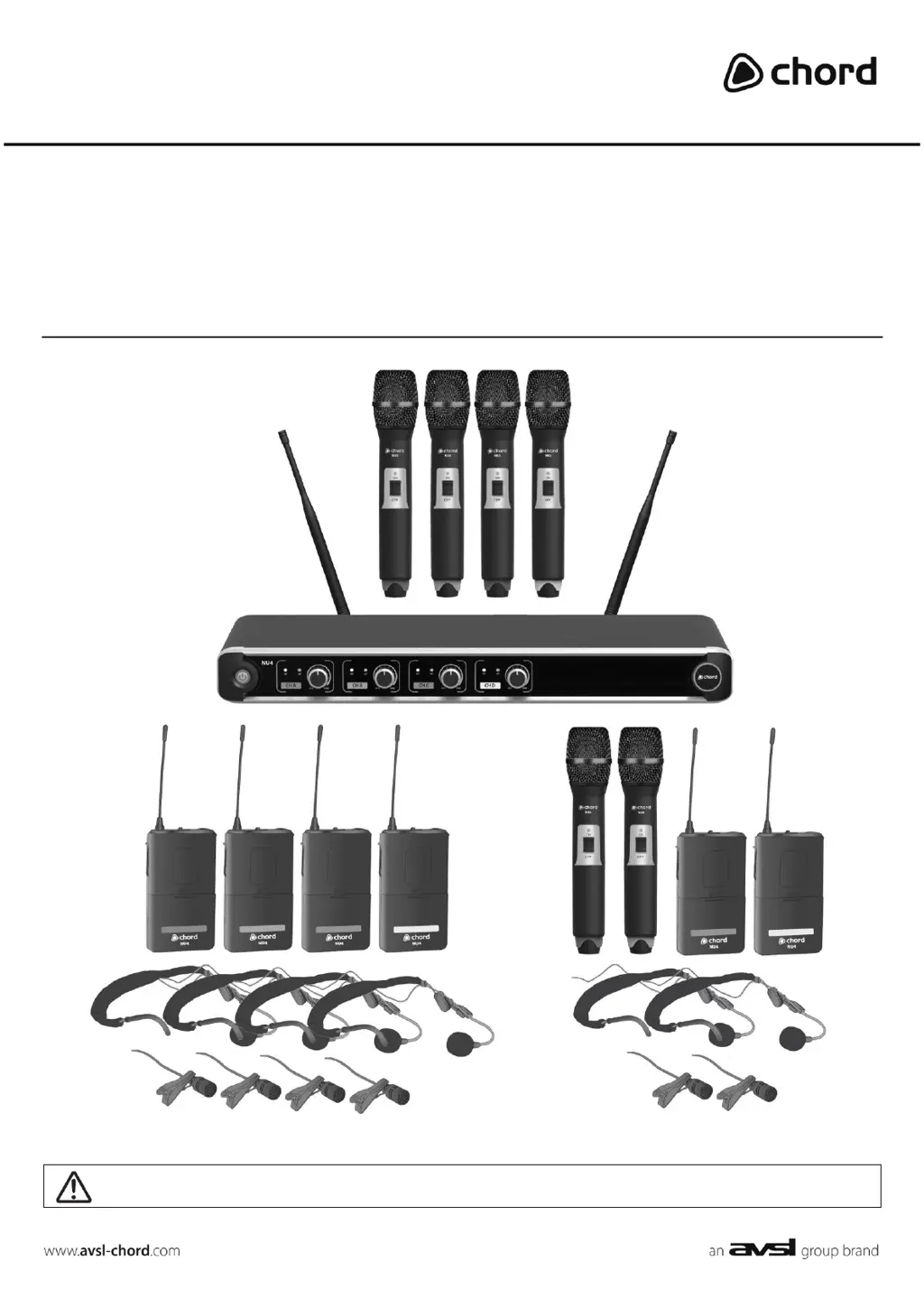
Lists all items included in the Chord NU4 wireless system package for user reference.

Safety and Usage Guidelines

Operational Warnings

Provides crucial warnings regarding fire, electric shock, and component damage from misuse.

General Safety Precautions

Details safety measures for power, environmental exposure, and battery handling.

Optimal Placement Advice

Offers guidance on positioning the system components for best performance and longevity.

Cleaning Instructions

Specifies methods for cleaning the transmitter and receiver to maintain hygiene and prevent damage.

Receiver Panel Components

Front Panel Overview

Identifies the power button, RF carrier LEDs, volume controls, and AF signal LEDs on the receiver's front.

Rear Panel Connectivity

Details the DC power jack, BNC antenna connectors, 6.3mm jack output, and XLR outputs on the receiver's rear.

Transmitter Features

Handheld Transmitter Details

Describes the On LED indicator, On/off switch, and battery compartment of the handheld transmitter.

Beltpack Transmitter Details

Outlines the antenna, On LED, On/off switch, jack socket, gain control, and battery compartment of the beltpack transmitter.

Setting Up and Operation

Transmitter Setup

Instructions for inserting batteries into handheld and beltpack transmitters and connecting microphones.

Receiver Connection and Power

Guidance on positioning the receiver, connecting antennas, audio outputs, and power adapter.

System Operation

Steps for powering on the system, adjusting volume, and handling potential feedback issues.

System Shutdown and Storage

Procedures for turning off the system, unplugging connections, and storing components safely.

Specifications and Troubleshooting

Technical Specifications

Provides detailed technical data for the receiver, transmitters, and microphones, including dimensions and frequencies.

Troubleshooting Common Issues

Offers solutions for problems like no power, no RF/AF signal, distorted audio, or low output.

Chord NU4 Series Specifications

General IconGeneral
BrandChord
ModelNU4 Series
CategoryMicrophone system
LanguageEnglish

Related product manuals