The CHOWEL TEACHING BOX, models TB40-P02A, P02B, and P02C, is an optional accessory designed for welding controllers, providing a user-friendly interface for programming and monitoring welding operations. This instruction manual outlines its functions, technical specifications, usage, and maintenance features.
Function Description
The teaching box serves as a primary interface for displaying and inputting program data in a spreadsheet format, simplifying the configuration of welding parameters. It offers various function select modes, allowing users to manage different aspects of the welding controller. These modes include:
- Teaching Mode Change: Enables switching between "PROG" (Program enable, data input enabled) and "noPRG" (Program disable, data input disabled) modes, controlling whether data can be modified.
- Data Name / Data Range Change: Allows users to view either the name of the present address data or the settable range of the data on the LCD display's bottom line.
- Backlight ON/OFF Change: Controls the backlight of the LCD for improved visibility in various lighting conditions.
- Data Copy: Facilitates copying data between the teaching box and the welding controller, or between different memory locations within the teaching box. This feature supports storing three types of data and includes a comparison function to detect discrepancies between the teaching box and controller data.
- Reset Various Functions: Provides options to reset specific counters and settings, including stepper reset, total weld counter reset, and tact counter reset. The availability of these reset functions may vary depending on the specific model of the welding controller.
- Schedule Duplicate: Allows for duplicating welding schedules, including both start and stepper schedules, from a source schedule number to one or more destination schedule numbers.
- Timer Slave Station No. Confirm / Change Mode: Applicable to welding controllers with communication functions, this mode enables confirming or changing the timer slave station number selected by the teaching box. It also allows for selecting the timer slave station number of the welding controller itself.
- Input/Output Monitor: Displays the input and output signals of the welding controller, with assignment (signal name) of each bit varying by model. This function is only available on welding controllers capable of monitoring I/O signals.
- Device Net Setting: Configures Device Net communication parameters, including node address and data rate (125kbps, 250kbps, 500kbps).
- CC Link Setting: Configures CC Link communication parameters, including slave station number and data rate (156kbps, 625kbps, 2.5Mbps, 5Mbps, 10Mbps).
- Ether Net Setting: Configures Ether Net communication parameters, including IP address, subnet mask, and gateway address. Each byte data for these settings has a range of 0 to 255.
- Profibus Setting: Configures Profibus communication parameters, including station address and transfer rate. The transfer rate for Profibus is automatic and cannot be changed from the welding controller side.
- Date/Time Confirm / Change Mode: Allows for confirming and changing the date and time settings.
- Write Collectively: Enables writing data collectively to a specified range of Y addresses within a range of X schedules.
- Error History: Monitors and displays a history of errors, storing up to one hundred items. Users can view individual error records or erase the entire history.
The teaching box also features an error alarm with a buzzer sound to alert users to faults.
Important Technical Specifications
The teaching box is designed to comply with CE marking standards, adhering to a range of European Norms including [EN50011-2], [EN50082-2], [EN60204-1], [EN61000-4-2], [EN61000-4-4], [EN61000-4-5], [EN61000-4-8], [ENV50140], and [ENV50141].
The device uses an LCD (Liquid Crystal Display) with a backlight for operation in dark environments. The display will automatically turn off after 3 minutes of inactivity or if no error occurs, and the backlight will turn on again if any key is pressed.
The keyboard includes number keys for data entry, arrow keys for navigation, a function select key to access menus, a mode selector key for welding controller weld mode selection, and a program data set/error reset key for data entry and error clearing. A Weld mode indicator LED flickers if the mode set by the teaching box differs from the welding controller's mode.
Usage Features
- Normal Display: Upon power-on or connection, the LCD shows the normal display, including X and Y addresses, data names/ranges, data values, teaching mode (PROG/noPRG), PILOT (START) status, and timer slave station number.
- Direct Jump Function: Double-clicking arrow keys allows for direct jump setup in X or Y addresses, enabling quick navigation by inputting an arbitrary address with number keys and pressing ENT./RESET.
- Mode Operations:
- WELD OPERATION: Sequence is active, and welding occurs.
- TEST: Sequence is active, but no welding occurs (for installation).
- PRESS TEST: No sequence operation; only VALVE OUTPUT is turned ON/OFF based on PILOT INPUT (no welding).
- Key Strokes for Function Selection: Most functions are accessed by pressing the FUN. key, then selecting a number corresponding to the desired function, or by navigating with arrow keys and confirming with ENT./RESET.
- Data Input and Confirmation: Data is typically entered using number keys and confirmed with the ENT./RESET key.
- Error Display: Communication errors are displayed with a specific message. Other errors show an error code, the schedule number where the error occurred, and a description. Errors can be reset by pressing ENT./RESET. If multiple faults occur, arrow keys can be used to navigate through them.
- Data Copy Process: The data copy function involves selecting the data type (e.g., common, schedule, stepper), specifying source and destination, and executing the copy. The system provides feedback on the copy status, including completion or any discrepancies.
- Reset Process: Resetting functions involves selecting the specific reset type (stepper, total weld counter, tact counter) and confirming the action. For individual stepper resets, the stepper number must be input.
- Schedule Duplicate Process: This involves inputting the source and destination schedule numbers. The system validates the input and executes the duplication, indicating completion or parameter errors.
- Communication Settings: For Device Net, CC Link, Ether Net, and Profibus, users can confirm and change parameters like node/station addresses and data rates, following specific key sequences.
- Date/Time Setting: Allows for adjusting date and time, with cursor navigation to target data bytes and input via number keys.
- Write Collectively: Requires inputting start and end schedule numbers, a Y address, and the data to be written.
- Error History Monitoring: Users can choose to "SHOW" error history to view records or "ERASE" it to clear all stored faults.
Maintenance Features
- Handling Precautions:
- Use only with corresponding welding controllers.
- Avoid dropping or subjecting the teaching box to strong shocks.
- Do not leave under direct sunlight.
- Protect from water splash, excessive dust, dirt, or spatter. Avoid attaching/detaching connectors in such environments.
- Troubleshooting: If the teaching box does not operate or display anything, users should:
- Turn off the welding controller's power supply.
- Check for any short circuits in the connector part.
- After a short wait, turn on the welding controller's power supply again.
- Refer to the welding controller's manual for more detailed troubleshooting.
- Manual Management:
- Users are advised to fully understand the manual before operation.
- Keep the manual in an accessible place for easy and regular reference.
- Order a new manual from NADEX Co., Ltd. if the original is lost or damaged.
- Transfer the manual to the next owner when the device is transferred.
- Software Version Compatibility: Some functions may not be available depending on the teaching box's software version.
- Data Integrity: The system includes checks for data discrepancies during copy operations and provides warnings if backup data has errors or if memory is lost due to excessive backup periods.
- Writing Inhibition: In cases where data items differ between the original and copied data (e.g., due to software changes), the system may display a "TIMER TYPE DIFFERS" message. Users can choose to "CANCEL" writing or "CONTINUE" to write other data while disregarding differing items. If writing is inhibited, a "WRITE INHIBITED" message is displayed.
- Cleaning: For cleaning, use thinner or benzene; avoid using a case deform or fade.

 Need help?
 General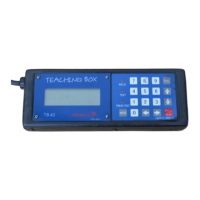

 To Next Page