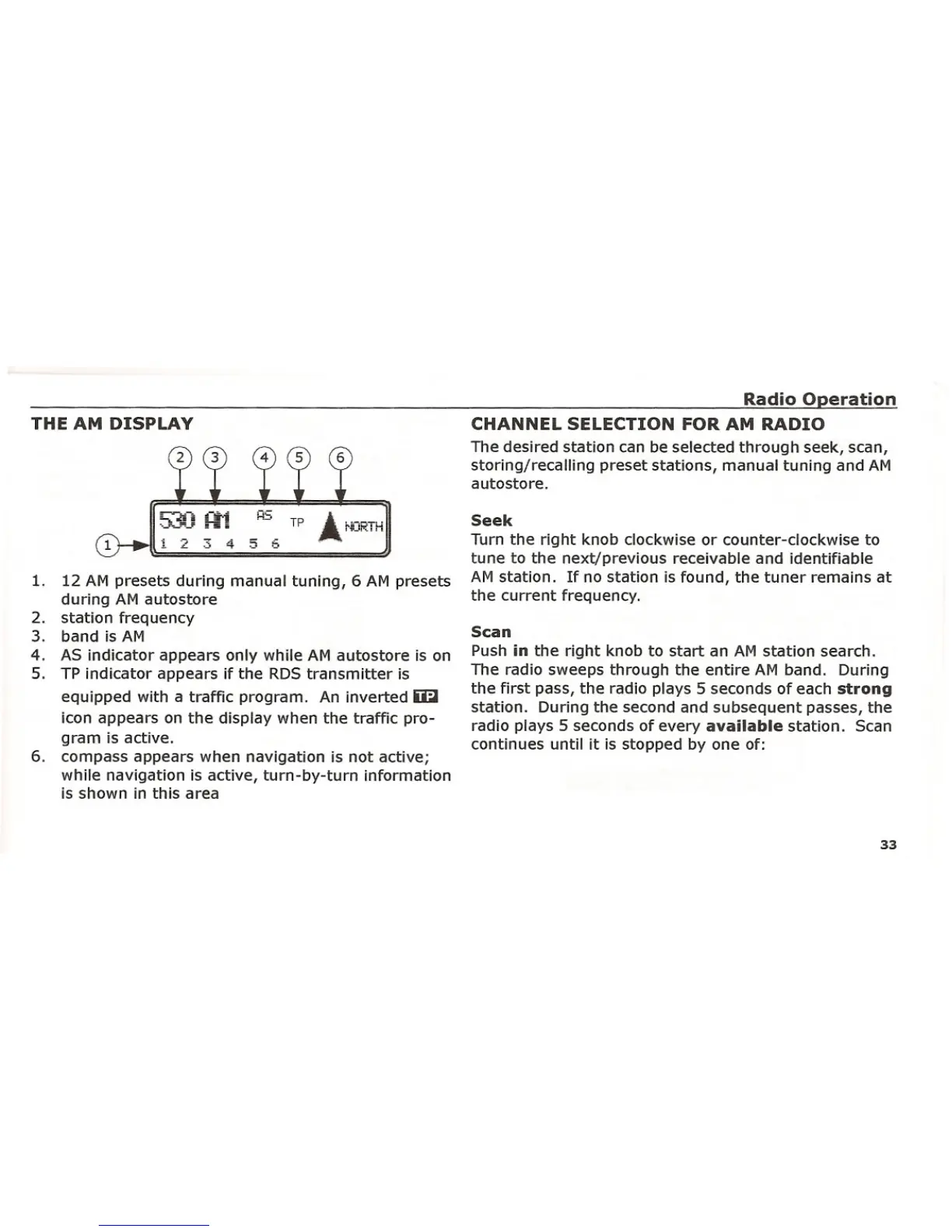
1. 12 AM presets during manual tuning, 6 AM presets
during AM autostore
2. station frequency
3. band is AM
4. AS indicator appears only while AM autostore is on
5. TP indicator appears if the RDS transmitter is
equipped with a traffic program. An inverted ~
icon appears on the display when the traffic pro-
gram is active.
6. compass appears when navigation is not active;
while navigation is active, turn-by-turn information
is shown in this area
THE AM DISPLAY
1 2 3 4
H5 A.
TP ..... !'IORTH
5 Eo
Radio Operation
CHANNEL SELECTION FOR AM RADIO
The desired station can be selected through seek, scan,
storing/recalling preset stations, manual tuning and AM
autostore.
Seek
Turn the right knob clockwise or counter-clockwise to
tune to the next/previous receivable and identifiable
AM station. If no station is found, the tuner remains at
the current frequency.
Scan
Push in the right knob to start an AM station search.
The radio sweeps through the entire AM band. During
the first pass, the radio plays 5 seconds of each strong
station. During the second and subsequent passes, the
radio plays 5 seconds of every available station. Scan
continues until it is stopped by one of:
33















 To Next Page