
 Need help?
Do you have a question about the Chuango KP-700 and is the answer not in the manual?
Thank you for purchasing this wireless keypad. It is recommended to install outside the entry door for operations.
Lists the components included with the keypad, such as batteries, manual, and screws.
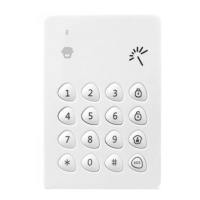
Details the physical layout and components of the keypad, including LED, RFID reader, and keys.
Instructions for inserting batteries and closing the keypad's rear cover.
Steps to link the keypad with the control panel for remote operation.
Guide to register RFID tags for disarming or unlocking the door.
Information on connecting the keypad to an electronic door lock for access control.
Steps for physically mounting the keypad on a door frame or wall.
How to access the keypad's configuration menu using admin code.
Configures a delay before the alarm system enters the armed state after activation.
Enables or disables the SOS button's immediate alarm trigger.
Turns on or off the audible feedback for key presses.
Enables or disables the function of disarming the system using RFID tags.
Configures whether disarming by RFID tag triggers an audible alarm.
Activates a mode to conserve battery power by putting the keypad to sleep.
Instructions to set or change the user access code for keypad operations.
Instructions to set or change the administrator access code.
Restores keypad settings to factory defaults, excluding learned RFID tags.
How to arm the alarm system using the keypad after entering a code.
Methods to disarm the alarm system via keypad or RFID tag.
Activates a mode where perimeter sensors are armed, but interior motion is ignored.
Initiates an alarm by holding the SOS key, with or without a code.
Disarms the system without audible siren alerts to avoid disturbing neighbors.
General guidelines and precautions for using and maintaining the keypad.
Prohibits actions like using near fire or attempting unauthorized disassembly.
Instructions for cleaning the keypad using soft cloths and mild detergents.
Answers common questions regarding keypad response, connection, and operation issues.
Details the function and color coding of wires for wired connections.
Provides key technical details such as power, distance, frequency, and dimensions.
 General
| Connectivity technology | Wireless |
|---|---|
| Product color | White |

 To Next Page