ENEN
Installation
Service Mode
Test Mode prevents the Siren's tamper switch from triggering
an alarm during installation, maintenance or when changing
the battery.
When the remote control is connected with the siren, press
[Disarm
] 3 times successively (please make sure two beeps
are heard at each time before continuing the next press), the
siren goes into service mode when a long beep is heard.
During this period, the siren will not alarm but beep if the
tamper switch or the connected sensors are triggered. This
brings you convenience on installation.
Press [Arm
] on remote control to exit service mode after a
short beep.
Note: Also you can press the tamper switch 7 times to enter installation
mode.
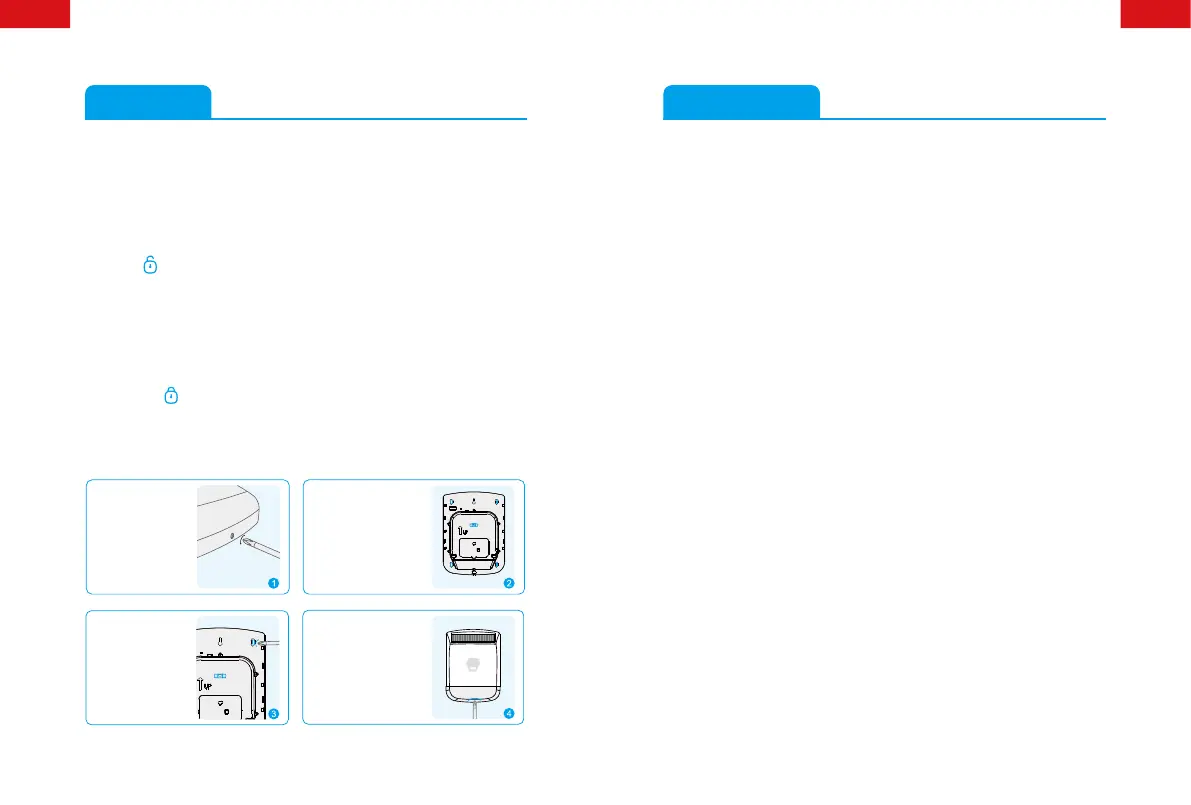
Remove the xing
screw from the
bottom edge of the
siren housing and
carefully remove front
cover.
Hold the mounting plate
in position and mark
the positions of the four
mounting holes. A spirit
level placed on the water-
proof casing will ensure a
perfect level.
Drill four holes and
t the wall plugs,
and then t supplied
xing screws in the
holes.
Hinge the front cover
locating tabs over the top
edge of the back plate and
carefully push the base of
the siren cover into place.
Secure the siren cover
in place by retting the
xing screw in the bottom
edge of the cover.
Specications
Backup Power 18650 3.7 V 1800 mAh rechargeable
lithium battery x 1
9 V 6F22 battery x 1
Solar Panel Output Current 2000 LUX illumination ≥ 4 mA
(in sunlight)
Maximum Alarm Current < 500 mA
Wireless Receiving Distance < 80m (in open area)
Operation Condition: Temperature -20°C~+55°C
Relative Humidity <80%
(non-condensing)
Maximum Siren Volume 110 dB
Static Current < 1 mA
Standby Time < 45 days (fully charged)
Wireless Receiving Frequency 433.92 MHz
Housing Material PC + ABS + ANTI-UV
Size (L x W x H) 309 x 230 x 79.7 mm


 To Next Page