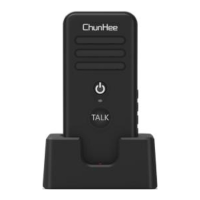
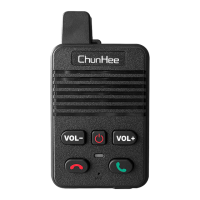
Indicator
* Charging Status:
1) Turn off status: Red color while charging.
2) Turn on status: Red color and with flashes blue color every 5
second.
Note: The light will goes out while fully charged.
* Standby Status: Blue color flashes every 5 seconds.
On a full charge, the standby time of the intercom is about 72-
96 Hours. (Please charge the intercom before first use.)
There has a low battery alert while the radio is low battery, it
will send a voice prompt every 20 seconds until it is turned off.
(If the radio runs out of power and turns off, turn it on when
fully charged.)
Low Battery Alert
* The microphone will beep while the device is within 1 meter.
Please don't worry about it, just need to separate them from
each other.
* We suggest to place the product into the charge station to
charge, it will protect the intercom.
* The intercom system does have not a waterproof design,
please take the product away from water.
* The intercom system is powered by battery, please Do not
place the the product in a flammable or explosive environment.
Warm Tips
Troubleshooting
Q1: Can’t turn on the intercom.
A1: 1) Charge for the intercom at least 1 hour.
2) Wait 5 seconds then hold the power button for 5-8s till
hear ‘Power On’ voice prompt.
Q2: The voice is weak or intermittent during receiving.
A2: 1) Recharge the battery.
2) Increase the volume level.
Q3: Can’t communicate with other intercom
A3: 1) Pair for the intercom.
2) All intercoms press the hang up button to stop talk, then
one of the intercom press the Green Call button to make a
new call, other intercoms waiting for the calling.
Q4: Unable to hear anyone because of too much noise and
hiss.
A4: 1) Move towards other members (make the distance of
the intercoms within 150ft).
2) Move to an open and flat area, restart the intercom, and
try again.
3) Stay away from equipment that will cause interference.
*If you have any question about the intercom, please
contact us without hesitant!


 To Next Page