DESCRIPTION OF FUNCTIONS:
ITEMS
SELECTABLE SETTING
FACTay SETTINGREMARKS
DISPLAY
COMMAND
1
Very steady
RANGE OF
2
Normal
SAP
VIBRATION
2Note 1
ADAPTER
3
Unstable
A
Extremely unstable
1
Limited
2
Standard
RANGE OF
3
Extensive
STb
STABILlTY
2
Note1
Hl
HOLD - limited
H2
HOLD - Standard
H3
HOLD - Extensive
CAL
CALlBRATIONSee the calibration section.
{page
111 Note 2
Uni
UNIT
Locking the key.
2
Note 3
SELECTION
Release the lock.
Output upon print command
1
made only after the bol once
has stabilized.
After print command made,
2
output as soon as balance
DATA
has stabilized.
OUT
TRANSMISSION
5Note 4
MODE
3
Output upon print command
regardless of stability.
4
Automatic output as soon as
balance has stabilized.
5
Automatic output regardless
of stability.
RS-232C
8nl
8 bit Non-parity
rS
INTERFACE 8nlNote 5
MODE
7El
7 bit Non-parity
RS-232C
1.2
1200BPS
rSS
INTERFACE2.4
2400BPS 1.2
Note 5
SPEED MODE
4.8
4800BPS
AUTQ-START
ON
Auto-start is on.
AST
MODE
OFF
Note 6
OFF
Auto-start is off.
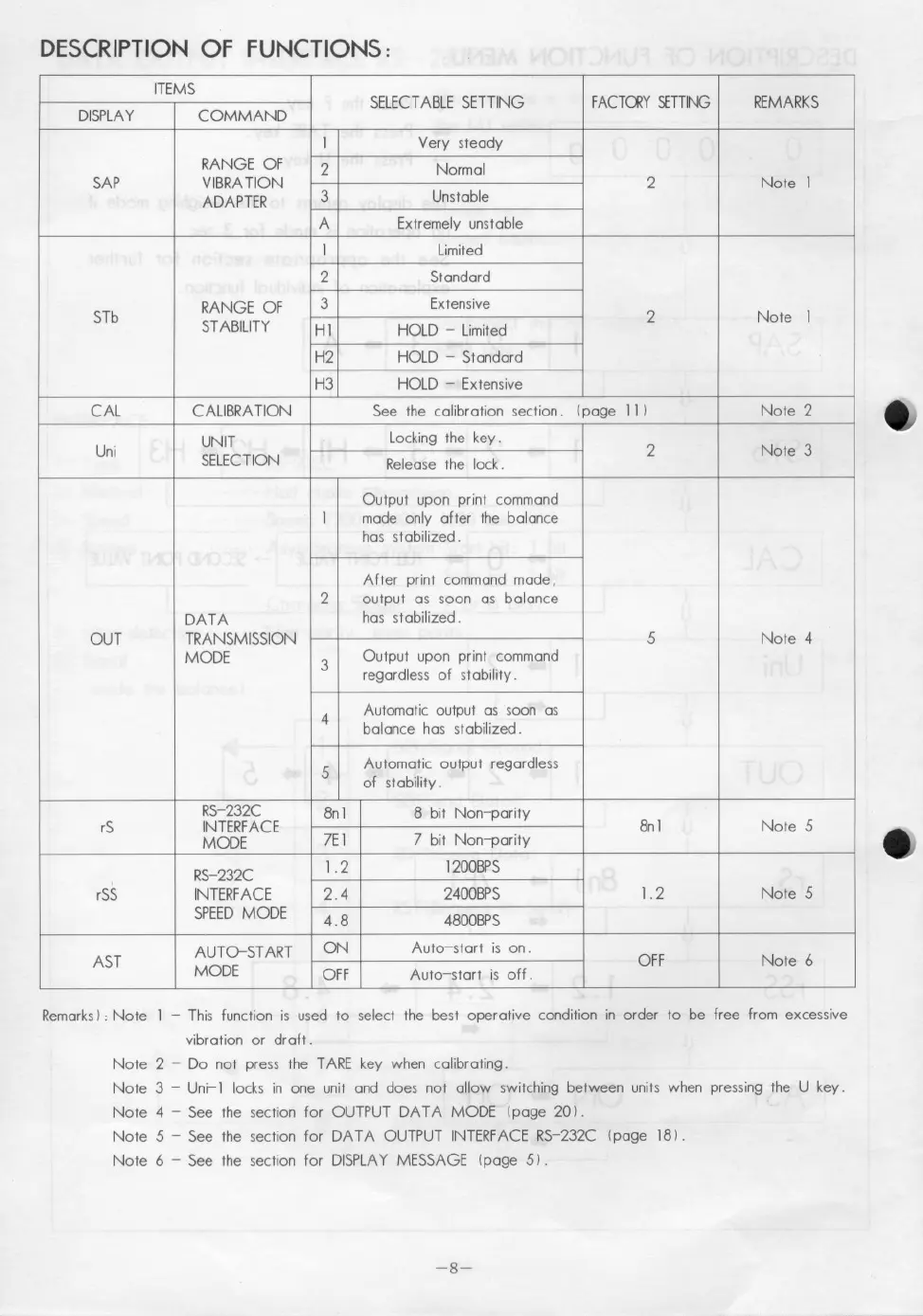
RemarksI : Note 1 - This function is used to select the best operative condition in order to be free from excessive
vibration or draft.
Note 2 - Do not press the TARE key when calibrating.
Note 3 - Uni-l locks in one unit and does not allow switching between units when pressing the U key.
Note 4 - See the section for OUTPUT DATA MODE (page 20 I .
Note 5 - See the section for DATA OUTPUT INTERFACE RS-232C (page 181.
Note 6 - See the section for DISPLAY MESSAGE Ipage 5 I .
-8-


 To Next Page
 Loading...