2
2021 Cicada Audio All rights reserved.
HOW TO DELETE A SETTING?
You can have up to 9 saved settings. But at
somepoint your going to want to delete some.
Here is how, its very simple. Go to the top of
any page and “Tap” the SAVE link. That will
bring you to ALL your saved settings. Press
and hold the setting you want deleted and slide
your finger to the left. You’ll see the trash can
in a red box. Tap that trash can...and its
GONE!
REMEMBER THAT ONCE A SETTING IS
DELETED IT IS GONE!!!!
Make sure to SAVE often. There is NO limit to
how many memories you can save. You can
always delete it (them?) later.
EQUALIZER (Q) TUTORIAL?
8 BANDS OF WHAT? PARA WHAT?
On our EQ you have 8 bands of PARAMETRIC
EQUALIZER. ANY frequency and 8 bands of
ANY Q and 8 bands of EQ of +20 /-20dB. In
other words you have a LOT of EQ capability!
Be careful what you do and know the limits of
your drivers and amplifier(s).
HOW TO ACTIVATE ANY EQ BAND?
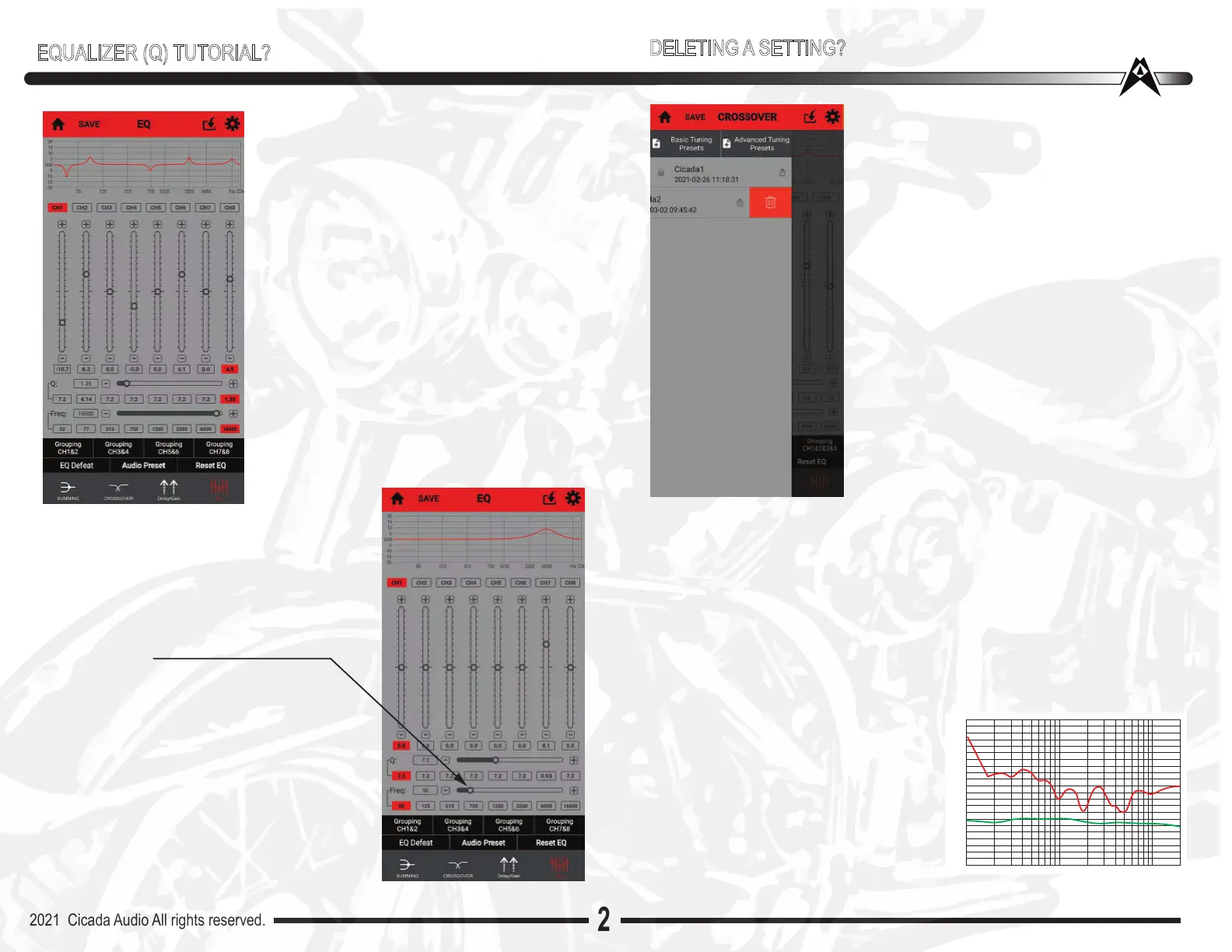
Simply “Tap” the band in the center. It will then
ACTIVATE that band and you know it is beca-
sue the grey boxes of that band turn RED. Now
you can adjust that band and make it anything
you want, any frequency, any Q, etc.
You’ll notice that the band I picked (7...yeah
Lucky 7) I’ve EQ’d +6.3dB at 6,000Hz with a Q
of 6.3. Notice how narrow the “peak” is. You
will hear this adjustment, one reason is it is in a
band of frequencies that human ears are very
senstitive to (2,000- 8,000Hz)
Now...notice to the right the SAME EQ
setting, same frequency same amount of
boost...BUT...different Q. Now we have a Q
of 1. Notice the difference in the curve. You
can DEFINITLEY hear this difference.
For FUN....just move the frequency slider to
the left or right
HUGE difference ! WOW! This is why
I perfer parametric to 1/3 octave EQ’s.
Its easier to HEAR the changes you make.
Easier to adjust.
Now if you think you screwed up (haven’t
we all!) just “Tap” and HOLD the Reset EQ
tab and ALL EQ settings will be eliminated.
DELETING A SETTING?
Lets go back to EQ settings
Now you’ve been playing around and you should have some sense of the
system coming together audio wise. Is the level correct? Meaning do you
have the ability to go to FULL power? Or does it sound like there is still more
to get out of your system?
Does it sound weird??
What IF you own a HD 2014-2020 and HAVEN”T “Flashed” you bike. IF you
dont know what that is you should read up on it on our website. In a “Nut-
Shell” HD has a “built-in” custom EQ setting in their stock OEM HD radio.
DB LEVEL
The STOCK HD EQ setting curve is shown
to the right (in RED). The “Desired” curve is
shown below that in GREEN. You can see
that the stock curve is WAY off the desired
curve. Have NO fear as Cicada is on it!
We’ve designed into OUR software are
own custom curves to flatten the HD curve!


 To Next Page
 Loading...