2
2021 Cicada Audio All rights reserved.
(Good time to SAVE and call it TEST1)
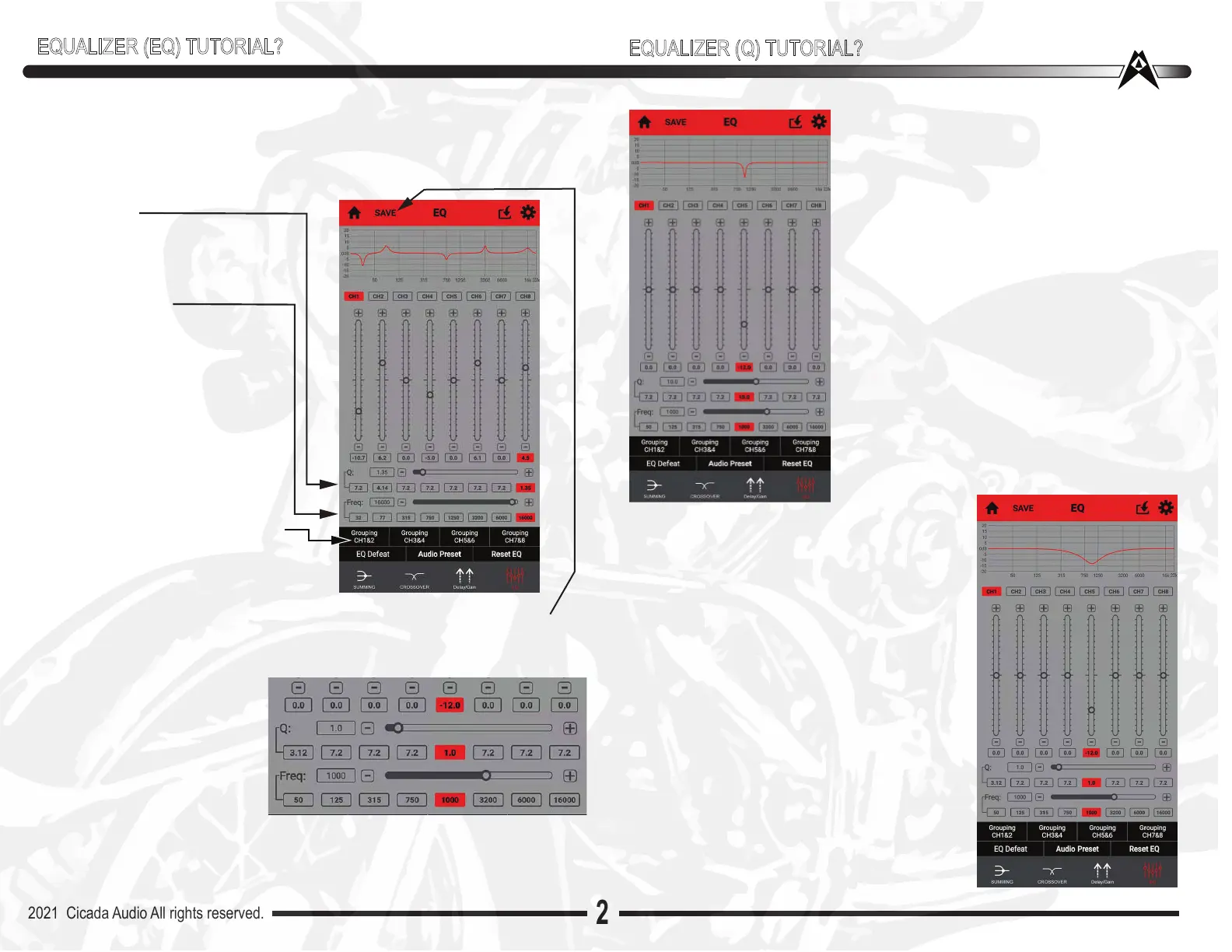
EQUALIZER SCREEN (EQ):
This is where ALL the “magic” happens. There are 8 bands of Parametric
Equalizer adjustments. Which means that YOU can select whatever
frequency you need to fix, or bands of frequencies and easily solve the
peaks or dips in your system setup. QUICKLY!
Q ADJUST:
Q (or width) of the frequency being
adjusted. Q’s of below 1 are very
wide, Q of 10 is very narrow
FREQUENCY:
Each of the 8 Bands can be
changed to ANY frequency you
need it to be.
Click inside the grey box to the
right of Freg: It will activate that
frequency of that channel.
Type the frequency desired
NOTE: if you want this be the
same for CH1/2 (for example)
then go below and click Grouping
CH1&2 (or whatever CH you
want to work with) That same
window you saw before will “pop”
open...then click whatrever
channel you want to Group with.
It will close and those channels are
now groupled
NOTE: All “Q’s” are set
at 7.2 by default. You
can move the slider to
change “Q” also!
NOTE: Frequency can
be “typed” You can move
the slider to change frequency!
DOUBLE NOTE: IF you have’t touched anything in a few seconds
you may have to tap the slider you are adjusting to activate it again
EQUALIZER (EQ) TUTORIAL?
EQUALIZER (Q) TUTORIAL?
Q? what do I do with that? Lets play with this
amazing EQ. There is so much you can do with
very few controls and be able to EQ any speaker
system very quickly. The beauty of “parametric”.
You have total control of your sound.
EXAMPLE: To the left we have an EQ setting of
1,000HZ -12dB with a Q of 10. Notice how
narrow this is. Very typical of what a 1/3 Octave
EQ would do. Big issue with this is that it tends to
be TOO narrow and not audible when you make
that adjustment. All I am doing now is showing
you how easy it is to adjust and what to touch and
slide to make your life easier, and these adjust-
ments meaningful. Even though Parametric is
seemingly more complicated, in reality it is MUCH
easier and quicker to EQ a system. But you
REALLY need an RTA to do this!! NO BS!! Your
phone can we a GREAT RTA. Download the app
I told you about on page 5
Now look to the right at the SAME EQ setting
as the above one same frequency, same
amount of cut, everything. BUT “Q” is differ-
ent. We went from a Q of 10 to a Q of 1.0
Notice the difference in the curve! You can
hear that for sure!!! Thats why Parametric is
so powerful. Once you know the frequency
you need to adjust (because your using an
RTA to SEE where you need to be adjusting)
then it really is a matter of playing with the Q
and how much boost or cut you do. BUT Q
makes the BIG difference.
Typically on a Bike you will adjust the front
speakers almost identically. That’s why you’ll
want to GROUP channels together to make it
easier


 To Next Page
 Loading...