2
2021 Cicada Audio All rights reserved.
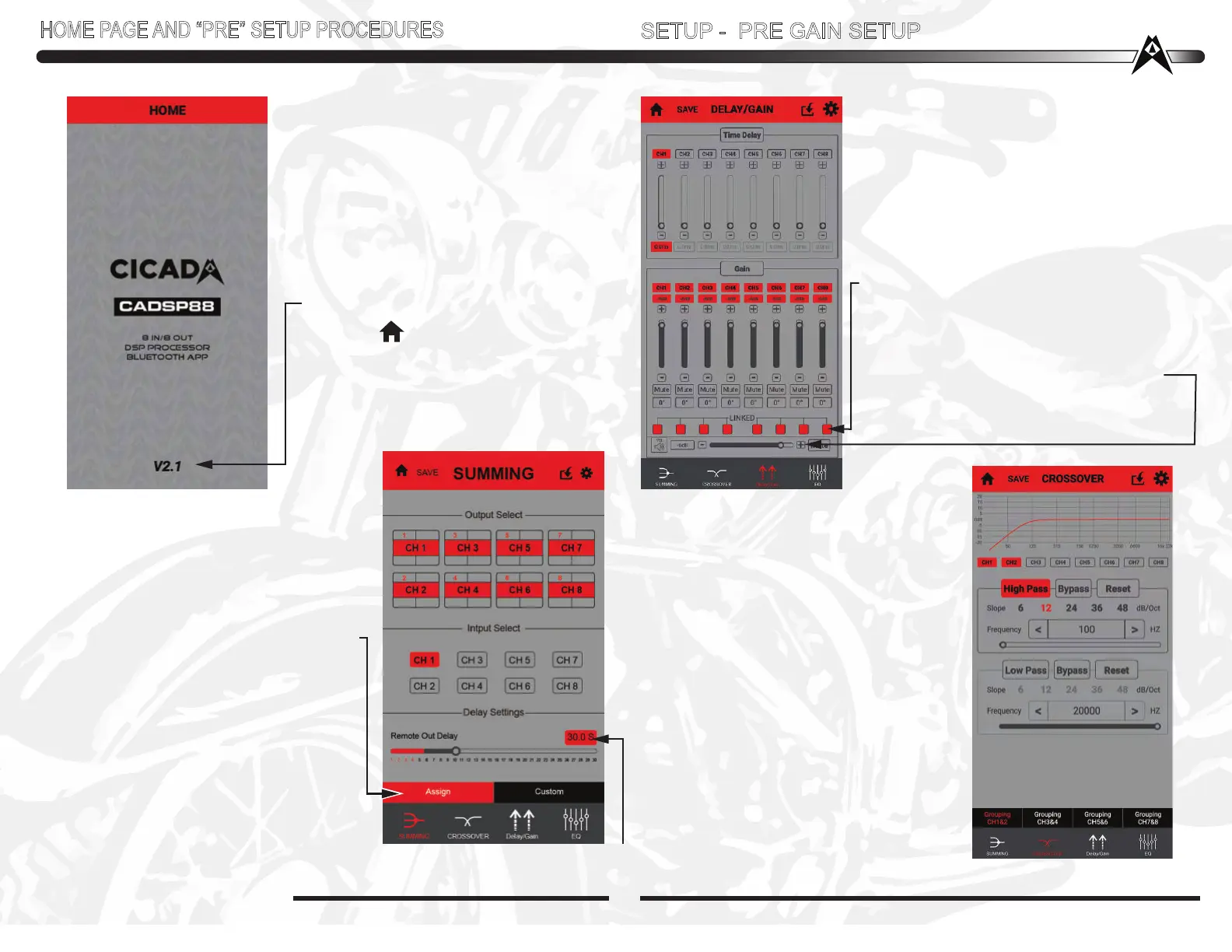
HOME PAGE:
This is just the beginning, and tell you
that you amplifer is a 4 channel amplifer
with a 6 channel processor BUILT IN!
Too cool!!!!
Hitting the “ ” link takes you back
to the “Start” page where you “TAP”
the screen to go back to the SUMMING
page. From there you can go to all
setup pages.
NOTE: Software version!!!
HOME PAGE AND “PRE” SETUP PROCEDURES
SETUP - PRE GAIN SETUP
Once that is done...lets move on to the
CROSSOVER PAGE-VERY IMPORTANT!!!!
Here you need to “PreSet” Crossover
settings. This is SUPER important if
you dont want to blow up your expensive
speakers!
ALL Speakers on a HD motorcycle audio
system MUST be highpassed -
PERIOD!!!! 99% of the time these are
high output “Pro Style” speakers with
high Fs (free air resonance) Make sure
to HP (High Pass) at 80Hz or higher on
any 6.5 Inch “Full Range” drivers.
DOING ANYTHING ELSE will cost you
time and money, and Heartburn!!
YOU’VE BEEN WARNED!!!!!
SUMMING PAGE:
Depending on your head unit (Stock HD
or aftermarket) determines what you
select here. If your bike is NOT flashed
and your stock bike started out with just
fairing speakers and your adding bags,
then you’ll want to choose ASSIGN
As that is the INPUT selection, you can
still get ALL channel out meaning
CH1/2/3/4/5/6/7/8 By selecting “Assign”.
This is an automatic function. AS
SHOWN! Clicking “Assign” Then Ch1 is
paralled to 3/5/7. Ch2 is paralled to
4/6/8. IF you have a flashed bike or after
market HU with frotn and rear outputs
then select “Custom”. IF you are doing
something unusual, then select “Custom”
and go for it!
SPECIAL NOTE: All “PreSetup”
is done with the amplifier(s) OFF!!
(or speakers disconnected)
DELAY/GAIN PAGE PRE GAIN
SETUP?? What? YES!
With ALL amplifier(s) OFF (or speakers
disconnected) DO all PreSets. First..set GAINs
on the DSP88 “GUI” (Graphical User Interface).
I tend to be safe about this and set ALL channels
at -6dB down as well as Master Gain.
This still gives you 12dB of GAIN adjustment at
the end. Easy way to do that is click the
LINKED boxes at the bottom of each channel.
Now just slide one of the channels gain setting
down to -6dB. Too easy!
All Channel gains are adjusted in one SWOOP.
Do the same to the MASTER Volume -6dB.
Thats the slider near the bottom of the page.
You have a MASTER Mute button too!
SPECIAL NOTE: SOME BIKES NEED LONGER THAN 3 OR 4 SECONDS FOR
TURN-ON TO NOT POP AND BANG. USE THIS TO ADJUST THAT - UP TO 30 SEC!!!


 To Next Page
 Loading...