2
2021 Cicada Audio All rights reserved.
Introduction
SETUP - CROSSOVERS AND GROUPING
“PRE” SETUP - CROSSOVER
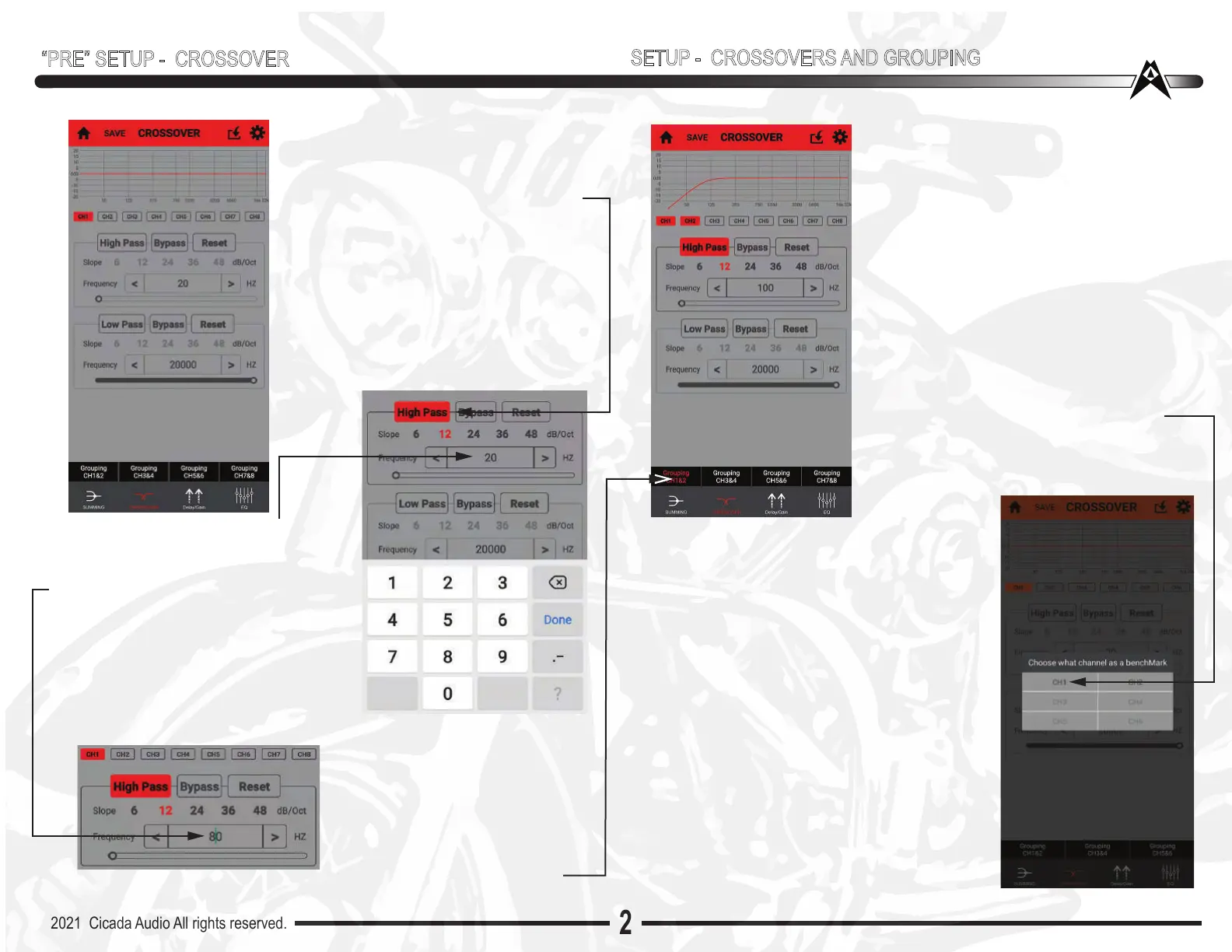
CROSSOVER PAGE
This is where you will HP you speakers
(or Low Pass - LP for subs) SIMPLY “TAP”
the HIGH PASS box, it will turn ORANGE
if it is “Activated”. Once activated select
crossover slope. 6/12/24/36 or 48dB slopes
are available to you. I recommend a 12 dB
slope. You can pick any slope you like.
Then “TAP” the frequency box (the one
that shows 20 in the middle).
Once you tap that - the keyboard window
opens up - SEE BELOW
Once you have highlighted the 20(as shown
to the right) go below and type in whatever
frequency you desire, A good frequency to
start with is 80Hz. Remember that these
settings can all change anytime you want
them too! So it isn’t forever. Just your intial
“PreSet Up”. Once you’ve type in whatever
frequency - hit Done and it will show up in
the Frequency “box” and you’ll see it in the
frequency response curve at the top of the
page too.
NOTE: Looking to the left you will
also notice that ONLY CH1“box” is
activated (Orange)
NOW IF you want both Left/Right
to be crossoverd over at the same
frequency go to the bottom of the
Crossover Page... and GROUP
GROUPING
Grouping is a wonderful thing!(did I hear “orgy”
in the background???... Oh...not that type of
grouping...Damn!!)
Anyway....this is a cool function to speed up
things and to keep it all together.
Typically you would want to make both the
front fairing speakers crossover at the same
frequency...logically. So the easy way is to
“group” CH1/CH2 - meaning Left Front and
Right front.
Simply “TAP” the Grouping CH1 & 2. A new
window opens. The window below, “TAP”
CH1. The window will blink out and CH1 and
CH2 are now “grouped” so whatever crossover
you’ve selected is for both CH1 and CH2
Too EASY!
HIGH PASS/LOW PASS/BAND PASS?
Highpass is ALWAYS used for Mids/Midbass
and tweeters. Lowpass is ALWAYS used for
woofers/subwoofers. Bandpass? Ahh.. that
can be used for a lot of things. For example
you could use it in a 3 way system (like a car)
with Tweeters up in the “A” pillars, Midbass in
the doors and Subwoofer in the trunk. A VERY
common 5 channels system. But on a bike?
You could use the bandpass feature for a
“woofer” (NOT a subwoofer!) Subwoofer (a
REAL one!) on a bike is ..well...DUMB in my
opinion. Too much road noise, bike is to loud,
very small enclsoures and the desire to have
HIGH SPL. ALL contribute a really BAD deal!!!
BUT ..,bandpass a serious woofer (higher Fs
than a sub!) And now ya got something!!!


 To Next Page
 Loading...