2
2021 Cicada Audio All rights reserved.
HOW TO SAVE ANY SETTING?
This is SUPER important. ALWAYS save
settings!!! Once you select SAVE on ANY
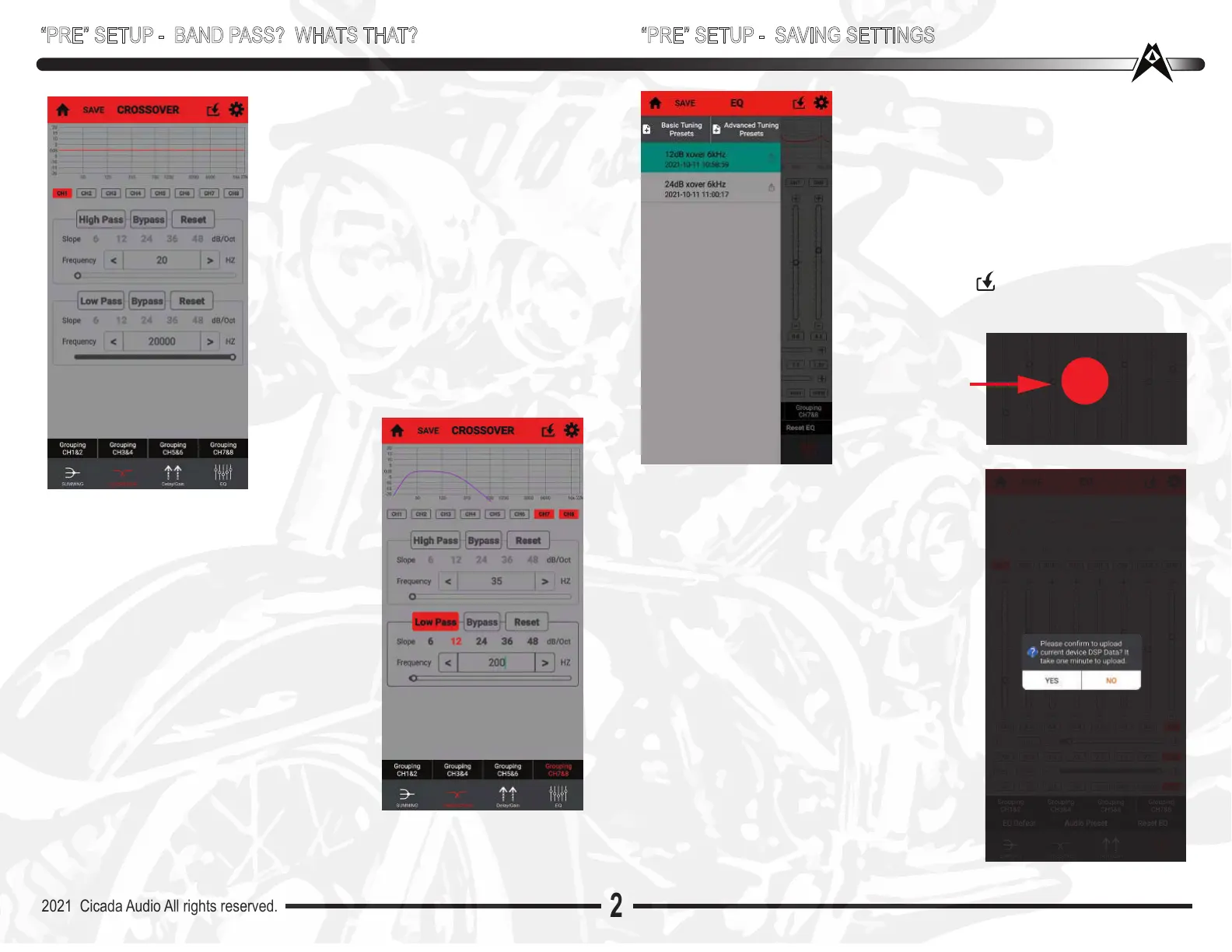
page it will bring you to the “Save” text box
as shown to the left. This is where you name
the file so you know which one it is,
Once named. It goes back to whatever page
you were on. IF you want to set this as your
setting, then go to the TOP of any page and
TAP this symbol This will “Load” it to the
processor can sometimes take up to 60 seconds,
.....so be patient.
BANDPASS?
High Pass is ALWAYS used for Mids/Midbass
and tweeters. Low Pass is ALWAYS used for
woofers/subwoofers. Band Pass? Ahh.. that
can be used for a lot of things. On a bike with
a Processor that has 8 outputs (Gee? Like a
DSP88??) ...High Pass the 4 channels that
drive all the High Pass drivers (probably CoAx
horns or High output Midbass drivers with horn
tweeters.) And then BandPass CH5/6 to a
monoblock or BIG stereo amplifier to some
knarly Pro style Midbass drivers that go low.
Thats not normal by the way. So hunt those
baby’s down. Need something with a High Fs
(like 45-50Hz) and realitively high sensitivity.
(over 95dB 1W/1M) Then CH7/8 can be
dedicated to woofers (typically BANDPASSED)
“PRE” SETUP - BAND PASS? WHATS THAT?
BAND PASS - HOW TO CREATE?
So ....how to create? Simple! Highpass plus
a Lowpass equals a BAND PASS. Look at
the settings on the CROSSOVER page to
the right. I’ve selected High Pass on the top
filter and selected 35Hz (basically I made a
subsonic filter here). Then on the bottom
filter I selected Low Pass. It is not highlight-
ed..but it is activated...as you can see that I
have selected 200Hz as the Low Pass. Look
above at the curve and you can see the filter.
COOL huh!!
If you are using this for a “Woofer” on your
bike then I would also recommend that you
“GROUP” CH7/8. That way the settings are
on both channels.
“PRE” SETUP - SAVING SETTINGS
BEFORE you see the bright orange loading
dot. You’ll get this page to the right that asks
do you REALLY want to load this DSP
settings file (DUH!!) Hit YES (of course!) and
the ORANGE dot comes up to mesmorize
you.
You’ve falling asleep...you’ll write me a check
for a million dollars...whoops ..you woke up!)
Moving on....
Remember that ANY setting can be deleted...
and at worst case you can go into settings,
then at bottom of page and TAP “Reset DSP
Tuning”.And your DSP88 will start off all clean
and fresh, NO EQ, Crossover or Gain/ Delay
settings.
YOU KNOW THE
SETTINGS ARE
BEING “LOADED”
WHEN YOU SEE
THIS ORANGE MOON
SPECIAL NOTE: TO REMOVE A CROSSOVER SETTING
SIMPLY TAP & HOLD RESET FOR 2 SECONDS
Load...


 To Next Page
 Loading...