Quick-start User Guide:
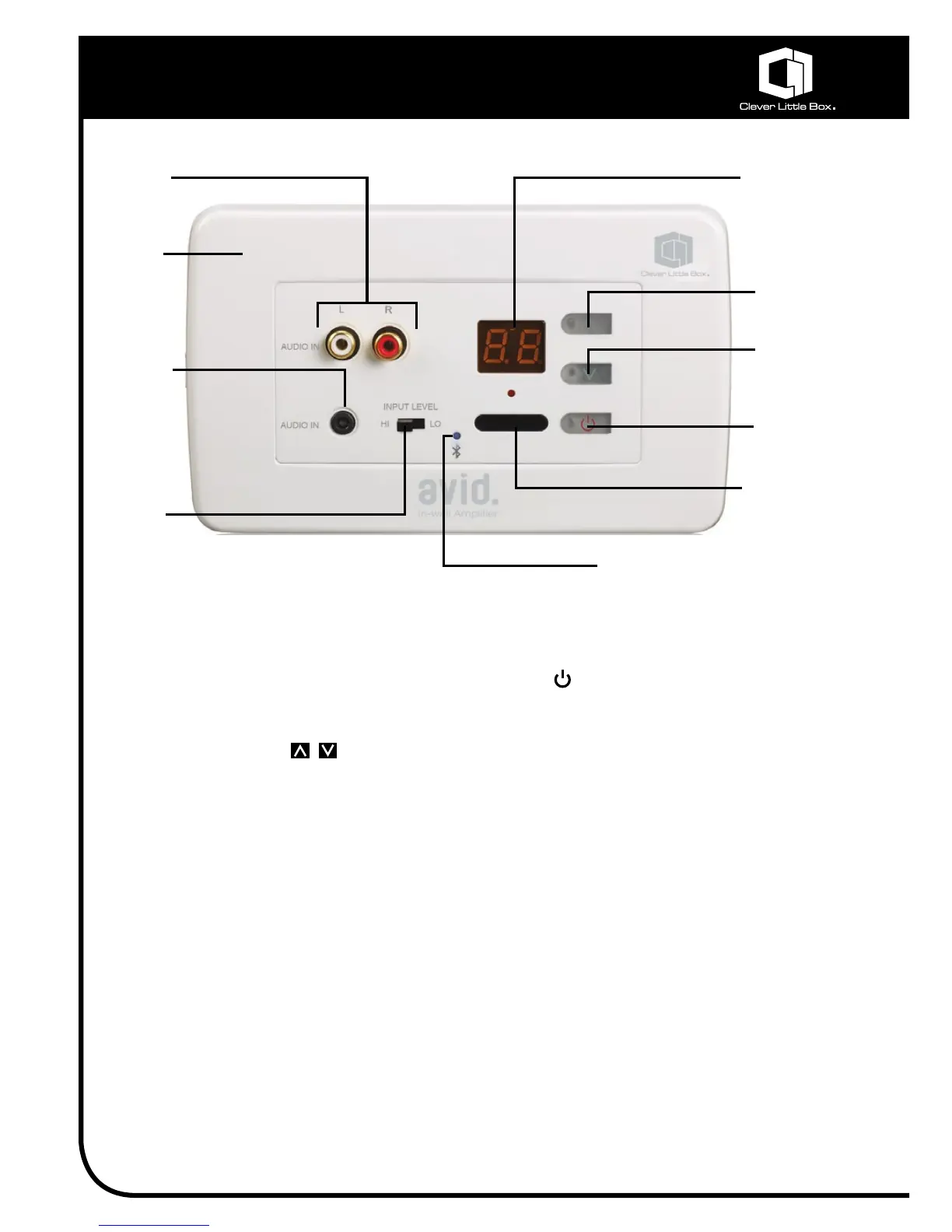
Stereo
Phono
Inputs
Audio Level
Display
Volume
Level Up
Volume
Level Down
ON/OFF
Switch
IR Receiver
Window
Hi/Lo Line
Level
Sensitivity
Switch
3.5mm
Jack Input
Fascia
Trim
Plate
Quick-start User Guide:
1. SwitchontheAVID2AmplierviathePowerSwitch()ofeitherthemainunitortheIR
remotecontrol.
2. EnsurethevolumeleveloftheAVID2issetto0usingthevolumecontrolsonthemainunit
orIRremotecontrol.
3. Connectyourmediaplayer/soundsourceeitherviaBluetoothorviawiredconnection(eg.
CD,DVD,MP3,laptop,etc)fromitslineleveloutputorheadphoneoutputintotheAVID2’s2
xStereoPhonoinputsorthe3.5mmJackinput.
(Connectingcablesarecommonlyavailableormayhavebeensuppliedaspartofyour
systembytheinstaller).
4. SetthevolumelevelonyourmediaplayertoapproximatelyhalfwayandpressPLAY.(NB.
Notallmediaplayerswillfeaturetheirownvolumecontrol).
5. Usingthevolumelevelcontrols(ofeithertheAVID2mainunitorIRremotecontrol),increase
thevolumeleveloftheAVID2ampliertoaclearandcomfortablelevelforyouraudience.
(MaximumVolumeLevel=20).
6. NOTE:Ifthevolumelevelisstilltoolow,furtherincreasethevolumelevelofthemediaplayer;
orwheretheaudiosignalisfromaheadphoneoutput(whichnormallygivesalowersignal
level),switchtheInputLevelSwitchonthemainAVID2unitto‘Lo’.
Bluetooth
LED Indicator


 To Next Page
 Loading...