
 Need help?
Do you have a question about the cinelli ZYDECO and is the answer not in the manual?
Steps to charge the battery and prepare the electric bike for its first use.
Learn about the assistance levels and how to change them using the iWoc button.
Guide to downloading and installing the Ebikemotion app on your smartphone or tablet.
Connect your smartphone via Bluetooth and register for an Ebikemotion account.
Important safety warnings and maintenance advice for the bicycle and its components.
Essential guidelines for handling, charging, and caring for the bike's battery.
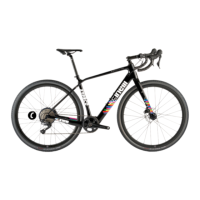
The Cinelli Zydeco Electric Mud is a versatile gravel bike designed for both muscular and assisted riding, equipped with an integrated Ebikemotion® assistance system. This guide provides essential information for its first use, ensuring a smooth and interactive experience for the rider.
The Zydeco Electric Mud functions as a dual-purpose bicycle, allowing riders to switch between a traditional muscular gravel bike and an electric-assisted mode. The core of its electric functionality lies in the Ebikemotion® assistance system, which provides pedal assistance through a motorized X35 hub. This system is controlled via an iWoc button, enabling riders to activate assistance and select from various levels of power output. For an enhanced and more interactive experience, the bike integrates with the Ebikemotion® APP, offering comprehensive monitoring and control features.
Before embarking on your ride, it's crucial to ensure the battery is adequately charged. The charging process is straightforward:
The Zydeco Electric Mud offers three distinct levels of pedal assistance, easily controlled through the iWoc button. When the system is active, a short press of the iWoc button will cause the LED to flash, displaying the color corresponding to the current assistance level:
The assistance level can be adjusted even while pedaling. To change the level:
To deactivate the assistance service, press and hold the iWoc button for 3 seconds. The LED light will blink twice and then turn off. For safety and battery conservation, the system will automatically turn off after one hour of inactivity.
The Ebikemotion® APP significantly enhances the riding experience by providing "smart" functionalities. It allows riders to monitor their activities, track performance, and gain a comprehensive overview of their rides.
The Ebikemotion® APP is available for download on smartphones and tablets. Users can find it in the Google PlayStore for Android systems and the APP Store for iOS systems. It's important to note that some older Android versions may not be compatible with the Ebikemotion® APP.
To fully utilize the Ebikemotion® APP, account registration is required. Users can register using their email and a chosen password, or through Facebook. Upon the first login, new users will be prompted to enter their account details. If registering with an email address, a confirmation email will be sent, requiring verification from the user's inbox.
The Ebikemotion® APP is available in two versions:
Users can access the "Manuals" section on the Cinelli.it website, specifically on the Zydeco Electric Mud page, to log into the web version of the APP. From here, automatic connection with Strava can be activated to synchronize activities with Ebikemotion.
The smartphone version allows users to record activities and obtain a general overview of their Cinelli Zydeco Electric Mud bike's status.
The connection between the smartphone and the Zydeco Electric Mud is established via Bluetooth:
For iOS app users, the bicycle connects automatically. It's important to ensure the connection is made to the intended bike, as the system connects to the first available Ebikemotion-enabled bike, even if it's not your specific Cinelli Zydeco Electric Mud. For Android users, manual pairing is necessary by selecting the "Connect to EBM" option.
Once paired, users can begin recording their activities. To register an activity, select "start activity" within the APP. This feature allows for recording GPS data, checking assistance levels, speed, route characteristics, and much more.
At the conclusion of an activity, select "interrupt activity" and then proceed to save and complete the activity data, including naming the activity and noting path characteristics. For a comprehensive understanding of all features available through the Ebikemotion app, it is recommended to consult the APP user manual, which can be downloaded from the Zydeco Electric Mud page on the official Cinelli.it website.
 General
| Fork | Columbus Futura Gravel 1-1/8” - 1-1/2” Tapered Carbon Monocoque |
|---|---|
| Wheel Size | 700c |
| Brakes | Disc |
| Headset | IS 42/28, 6 | IS 52/40 |
| Bottom Bracket | Press-fit |
| Cable Routing | Internal |
| Saddle | Cinelli |
| Pedals | Not included |
| Drivetrain | Shimano GRX |
| Fork Weight | 450 g |
| Brake Levers | Shimano GRX |
| Front Derailleur | Shimano GRX |
| Rear Derailleur | Shimano GRX |
| Shifters | Shimano GRX |
| Chain | Shimano or SRAM (depending on model) |
| Crankset | Shimano GRX |
| Wheelset | Alloy |
| Tires | WTB Riddler |
| Stem | Alloy |
| Cassette | Shimano |
| Seatpost | Alloy |

 To Next Page