Need help?
Do you have a question about the Circontrol Raption 50 Series and is the answer not in the manual?
Crucial guidelines for safe operation and maintenance of the Charge Point.
Details the core functionalities and components of the Charge Point.
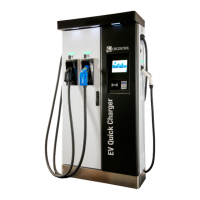
Provides a visual breakdown and identification of the Charge Point's external parts.
Specifies the physical dimensions of the Raption 50 Charge Point in millimeters.
Explains the meaning of different LED beacon colors indicating the charging status.
Details the types of connectors available and their charging capabilities.
Describes the initial startup sequence and the screens shown when the Charge Point powers on.
Guides the user through the process of initiating an electric vehicle charging session.
Explains various error messages and scenarios that can occur during the start of a charge.
Details the steps required to properly end an ongoing electric vehicle charging session.
Explains the information displayed on the HMI screen during AC and DC charging.
Describes the summary screen displayed after a charging session is completed or interrupted.
Explains the function and behavior of the emergency stop button.
Shows symbols indicating the status of each connector (ready, out of service, disabled).
Explains how to check the status of individual connectors and what the indicators mean.
Describes how to view and interpret error messages displayed by the Charge Point.
Introduces the process of configuring the Charge Point using its Ethernet port.
Lists the necessary hardware and software for setting up and configuring the Charge Point.
Details the recommended network topology and IP address configuration for PC-to-Charge Point connection.
Provides a step-by-step guide to establish a wired LAN connection between a PC and the Charge Point.
Explains how to access and navigate the Charge Point's web-based setup and management interface.
Introduces the communication capabilities of the Charge Point, focusing on modems.
Details the configuration steps for the Teltonika RUT240 4G modem.
Overview of the Sierra Wireless AirLink LS300 3G modem and its features.
Introduces the Open Charge Point Protocol (OCPP) for communication between Charge Points and central systems.
Steps to ensure the correct function of OCPP 1.5, focusing on network setup.
Guides on configuring OCPP 1.5 integration and accessing its settings page.
Verifies the OCPP 1.5 connection by checking logs and specific messages for success.
Steps to ensure the correct function of OCPP 1.6, focusing on network setup.
Explains the process of applying a license file to activate Charge Point features.
Guides on configuring OCPP 1.6 integration and accessing its settings page.
Verifies the OCPP 1.6 connection by checking logs and specific messages for success.
Introduces how to monitor the Charge Point using its IP address and client software.
Guides the user on how to establish a connection using the CirCarLife client software.
Provides an overview of the CirCarLife Scada client software interface and its sections.
Explains how to view device status and parameters within the CirCarLife client.
Explains how to view charging session data in table format using the CirCarLife client.
Explains how to view events in real-time, noting limitations for Raption Series.
Introduces managing output power for DC and AC using CirCarLife Client software.
Guides on setting the maximum DC output power using the CirCarLife client software.
Details how to set the maximum AC output power using the 'Charge Point Setup' software.
 General
| Brand | Circontrol |
|---|---|
| Model | Raption 50 Series |
| Category | Battery Charger |
| Language | English |

 To Next Page