34
Cisco 1721, 1760, 2621XM, 2651XM, 2691, 3725, and 3745 Modular Access Routers and 7206-VXR NPE-400 Router FIPS 140-2 Non-Proprietary
OL-6083-01
The Cisco 1721, 1760, 2621XM, 2651XM, 2691, 3725, 3745, and 7206 VXR NPE-400 Routers
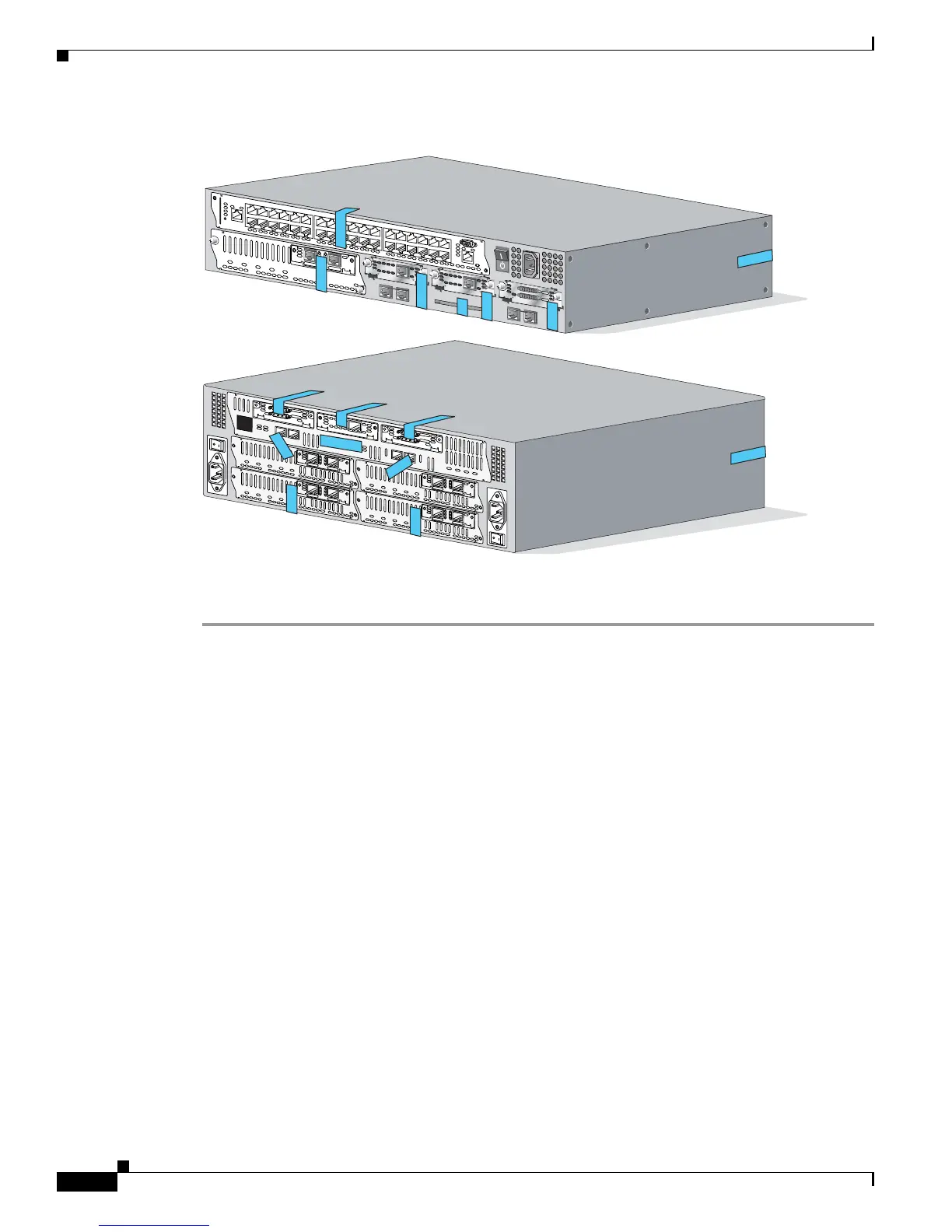
Figure 23 Cisco 3725 and Cisco 3745 Tamper Evidence Label Placement
To apply tamper-evidence labels to the Cisco 7206 VXR NPE-400:
Step 1 Clean the cover of any grease, dirt, or oil before applying the tamper evidence labels. Alcohol-based
cleaning pads are recommended for this purpose. The temperature of the router should be above 10°C.
Step 2 Place the first label on the router as shown in Figure 24. The tamper evidence label should be placed so
that the one half of the label covers the enclosure and the other half covers the 7206 VXR NPE-400
Input/Output Controller.
Step 3 Place the second label on the router as shown in Figure 24. The tamper evidence label should be placed
over the Flash PC Card slots on the Input/Output Controller.
Step 4 Place the third label on the router as shown in Figure 24. The tamper evidence label should be placed
so that one half of the label covers the enclosure and the other half covers the port adapter slot 1.
Step 5 Place the fourth label on the router as shown in Figure 24. The tamper evidence label should be placed
so that one half of the label covers the enclosure and the other half covers the port adapter slot 2.
Step 6 Place the fifth label on the router as shown in Figure 24. The tamper evidence label should be placed so
that one half of the label covers the enclosure and the other half covers the port adapter slot 3.
Step 7 Place the sixth label on the router as shown in Figure 24. The tamper evidence label should be placed
so that one half of the label covers the enclosure and the other half covers the port adapter slot 4.
Step 8 Place the seventh label on the router as shown in Figure 24. The tamper evidence label should be placed
so that one half of the label covers the enclosure and the other half covers the port adapter slot 5.
Step 9 Place the eighth label on the router as shown in Figure 24. The tamper evidence label should be placed
so that one half of the label covers the enclosure and the other half covers the port adapter slot 6.
Step 10 Place the ninth label on the router as shown in Figure 24. The tamper evidence label should be placed
so that one half of the label covers the enclosure and the other half covers the network processing engine.
SEE MANUAL BEFORE INSTALLATION
AL
CD
LP
RD
TD
SEE MANUAL BEFORE INSTALLATION
DSU
56K
AL
CD
LP
RD
TD
SEE MANUAL BEFORE INSTALLATION
DSU
56K
EN
V0
BANK 4
BANK 3
BANK 2
BANK 1
BANK 0
NM-HDV
V
W
I
C
2
M
F
T
-
E
1
S
E
E
M
A
N
U
A
L
B
E
F
O
R
E
I
N
S
T
A
L
L
A
T
I
O
N
C
T
R
L
R
E
2
C
T
R
L
R
E
1
A
L
L
P
C
D
99508
E
N
V
0
B
A
N
K
4
B
A
N
K
3
B
A
N
K
2
B
A
N
K
1
B
A
N
K
0
NM-HDV
V
W
I
C
2
M
F
T
-
E
1
S
E
E
M
A
N
U
A
L
B
E
F
O
R
E
I
N
S
T
A
L
L
A
T
I
O
N
C
T
R
L
R
E
2
C
T
R
L
R
E
1
A
L
L
P
C
D
E
N
V
0
B
A
N
K
4
B
A
N
K
3
B
A
N
K
2
B
A
N
K
1
B
A
N
K
0
NM-HDV
V
W
I
C
2
M
F
T
-
E
1
S
E
E
M
A
N
U
A
L
B
E
F
O
R
E
I
N
S
T
A
L
L
A
T
I
O
N
C
T
R
L
R
E
2
C
T
R
L
R
E
1
A
L
L
P
C
D
E
N
V
0
B
A
N
K
4
B
A
N
K
3
B
A
N
K
2
B
A
N
K
1
B
A
N
K
0
NM-HDV
V
W
I
C
2
M
F
T
-
E
1
S
E
E
M
A
N
U
A
L
B
E
F
O
R
E
IN
S
T
A
L
L
A
T
I
O
N
C
T
R
L
R
E
2
C
T
R
L
R
E
1
A
L
L
P
C
D
E
N
V
0
B
A
N
K
4
B
A
N
K
3
B
A
N
K
2
B
A
N
K
1
B
A
N
K
0
NM-HDV
V
W
I
C
2
M
F
T
-
E
1
S
E
E
M
A
N
U
A
L
B
E
F
O
R
E
I
N
S
T
A
L
L
A
T
I
O
N
C
T
R
L
R
E
2
C
T
R
L
R
E
1
A
L
L
P
C
D
S
E
E
M
A
N
U
A
L
B
E
F
O
R
E
I
N
S
T
A
L
L
A
T
I
O
N
S
E
R
I
A
L
1
S
E
R
I
A
L
0
C
O
N
N
C
O
N
N
W
I
C
2
T
S
E
E
M
A
N
U
A
L
B
E
F
O
R
E
I
N
S
T
A
L
L
A
T
I
O
N
S
E
R
I
A
L
1
S
E
R
I
A
L
0
C
O
N
N
C
O
N
N
W
I
C
2
T
S
E
E
M
A
N
U
A
L
B
E
F
O
R
E
I
N
S
T
A
L
L
A
T
I
O
N
D
S
U
5
6
K
C
D
A
L
L
P
R
D
TD



 To Next Page