2-8
Cisco Video Surveillance 6400 IP Camera Installation Guide
OL-28494-01
Chapter 2 Camera Installation
Connecting a Waterproof Ethernet Cable
Connecting a Waterproof Ethernet Cable
To connect the 6400 IP camera to an Ethernet cable with a waterproof connection, perform the following
steps.
Procedure
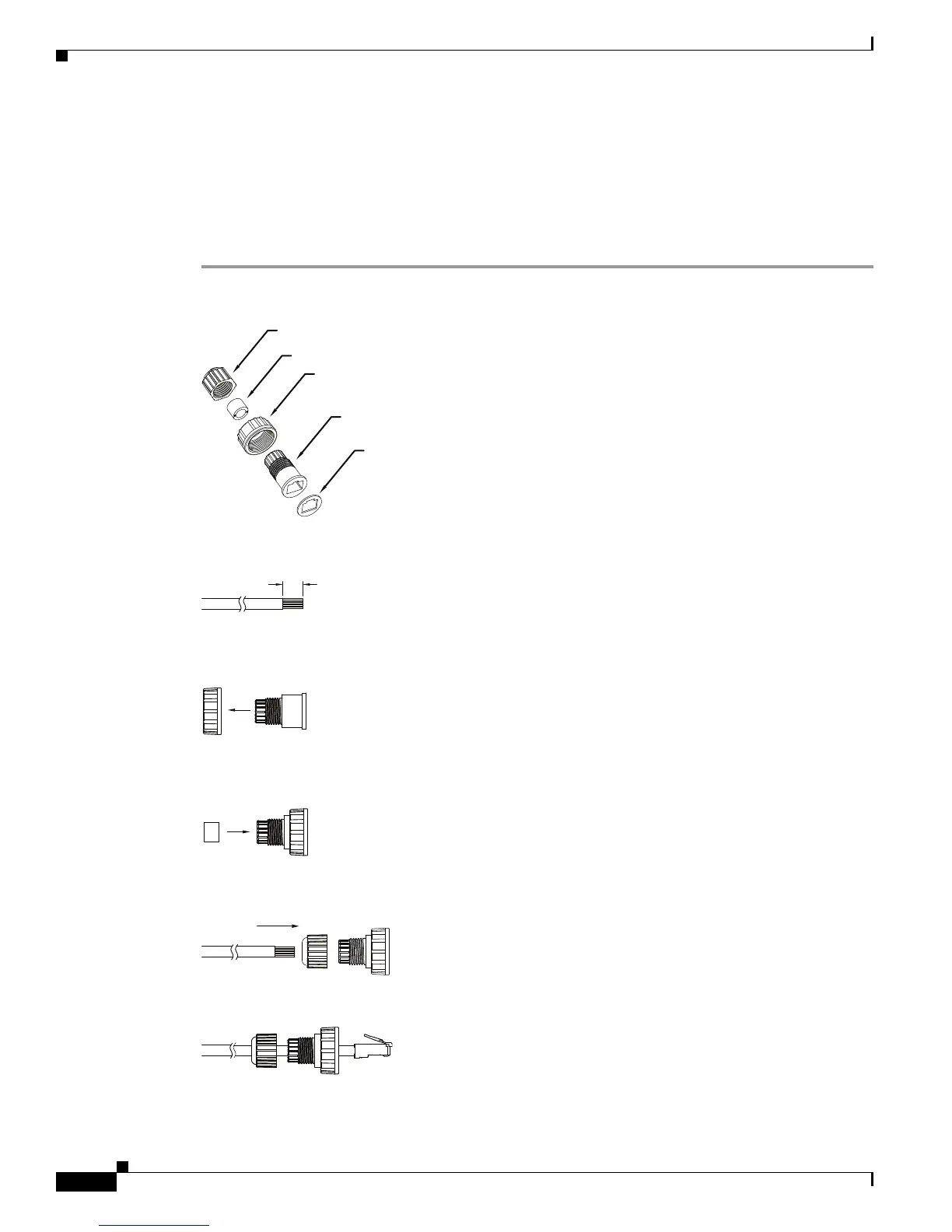
Step 1 Disassemble the components of the waterproof connector into its individual components as shown
below.
Step 2 Strip about 1/2 inch (12 mm) of the sheath off the end of an Ethernet cable.
Step 3 Insert the housing (D) into the screw nut (C).
Step 4 Insert the seal (B) into the housing (D).
Step 5 Insert the stripped Ethernet cable through the sealing nut (A) and the housing (D).
Step 6 Clamp the cable with an RJ45 plug.
Sealing Nut (A)
Seal (B)
Screw Nut (C)
Housing (D)
Gasket (E)
1/2 in. (12 mm)
(B)


 To Next Page