5-61
Cisco 7600 Series Router Installation Guide
OL-4503-24
Chapter 5 Removal and Replacement Procedures
Removing and Replacing the Power Supply
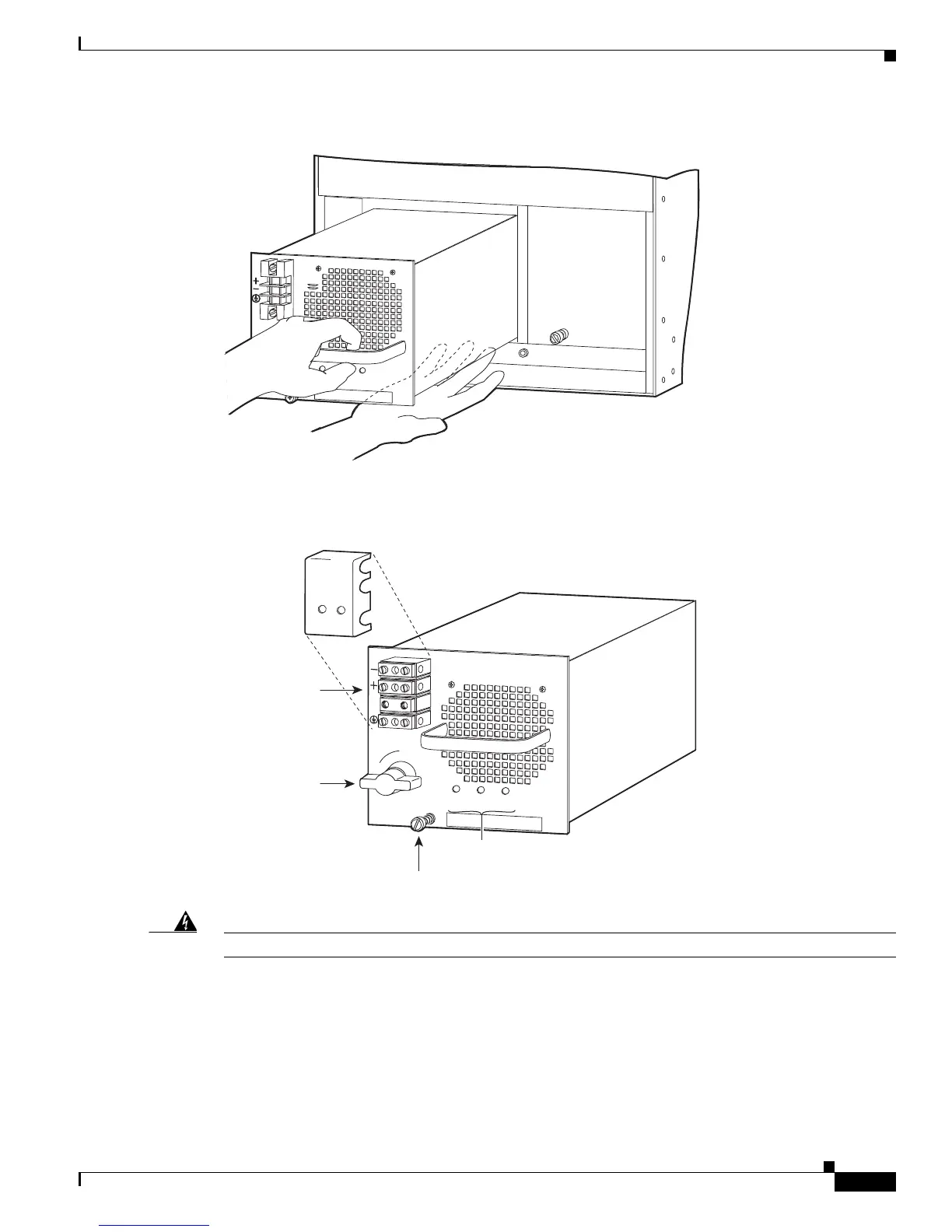
Figure 5-64 Handling a DC-Input Power Supply
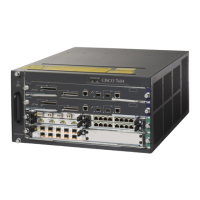
Step 4 Tighten the power supply captive installation screws. (See Figure 5-65.)
Figure 5-65 2500 W DC-Input Power Supply
Warning
Power supply captive installation screws must be tight to ensure protective grounding continuity.
Step 5 Remove the two screws securing the terminal block cover, and slide the cover off of the terminal block
(Figure 5-65).
Step 6 Attach the appropriate lugs to the DC-input wires. The maximum width of a lug is 0.300 inch (7.6 mm).
The wire should be sized according to local and national installation requirements. Use only copper wire.
INPUT
OK
FAN
OK
OUTPUT
FAIL
I
0
85741
INPUT
OK
FAN
OK
OUTPUT
FAIL
I
0
85906
Power
switch
DC power cable
terminal block
Terminal block
cover
Status LEDs
Captive installation
screw



 To Next Page