Need help?
Do you have a question about the Cisco Aironet 1800s and is the answer not in the manual?
Details model number format and regulatory domain information.
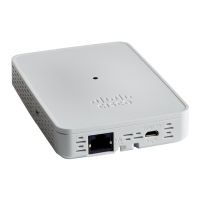
Describes the physical ports and connectors on the sensor.
Details available methods for powering the network sensor.
Key safety precautions and warnings for equipment installation and operation.
Instructions to check received items against the packing list.
Details the function of the status LED and the reset button.
Describes ports based on the installed PoE/Ethernet or AC adapter module.
Key steps involved in physically installing and powering the sensor.
Steps for configuring the sensor for network monitoring.
Details mounting and powering for different accessory modules.
Step-by-step guide for mounting the sensor using the AIR-AP-BRACKET-NS.
Instructions for mounting the sensor using the AC adapter cradle.
Describes the roles of the wireless LAN controller and cloud service.
Explains the meaning of different LED states for troubleshooting.
Describes the Link and Activity LEDs on the Ethernet port.
Details how to use the reset button for factory defaults or storage clearing.
Statement regarding compliance with Federal Communications Commission standards.
Japanese regulatory statement for IT equipment compliance.
Statement regarding the use of approved power cables and adapters.
Statement regarding compliance with Industry Canada regulations.
Overview of compliance with RF exposure standards.
Details FCC limits and guidelines for radio wave exposure.
 General
| Frequency Band | 2.4 GHz, 5 GHz |
|---|---|
| PoE (Power over Ethernet) Supported | Yes |
| Operating Temperature | 32°F to 104°F (0°C to 40°C) |
| Wireless LAN Standard | IEEE 802.11ac |
| Security Features | WPA2, 802.1X, AES, TKIP, WPA |
| Antenna Type | Internal |
| Mounting Type | Ceiling, Wall |
| Humidity Range Operating | 10% to 90% (non-condensing) |
| Height | 1.3" |

 To Next Page