Connecting the equipment
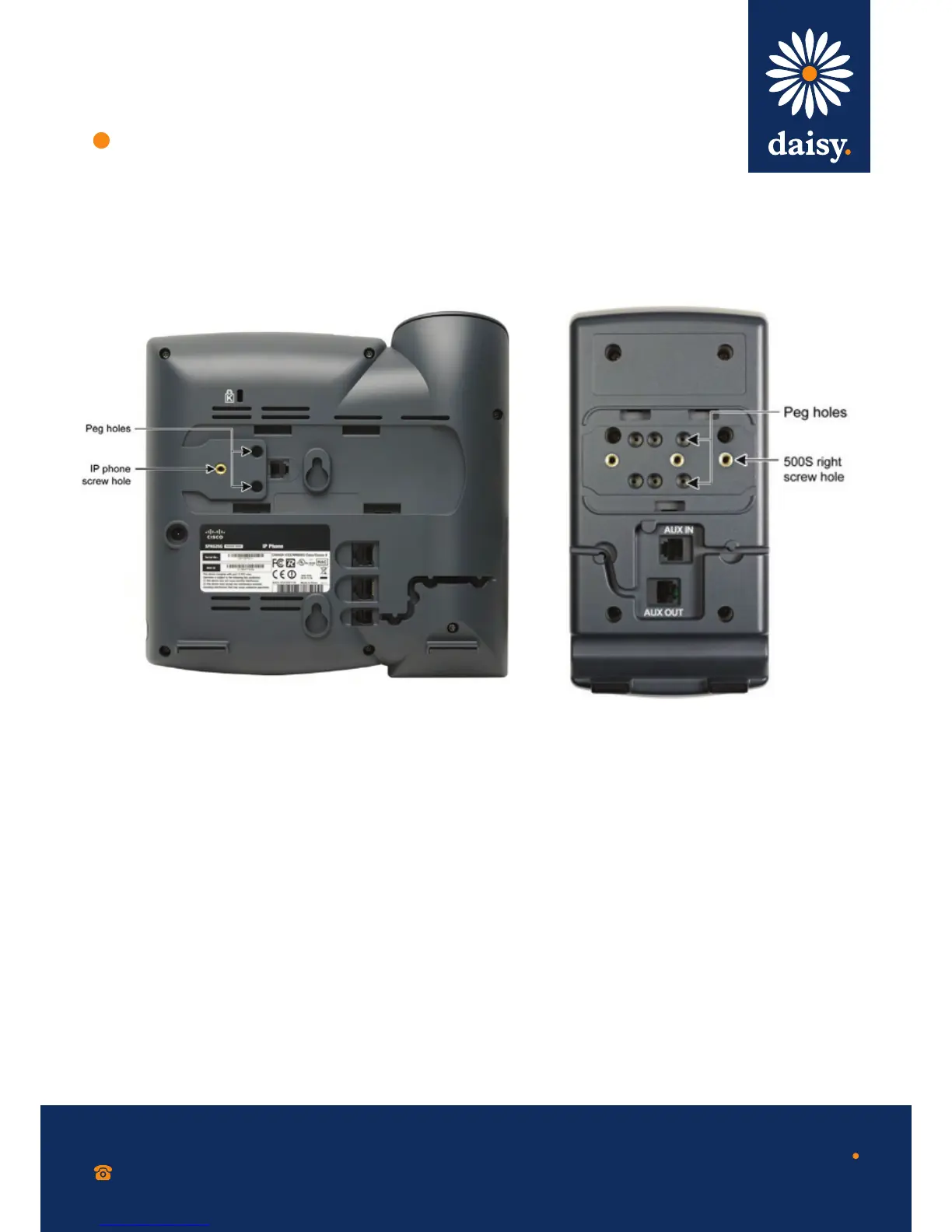
The following procedure describes how to attach the Cisco SPA 500S to a Cisco SPA 500 Series IP Phone.
0800 040 8888
working with daisy
www.daisygroupplc.com
v1 - 06/13
Step 1 Turn both the Cisco SPA 500 Series IP
Phone and the Cisco SPA 500S face down.
Step 2 Align the screw hole in the Cisco SPA 500
Series IP Phone with one of the holes on the
attachment arm.
Step 3 Insert the pegs on the attachment arm into
the peg holes as shown below on the Cisco
SPA 500 Series IP Phone.
Step 4 Using an attachment arm screw, secure
the attachment arm to the Cisco SPA 500
Series IP Phone.
Step 5 Align the right screw hole in the Cisco
SPA 500S with the unused hole on the
attachment arm.
Step 6 Insert the pegs on the attachment arm
into the peg holes on the Cisco SPA 500S.


 To Next Page
 Loading...