How To Pair Your CZ Smart Full Display Smart Watch.
Pairing your CZ Smart with your Android or iOS phone is easy. Follow these simple steps to get started.
STEP 1
STEP 2
STEP 3
STEP 4
STEP S
STEP 6
6:28
— Download and install the CITIZEN CONNECTED app via Apple App Store or Google Play Store.
—Follow the app's instructions to create a user account.
—Once you enter the pairing screen, press Touchscreen (A) on the phone and select the language on the watch and follow the instructions on the phone.
—Agree to the Termsof Service (B), and select the watch name listed (C).
—Once you've selected the watch name, the phone will prompt to pair with the watch, press Pair (D).
- Follow the phone's on-screen instructions to complete the setup (E).
Welcome To
Citizen
Smartwatches
Select your smartwatch type below
TOUCHSCREEN
A new generation Of
smartwatches
powered with the
latest Wear OS by
Google
HYBRID
The classic style you
love. The smart
teatures you want. The
long-lasting battery
you need.
*Gen 5 touchscreen watches and older pair
With t
e app.
Terms Of Service
Google Terms Of Service
By continuing. you agree to Google
and Priyagy-pqligy.
Send usage and diagnostic
reports
Help invrove Wear OS by automatically
sending diagnostic and device usage data to
Google. If your additional Web & App Activity
setting is turned on, this data may be saved to
your Google Account.
Location
Your watch may use the location from your
phone. or the watch if available; Location may
use sources like GPS, Wi-Fi, mobile networks,
and sensors to help estimate your device's
location. Google may collect location data
periodically and use this data in an
anonymous way to improve location accuracy
and location-based services. The overall
location setting may be accessed here or on
the watch The Google Location Accuracy
setting may only be accessed on the watch.
Connect Your
Watch
Tap your watch name whenit in the
list below
CZ Smart 2.1 0122
Connect Your
Watch
Tap your watch name whm it in the
list below
cz s
Bluetooth Paiü•g
•CZ Smart 2.1• to with
CoMirm that the
•8S6982• is •CZ Smrt
2.1'. DO not enter this code en my
RETRY
6:30
Connecting
We're connecting to your watch
DECLINE AGREE

 Need help?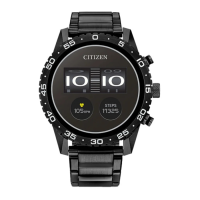

 To Next Page
 General