File name: D48A1_SDC760N_English_100419 vision : 04.11.05
250x72mm(12.5x72mm)
* POWER SUPPLY English
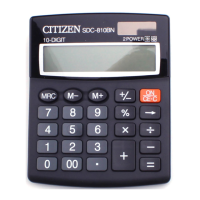
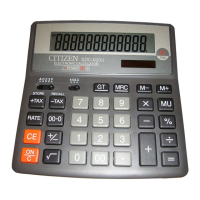
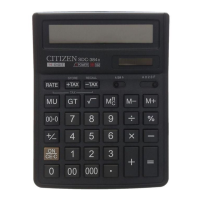
CITIZEN model SDC-760N is a dual-powered (high power solar +
back-up battery) calculator operative under any lighting conditions.
-Auto power-off function-
The calculator switches the power off automatically if there has
been no key entry for about 7 minutes.
-Battery change-
If the back-up battery needs to be changed, open the lower cabinet
to remove the old battery and insert a new battery in the indicated
polarity. After changing battery, please use a metal, elliptical object
to press the RESET pad on printed circuit board.
-Reset operation-
If the calculator is lock and further key operations becomes impossible,
please press the center on [MC] & [=] at the same time to release the
condition. It will return all setting to default setting.
* KEY INDEX English
[
C
ON
] : Power on / Clear key. [CE] : Clear entry.
[00
→
0] : Right shift key. [M+] : Memory plus key.
[M–] : Memory minus key. [+/–] : ±Sign change key
[MR] : Memory recall key [MC] : Memory clear key.
[MU] : Mark-up / Mark-down Key [
] : Square root key
[RATE] : Tax rate setting key
[
TAX-
RECAL
] : Price without tax key / To recall tax rate when pressing
[RATE] and [–TAX] keys.
[
TAX
STOR
+
]: Price with tax key / To store tax rate when pressing [RATE]
and [+TAX] keys.
A 0 2 3 4 F
Decimal place selection switch
– F –
– 0– 2– 3– 4–
– A –
Floating decimal mode
Fixed decimal mode
ADD–mode automatically enters the monetary
decimal in addition and subtraction calculations
5/4
Round up / Round-off / Round-down switch
The Signs Of The Display Mean The Following:
MEMORY:memory –MINUS:Minus ( or negative)
ERROR:Overflow-error. TAX : Amount of tax
–TAX : Price excluding tax +TAX : Price including tax
% : Tax rate stored RATE : Tax rate setting
* OPERATION EXAMPLES English
1.Calculation Examples
Before performing each calculation, press the [
C
ON
] key.
Example Key operation Display
2 x 3 = 6 2 [x] 2 [CE] 3 [=]
6.
7 x 9 = 63
7 [÷] [x] 9 [=]
63.
300 x 27% = 81 300 [x] 27 [%] 81.
56
11.2
x 100% = 20%
11.2 [÷] 56 [%]
20.
300+(300 x 40%)=420 300 [+] 40 [%] 420.
300–(300 x 40%)=180 300 [–] 40 [%] 180.
1400 x 12% = 168 1400 [x] 12 [%] 168.
6 + 4 + 7.5 = 17.5
6 [+] 4 [+] 7.5 [=] 17.5
5 x 3 ÷ 0.2 = 75
[
C
ON
] 5 [x] 3 [
÷
] 0.2 [=]
75.
8 ÷ 4 x 3.7 + 9 =16.4 8 [÷] 4 [x] 3.7 [+] 9 [=]
16.4
5
4
= 625 5 [x] [=] [=] [=] 625.
1 / 2 = 0.5 2 [÷] [=] 0.5
A 0 2 3 4 F
10) 3 x (2
1
+
= 0.0625
2 [x] 3 [+] 10 [÷] [=]
0.0625
144
= 12
144 [
]
12.
A 0 2 3 4 F
5/4
$14.90+$0.35–$1.45+
$12.05=$25.85
1490 [+] 35 [–] 145
[+] 1205 [=]
145.
25.85
2.Memory Calculation
[MC] [
C
ON
]
0.
12 [x] 4 [M+] 20 [÷] 2 [M–]
MEMORY
10.
[MR]
MEMORY
38.
A 0 2 3 4 F
5/4
(12 x 4) – (20 ÷ 2)
= 38
[MC]
[
C
ON
]
0.
3.Constant Calculation
2 + 3 = 5 2 [+] 3 [=] 5.
4 + 3
= 7 4 [=] 7.
3 x
4 = 12 3 [x] 4 [=] 12.
A 0 2 3 4 F
3 x
6 = 18 6 [=] 18.
4.Overflow Error Clear
12345678901234567
ERROR
1’234’567’890’123’456.
[00
→
0]
1’234’567’890’123’456.
[x] 10000 [=]
ERROR
1’234.567890123456
1234567890123456
x 10000 =
1'234.567890123456x10
16
[
C
ON
]
0.
5.PRICE MARK-UP & DOWN CALCULATION
2000+(P x 20%)=P
P=
20% - 1
2000
=2'500.00
2500–2000 = 500.00
2000 [÷] 20 [MU]
[MU]
2'500.00
500.00
2000–(P x 20%)=P
P=
20% 1
2000
+
=1'666.67
2000 [÷] 20 [+/–] [MU]
1'666.67
A 0 2 3 4 F
5/4
15000
15000 - 18000
x100%
= 20.00%
18000 [–] 15000 [MU] 20.00
6. Tax Calculation
3.
%
+TAX
103.
100+TAX(3%)
= 103
Tax sum = 3
3 [RATE] [+TAX]
100 [+TAX]
[+TAX]
TAX
3.
* 3 = Tax sum 103 = Tax inclusive value
3.
%
–TAX
200.
206–TAX(3%)
= 200
Tax sum = 6
[
C
ON
]
[RATE] [–TAX]
206 [–TAX]
[–TAX]
TAX
6.
A 0 2 3 4 F
* 6 = Tax sum 200 = Tax exclusive value



 To Next Page