EasyManua.ls Logo

Citronic RU26H - User Manual

Citronic RU26H
5 pages
Print Icon
To Next Page IconTo Next Page
Loading...
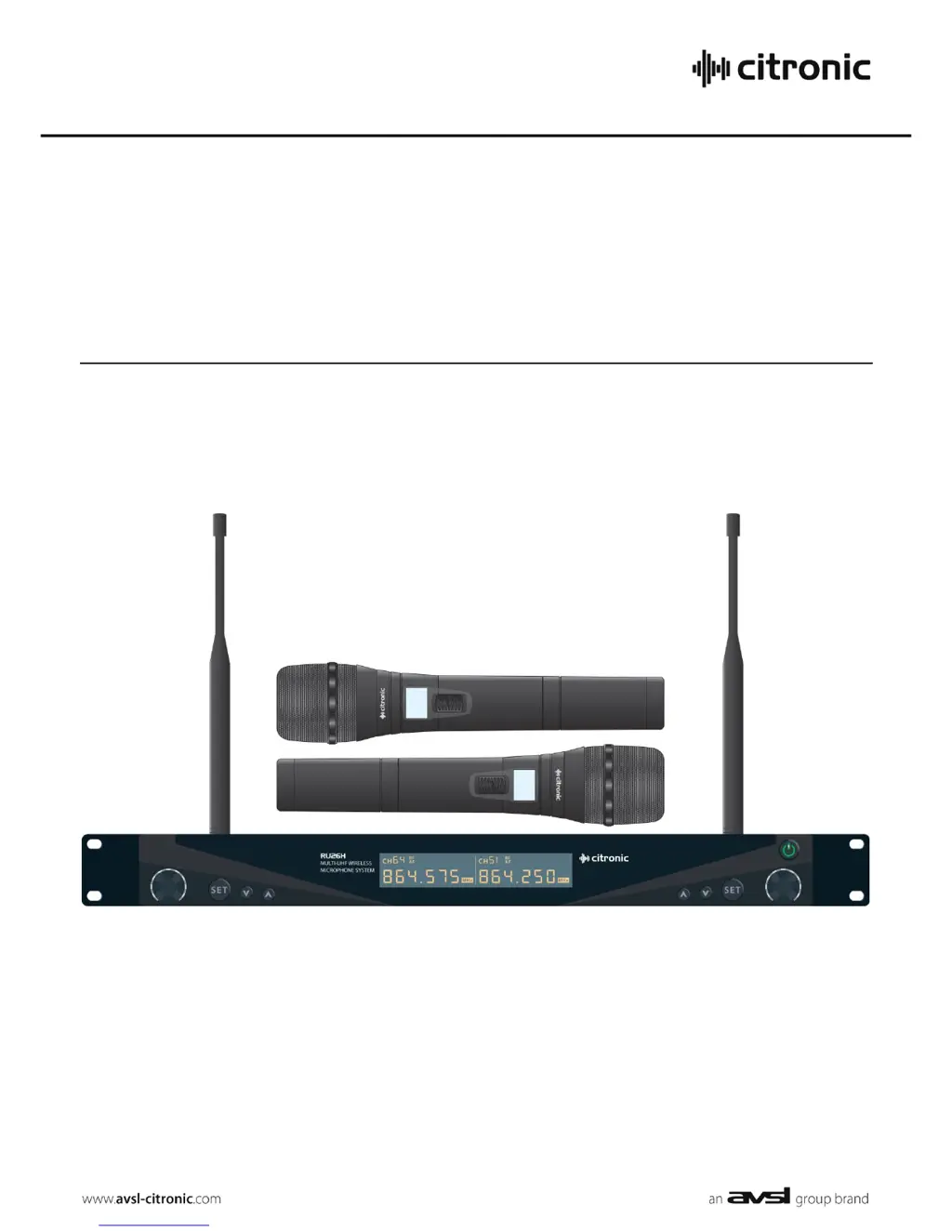
RU26H
Dual Multi-UHF Wireless System
Item ref: 171.860
User Manual
Version 1.0

Questions and Answers

  • T
    Tracy BlanchardJul 31, 2025
    What to do if all LEDs are lit but no sound from Citronic Microphone system?
    • K
      kjonesJul 31, 2025
      If all the LEDs are lit on your Citronic Microphone system but there is no sound, first ensure the receiver is properly connected to the amplifier/mixer. Then, make sure that both the receiver and amplifier/mixer channel volumes are turned up.
  • T
    Terry HarrisAug 5, 2025
    What to do if POWER and RF LEDs are lit but no AF and no sound on Citronic RU26H?
    • J
      Jessica SmithAug 5, 2025
      If the “POWER” and “RF” LEDs are lit, but there is no “AF” LED and no sound from your Citronic Microphone system, verify that the transmitter switch is not in the “MUTE” position and ensure the transmitter has good or charged batteries. Also, check that there isn't another nearby transmitter using the same frequency.
  • G
    Gregory Cunningham DVMAug 10, 2025
    Why is the Citronic RU26H Microphone system output very low?
    • S
      schneiderharoldAug 10, 2025
      If the output from your Citronic Microphone system is very low, try the following: First, turn up the VOLUME on the receiver. Second, increase the Gain on the mixer/amplifier. Third, ensure that the Jack output is not connected to a Mic input. Finally, check the transmitter batteries.
  • W
    William TaylorAug 15, 2025
    How to fix a very loud or distorted Citronic Microphone system output?
    • A
      Allison TorresAug 16, 2025
      If the output from your Citronic Microphone system is very loud or distorted, turn down the VOLUME on the receiver and reduce the Gain on the mixer/amplifier. Also, ensure that the XLR output is not connected to a Line input.
  • C
    christina92Aug 21, 2025
    How to troubleshoot POWER LED not lighting on Citronic RU26H Microphone system receiver?
    • R
      robert42Aug 21, 2025
      If the “POWER” LED does not light up on your Citronic Microphone system receiver, ensure that the power adapter is properly connected to the mains and is working. Also, verify that the receiver is switched on.
  • J
    Jacqueline RyanAug 26, 2025
    What to do if POWER LED is lit but no RF or AF LEDs on Citronic RU26H?
    • M
      Michelle TaylorAug 26, 2025
      If the “POWER” LED is lit but no “RF” or “AF” LEDs are illuminated on your Citronic Microphone system, ensure the transmitter is switched on and is within reception range. Check that the transmitter batteries are in good condition or charged. Ensure the transmitter and receiver frequencies are synced and verify that no other nearby transmitter with the same frequency is active.

Summary

Introduction and Package Contents

Package Contents

Lists all items included in the Citronic RU26H wireless system package.

Important Warnings

Provides critical warnings regarding fire, electric shock, liquid exposure, and impact.

Safety Precautions

Outlines essential safety precautions for using the wireless system, including adapter use and battery handling.

Placement Guidelines

Details optimal placement guidelines for components to ensure performance and prevent damage.

Cleaning Instructions

Offers instructions on how to clean the wireless system components safely and effectively.

Control Layout and Initial Setup

Receiver Control Layout

Details the functions of the receiver's LCD display, buttons, and rotary control.

Transmitter Control Layout

Describes the display, switch, and battery compartment of the handheld transmitter.

Setting Up the System

Step-by-step guide for preparing the wireless system for operation.

System Operation and Tuning

Powering On and Positioning

Steps for connecting power, positioning the receiver, and turning on the system.

Transmitter Operation Modes

How to operate the transmitter's switch for mute, continuous operation, and standby modes.

Frequency Tuning and Syncing

Procedures for selecting carrier frequencies and syncing transmitters via infrared.

In-Use Procedures and Storage

Guidelines for muting, powering off, packing, and storing the system when not in use.

Specifications and Troubleshooting

Technical Specifications

Lists key technical details including power, frequency, performance metrics, and dimensions.

Troubleshooting Common Issues

Solutions for common problems such as no power, signal loss, and audio output issues.

Disposal Information

Guidance on properly disposing of the unserviceable device according to statutory requirements.

Citronic RU26H Specifications

General IconGeneral
Transmitter Power10mW
Frequency Response50Hz - 15kHz
Output Impedance600 Ohms
Polar PatternCardioid
ConnectorXLR

Related product manuals