EasyManua.ls Logo

Citronic SM650 - Page 5

Citronic SM650
17 pages
Print Icon
To Next Page IconTo Next Page
To Previous Page IconTo Previous Page
Loading...
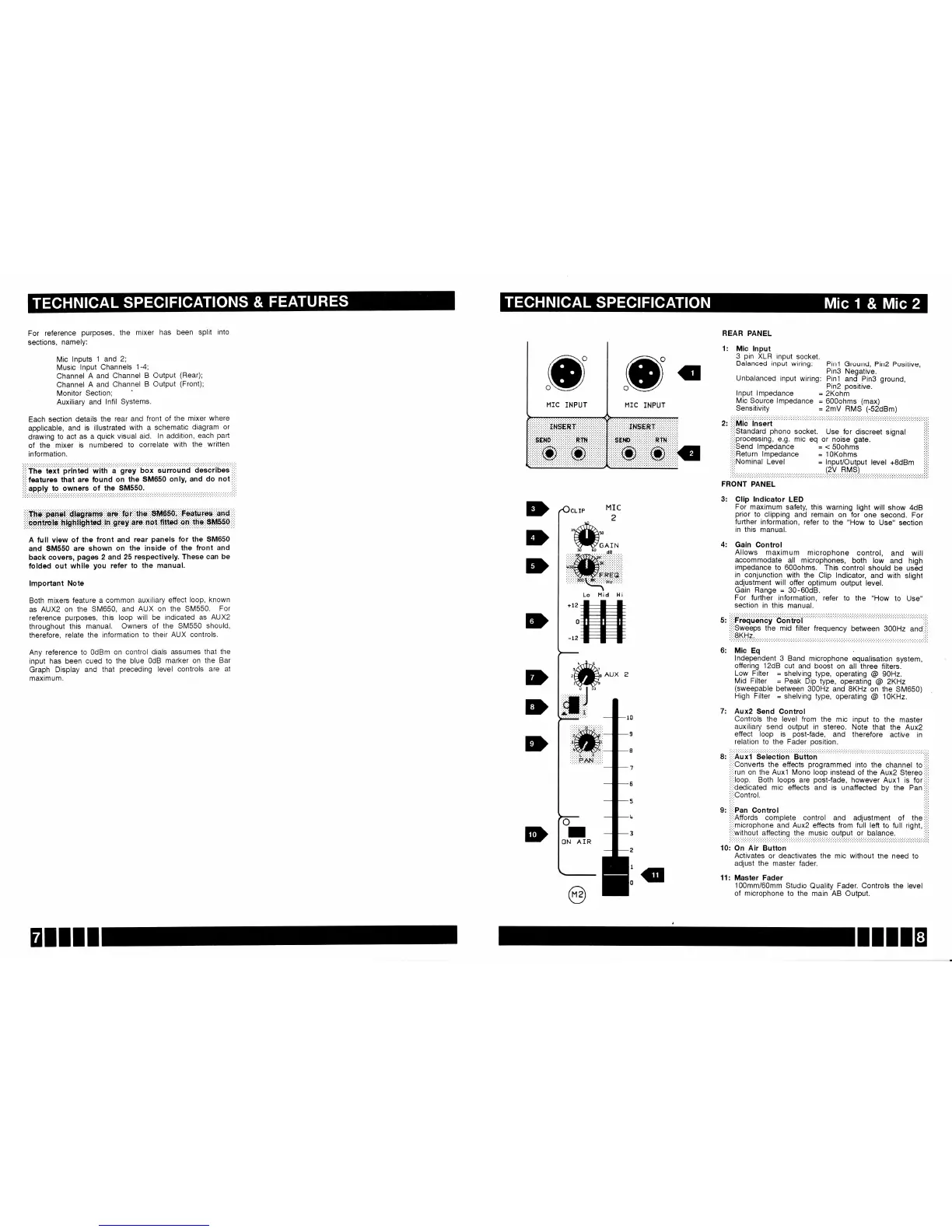
For reference
purposes,
the
mixer
has
been
split
into
sections,
namely:
Mic
lnputs
1 and 2;
Music
lnPut
Channels
1-4;
Channel
A and
Channel
B
Output
(Rear);
Channel
A and
Channel
B
Output
(Front);
Monitor
Section;
Auxiliary
and
lnfil
SYstems.
Each
section
details
the
rear and
front
of
the
mixer
where
applicable,
and is
illustrated
with a
schematic
diagram
or
drawing
to act as
a
quick
visual
aid.
ln addition,
each
part
of
the
mixer is
numbered
to
correlate
with
the
written
information.
.:.:.:.:.:.:...:.:..'.':.......:.:....'.......':.:...:.....:':.:'......:..':':..'.'."'..'.'
i:i:ftr;
Uit
iii;tea
wath
;
gi"y
box
surround
ocscriues,:,:
,i,ifeatures
that are
found
on the
SM650
only, and
do not,,;'
::::ennly
!9 9w19T?
9l !P
9M9!9,
::::
A
full view
of the
front and
rear
panels
for
the
SM650
and
SM550
are
shown
on the inside
of the front
and
back covers,
pages
2 and
25 respectively.
These
can
be
folded
out whlle
you
refer
to the manual.
lmportant
Note
Both
mixers
feature
a
common
auxiliary
effect
loop, known
as
AUX2 on
the SM650,
and AUX
on the
SM550.
For
reference
purposes,
this
loop
will be indicated
as AUX2
throughout
this
manual.
Owners
of
the SM550
should,
therefore,
relate
the
information
to their
AUX controls.
Any
reference to
0dBm
on control
dials assumes
that the
input
has been
cued
to the blue
OdB
marker
on the Bar
Graph
Display
and
that
preceding
level controls
are
at
maximum.
D
D
D
D
D
E}
MIC
2
REAR
PANEL
1:
Mic lnput
3
pin
XLR
input
socket.
Balanced
input
wiring:
Unbalanced
input
wiring:
Pin2
Positive,
ground,
3: Clip
lndicator LED
For
maximum
safety,
this
warning light
will show
4dB
prior
to clipping
and
remain
on for
one
second.
For
fufther information,
refer
to the
"How to Use"
section
in this
manual.
4: Gain
Control
Allows
maximum
microphone
control,
and
will
accommodate
all microphones,
both
low
and
high
impedance
to 600ohms.
This control
should be
us6d
in conjunction
with the
Clip
lndicator,
and
with slight
adjustment
will
otfer
optimum
output
level.
Gain
Range
=
30-60d8.
For
further
information,
refer
to
the
"How
to Use"
section
in this
manual.
S:
,i,iFrequdrricy
Coritfol
,::,
i,;,Qweeps
the
mid
filter frequency
between
300H2
and,,i,
..:.
6:
Mic
Eq
ln-dependent_3
Band
microphone
equalisation
system,
offering
12dB cut
and
boost on
all
three filters.
Low Filter
=
shelving
type,
operating
@
90H2.
Mid
Filter
=
Peak
Dip
type,
operating
@
ZKHz
(sweepable
between
300H2
and SKHr
on
the SM650)
High Filter
=
shelving
type,
operating
@
1OKHz.
7:
Aux2
Send
Control
Controls
the level from
the mic input
to the
master
auxiliary
send output
in stereo.
Note that
the
Aux2
effect
loop
is
post-fade,
and
therefore
active
in
relation
to the
Fader
position.
8:
::::Auxl
Selection
Button
,,i,
ii,'Converts
the effects
programmed
into the channel
to
i:i,
i:i:run
on
the Auxl
Mono
loop
instead
of the
Aux2 Stereo::ii
,',,loop.
Both loops are
podt{ade,
however
Auxl is
fori:i:
:i:idedicated
mic effects
and is unaffected
by
the
pan
i,ii
:,iiOontrol.
:i:i
l:l:
g:
iiiiPan
Control
::::
:i,iAffords
complete control and
adjustment
of the:':,
:,i,microphone
and Aux2 effects from
full left
to full right,:i:i
i':'without
affecting the music output
or balance.
,i,'
10: On
Air
Button
Activates or deactivates
the mic without
the need to
adjust the
master fader.
11: Master Fader
100mm/60mm
Studio
Quality
Fader.
Controls
the level
of
microphone to
the main AB Output.
+12
0
-12
o
I
ON
AIR
EIIII

Related product manuals