EasyManua.ls Logo

Citronic SM650 - Page 6

Citronic SM650
17 pages
Print Icon
To Next Page IconTo Next Page
To Previous Page IconTo Previous Page
Loading...
INPUT CHANNELS
1&2
-
CD /
LINE
REAR
PANEL
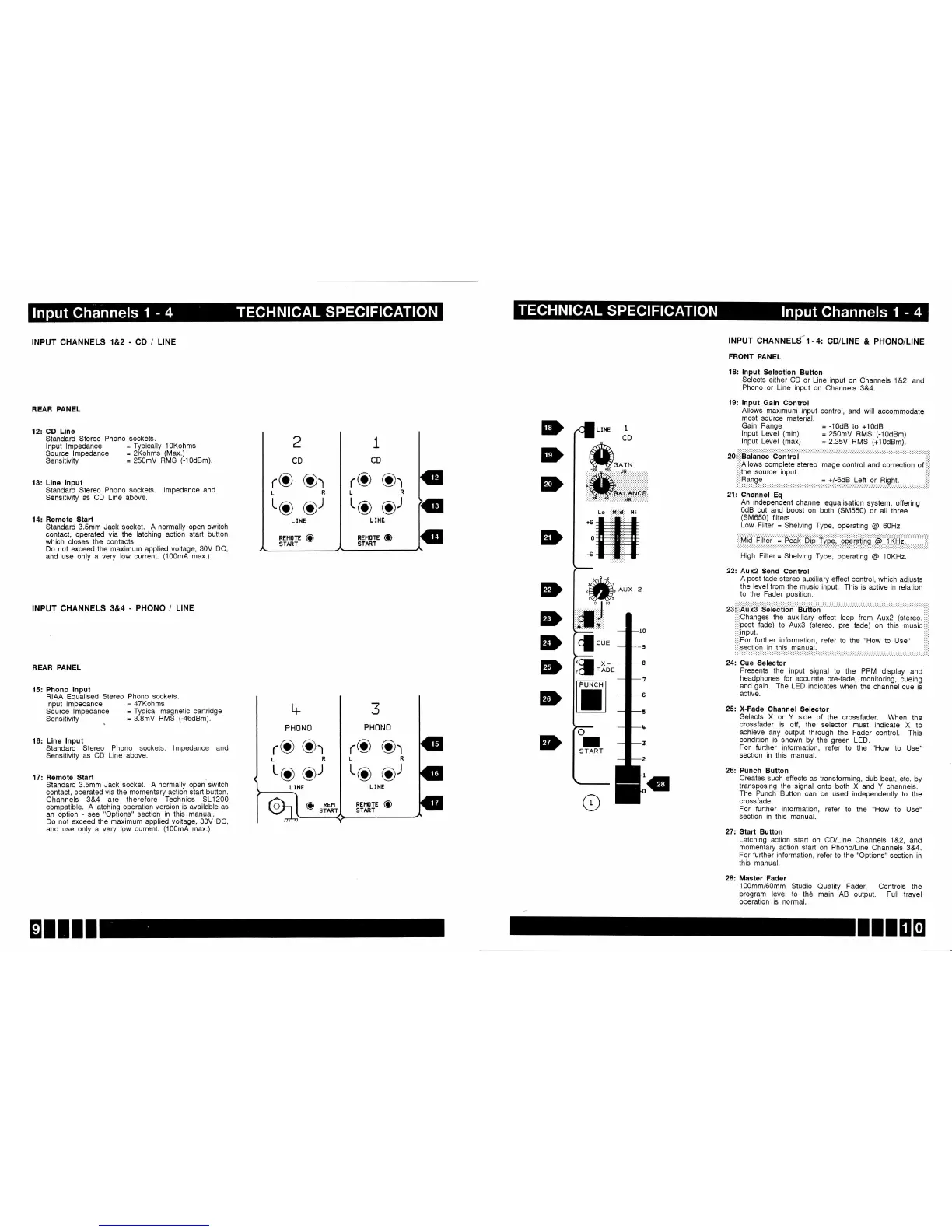
12:
GD Llne
Standard
Stereo
Phono sockets.
lnput lmpedance
=
Typically
l0Kohms
Source
lmpedance
=
2Kohms
(Max.)
sensitivity
=
250mV
RMS
(-10dBm).
13:
Llne lnput
Standard
Stereo
Phono
sockets.
lmpedance and
Sensitivity as
CD Line above.
14: Remote Start
Standard 3.5mm Jack
socket. A normally
open switch
contact, operated via the
latching action
start button
which
closes the
contacts.
Do not
exceed the maximum
applied voltage,
30V DC,
and use only
a very low
current.
(100mA
max.)
INPUT CHANNELS
3&4
PHONO
/
LINE
I
CD
INPUT
CHANNELS-1.4:
CD/LINE
&
PHONO/LINE
FRONT
PANEL
18: lnput
Selectlon
Button
Selects
either
CD
or Line
input
on
Channels
1&2,
and
Phono
or
Line input
on
Channels
3&4.
19: lnput
Gain
Control
Allows
maximum
input
control,
and
will accommodate
most
source
material.
Gain
Range
=
-10d8
to
+10d8
lnput
Level
(min)
=
250mV
FIMS
(-10dBm)
lnput
Level
(max)
=
2.35V
HMS
(+10dBm).
20::::Balance
Control
,i,i
:,:'Allows
complete
stereo
image
control
and correction
of
i::i
:':,tne
source
input.
i'i'
t,tiflglgg. . .=.t/:6dB
Left
or Right.
:i:i
21:
Channel
Eq
An_independent
channel
equalisation
system,
offering
6dB
cut
and boost
on
both
(SM550)
or
all three
(SM650)
filters.
Low
Filter
=
Shelving
Type,
operating
@
GOHz.
i:iMiQ
fiter ;
P.-e?li
Dip- tipi,
qpiteriils
@:f
RHi:
i:i:
High
Filter
=
Shelving
Type,
operating
@
1OKHz.
222
Aux2
Send
Control
A
post
fade
stereo
auxiliary
effect control,
which
adjusts
the
level from
the
music input.
This is active
in relation
to the Fader
position.
Presents
the input
signal
to
the PPM
display
and
headphones
for
agcurate
pre-fade,
monitoring,
cueing
and
gain.
The
LED
indicates
when the
channel
cue
is
active.
25:
X-Fade
Channel
Selector
Selects
X or Y
side
of the
crossfader.
When
the
crossfader
is off,
the
selector
must
indicate X to
achieve
any output
through
the
Fader control.
This
condition
is shown
by
the
green
LED.
For
further
information,
refer to
the
"How
to
Use"
section in this
manual.
26:
Punch
Button
Creates
such
effects
as transforming,
dub
beat, etc.
by
transposing
the signal
onto both X
and Y channels.
The
Punch
Button can
be used independently
to
the
crossfade.
For
further information,
refer to
the
"How
to
Use"
section in
this manual.
27: Start
Button
Latching action
start on
CD/Line
Channels
1&2,
and
momentary
action staft
on Phono/Line
Channels
3&4.
For
further information,
refer to the
"Options" section
in
this
manual.
28:
Master Fader
100mm/60mm
Studio
Quality
Fader. Controls
the
program
level
to the
main AB output.
Full travel
operation
is normal.
2
CD
1
CD
L INE
REl.trTE
(D
START
*.^,_
-r0
+10
.
:.:. :. :.;{Lt. :. :':. :. :. 9
E,
:':.:. :. :.:.
iffiil
lli
Lo
,'ttii*,
H i
tffi
REAR
PANEL
15: Phono lnput
RIAA Equalised
Stereo
lnput lmpedance
Source lmpedance
Sensitivity
Phono sockets.
=
4TKohms
=
Typical magnetic
cartridge
=
3.8mV RMS
(-46dBm).
16: Llne
lnput
Standard Stereo
Phono
sockets. lmpedance
and
Sensitivity as
CD Line above.
17: Remote
Start
Standard
3.5mm Jack socket. A
normally open switch
contact, operated
via the momentary
action staft button.
Channels 3&4 are
therefore Technics
SL1200
compatible.
A latching
operation version is
available
as
an option
-
see
"Options"
section
in
this manual.
Do
not exceed the
maximum applied
voltage, 30V DC,
and use
only a very low
current.
(100mA
max.)
rO
Or
rO
Or
to..,-9'
REHOTE
(D
START
L6
oJ
D
D
D
D
D
D
D
ED
Lg
or
(D
REr'l
START
L INE
REi,tlTE CD
START
IIIEO

Related product manuals