EasyManua.ls Logo

CITYSING-E ZQS-4210 - User Manual

CITYSING-E ZQS-4210
2 pages
Print Icon
To Next Page IconTo Next Page
Loading...
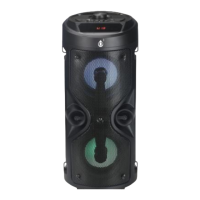
Bluetooth Speaker ZQS-4210
FEATURES:
1. Outdoor HiFi Wireless BT Speaker with double 4inch subwoofer.
2. Output power is strong, you can enjoy your music anywhere
3. BT 5.0 with lower power consumption and over 10m meters operating range.
4. Support USB and Micro-SD card and AUX and FM Radio, and TWS function.
5. Support wired microphone give you experience the singer's feeling.
6. Colorful LED lights looks more beautiful.
7. With Strap, easy to take out, wherever beach, garden, party, outskirts etc.
SPECIFICATION:
Speaker Type
2 x 4inch
POWER WATTS/RMS Power
10W
HERTZ /Frequency Response
150Hz - 18KHz
Signal to Noise Ratio
≥80dB
Woofer
Full Range Frequency Speaker
Tweeter
BT Version
V5.0
InPut Specs
DC 5V, 1A
Output Voltage
3.7V
Battery
1200mAh
Illumination
LED Flashlight
Display
LED Display
Connections
BT/Micro SD/USB/FM/AUX/MIC
Unit Measures (mm)
170 x 170 x 400
Unit Weight (kgs)
1.56
Box Measures (mm)
178 x 178 x 408
Box Weight (kgs)
1.76
Master Box Measures (mm)
728 x 550 x 425
Master Box Weight (kgs)
21.3
Accessories
Remote Control, Charging Cable, Audio Cable, Strap
MANUAL
1. BT Mode:
a) BT Version: 5.0, with lower power consumption and over 10m meters operating range.
b) ON/OFF, after the power is turned on, the display “BLUE” flashes and the speaker emits a BT mode tone.
c) The “BLUE” character flashes into the pairing state, open the phone BT, search for the device name, click the device name to
confirm and then connect. After the connection is successful, “BLUE” is always on, and the speaker sends a pairing success
tone. The “BLUE” character is displayed during playback, and the “PAUS” character is displayed when paused.
2. TF/Micro SD Card Mode:
a) When the speaker is not plugged into the TF card device, it will boot into the BT mode. Inserting the TF card speaker will
automatically detect the TF card playback mode, displaying ‘PLAY’ and playback time. If the speaker has a TF card device, it
will enter the TF card mode directly after booting.
b) The display shows the playback time during playback, and “PAUS” character are displayed when paused.
Question and Answer IconNeed help?

Do you have a question about the CITYSING-E ZQS-4210 and is the answer not in the manual?

Summary

Product Features

Product Specifications

User Manual

Bluetooth (BT) Mode

Details Bluetooth connectivity, pairing, and status indicators.

TF;Micro SD Card Mode

Automatic detection and playback from TF/Micro SD cards.

U Disk Mode

Automatic detection and playback from USB drives.

FM Radio Mode

FM radio functionality, station scanning, and playback.

AUX Mode

Connect external audio devices via AUX cable.

Microphone Function

Usage of the wired microphone input.

Charging Instructions

Instructions for charging the device and indicator light status.

Low-Power Protection

Device behavior during low battery conditions.

Mode Cycling

How to cycle through different input modes.

LED Flashlight Operation

How to turn the LED flashlight on/off.

TWS Functionality

Pairing two speakers for True Wireless Stereo.

FCC Compliance Statement

Overview

The ZQS-4210 is an outdoor HiFi wireless Bluetooth speaker featuring dual 4-inch subwoofers, designed to deliver strong output power for enjoying music anywhere.

Function Description:

This versatile speaker offers multiple playback modes, including Bluetooth (BT), USB disk, TF/Micro SD card, AUX input, and FM radio. It also supports a wired microphone for karaoke or public speaking, and a TWS (True Wireless Stereo) function for pairing two speakers. The device includes colorful LED lights for enhanced aesthetics and comes with a strap for easy portability, making it suitable for various outdoor activities like beach trips, garden parties, or excursions.

Important Technical Specifications:

  • Speaker Type: 2 x 4inch
  • POWER WATTS/RMS Power: 10W
  • HERTZ/Frequency Response: 150Hz - 18KHz
  • Signal to Noise Ratio: ≥80dB
  • Woofer: Full Range Frequency Speaker
  • BT Version: V5.0
  • InPut Specs: DC 5V, 1A
  • Output Voltage: 3.7V
  • Battery: 1200mAh
  • Illumination: LED Flashlight
  • Display: LED Display
  • Connections: BT/Micro SD/USB/FM/AUX/MIC
  • Unit Measures (mm): 170 x 170 x 400
  • Unit Weight (kgs): 1.56
  • Accessories: Remote Control, Charging Cable, Audio Cable, Strap

Usage Features:

BT Mode:

  • BT Version: 5.0, offering lower power consumption and an operating range of over 10 meters.
  • Pairing: Upon power-on, the display shows "BLUE" flashing, and the speaker emits a BT mode tone. Open your phone's Bluetooth, search for the device name, click to connect. Once connected, "BLUE" remains steady, and the speaker emits a pairing success tone.
  • Playback: During playback, "BLUE" is displayed. When paused, "PAUS" is displayed.

TF/Micro SD Card Mode:

  • Automatic Detection: If no TF card is inserted, the speaker defaults to BT mode. Inserting a TF card automatically switches to TF card playback mode, displaying 'PLAY' and playback time. If a TF card is present at boot-up, it will directly enter TF card mode.
  • Playback: The display shows playback time. "PAUS" is displayed when paused.

U Disk Mode:

  • Automatic Detection: Similar to TF card mode, if no U disk is inserted, the speaker defaults to BT mode. Inserting a U disk automatically switches to USB playback mode, displaying 'PLAY' and playback time. If a U disk is present at boot-up, it will directly enter TF card mode.
  • Playback: The display shows playback time. "PAUS" is displayed when paused.

FM Mode:

  • Activation: Press the 'MODE' button to enter FM mode. The FM frequency range is 87.5Hz – 108.0MHz.
  • Antenna: The speaker has a built-in radio antenna, so an external antenna is not needed.
  • Station Search: Press and hold the 'PLAY/PAUSE' button to automatically search for stations.
  • Pause: Press the 'PLAY/PAUSE' button to pause playback.

AUX Mode:

  • Connection: Plug one end of the 3.5MM audio cable into the speaker's AUX jack, and the other end into a phone or computer. The speaker will automatically detect AUX mode.
  • Display: "LINE" is displayed in AUX mode.
  • Pause: Press the 'PLAY/PAUSE' button to pause.

MIC Function:

  • Activation: In power-on mode, plug in a wired microphone to start using it. (Remember to turn on the wired microphone's button before use.)

TWS Function (True Wireless Stereo):

  • Pairing: First, connect your mobile phone successfully to one BT speaker. While in BT mode, double-click the Play/Pause button on another BT speaker to enter TWS pairing. This allows two speakers to play audio simultaneously for a wider soundstage.

Mode Cycle:

  • Press the 'MODE' button to switch between USB → TF → BT → FM → AUX.
  • Note: USB, TF, and AUX modes are only displayed when the respective devices (USB drive, TF card, or AUX cable) are plugged in.

LED Flashlight:

  • Press and Hold the 'MODE' button to turn on or turn off the LED flashlight.

Maintenance Features:

Charging:

  • Connection: Plug the USB cable into the speaker and connect it to a 5V charger or computer to charge the internal Li-battery.
  • Indicator: A red light on the charging indicator will be on during charging. The indicator light turns off when the battery is fully charged.

Low-power Protection:

  • Alarm: When the built-in battery voltage drops below 3.3V, the speaker will emit a low-power alarm sound.
  • Automatic Shutdown: If the battery voltage drops below 3.1V, the speaker will automatically shut down to protect the battery.

FCC Statement:

This device complies with part 15 of the FCC rules. Operation is subject to two conditions: (1) this device may not cause harmful interference, and (2) this device must accept any interference received, including interference that may cause undesired operation. Changes or modifications not expressly approved by the party responsible for compliance could void the user's authority to operate the equipment. This equipment has been tested and found to comply with the limits for a Class B digital device, pursuant to part 15 of the FCC Rules. These limits are designed to provide reasonable protection against harmful interference in a residential installation. This equipment generates uses and can radiate radio frequency energy and, if not installed and used in accordance with the instructions, may cause harmful interference to radio communications. However, there is no guarantee that interference will not occur in a particular installation. If this equipment does cause harmful interference to radio or television reception, which can be determined by turning the equipment off and on, the user is encouraged to try to correct the interference by one or more of the following measures:

  • Reorient or relocate the receiving antenna.
  • Increase the separation between the equipment and receiver.
  • Connect the equipment into an outlet on a circuit different from that to which the receiver is connected.
  • Consult the dealer or an experienced radio/TV technician for help. The device has been evaluated to meet general RF exposure requirements and can be used in portable exposure conditions without restriction.

CITYSING-E ZQS-4210 Specifications

General IconGeneral
BrandCITYSING-E
ModelZQS-4210
CategorySpeakers
LanguageEnglish