CLA-VAL D35
Quick Start Guide
CLA-VAL Europe www.cla-val.ch cla-val@cla-val.ch 2 - D35001SE B 07/23
© Copyright CLA-VAL Europe - Specifications subject to change without notice - no contractual illustrations. Reduce your waste - Sort your rubbish
3 PRODUCT CONFIGURATION
1. Activate "Configuration" mode on your D35 as indicated in the previous section (from "Acquisition" mode, press the
button for 5 seconds).
2. Connect your smartphone, tablet, or computer to the WiFi network generated by the D35.
The network has the default name: D35-< serial number>
The default password is: D35_< last 4 digits of the series serial number >
We strongly recommend changing the default password at first installation.
Note: The network generated by the D35 has no Internet access. Any error messages about this can be ignored.
3. Enter the address http://192.168.4.1 in your preferred internet browser, or scan the following QR code using a QR code
reader application:
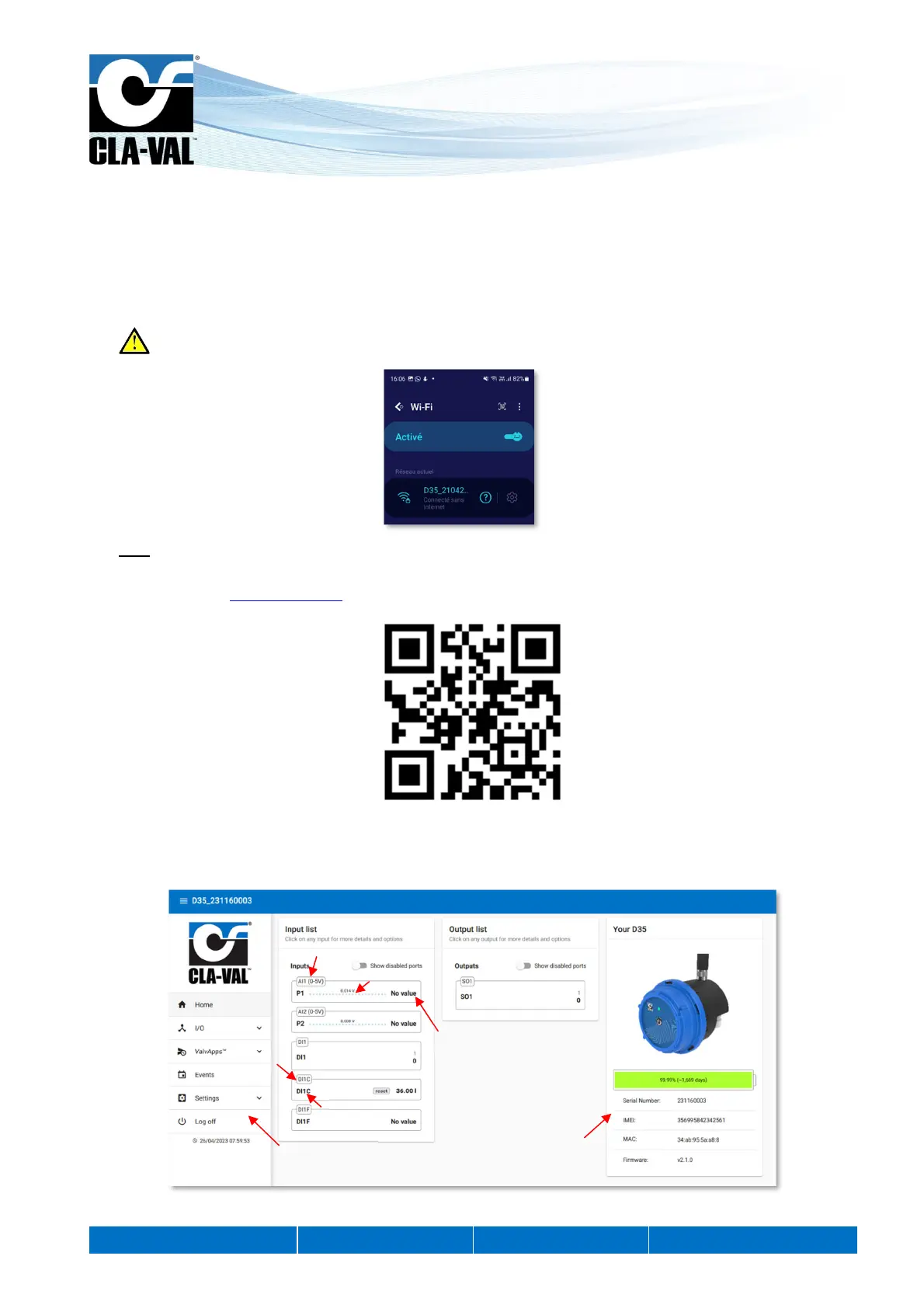
4. After a few seconds, the D35 User Interface will be displayed. If not, please refresh the browser window.
5. The home page displays basic information, such as product input measured values in real time, as well as software
version and other useful information about your D35.
T
e of senso
alue in
olts
Input Identification
In
ut name
Value measured in
Navigation menu
of the web site
General device information


 To Next Page