The Clarity AH200 is a pair of amplified wireless headphones designed to provide high-quality sound and offer various features for calls and music listening, particularly for users who may benefit from amplified audio. The headphones feature a sleek design with black earcups and a brown leather-like headband.
Function Description:
The primary function of the Clarity AH200 headphones is to provide amplified audio for both mobile phone calls and music listening. They are designed for ease of use, with a straightforward setup process. The headphones can be paired with a mobile phone via Bluetooth, allowing users to make, answer, and end calls, as well as listen to music wirelessly. When paired with a mobile phone, the headphones can also mute TV audio during incoming calls and resume previous audio activity after a call is declined. The left headphone includes dedicated buttons for music control (pause/play, next track, back track).
Important Technical Specifications:
- Weight: 9.1 oz.
- Wireless Listening Time: Up to 18 hours from a rechargeable battery.
- Standby Time: Up to 21 days.
- Audio Quality: High quality audio.
- Technology: Multipoint technology (allows connection to multiple devices simultaneously, though the manual primarily focuses on mobile phone pairing).
- Charging Time: Up to 2.5 hours for a full charge.
- Operating, Storage, and Charging Temperature: 10°C to 40°C (50°F to 104°F).
Usage Features:
Pairing to Mobile Phone:
- Turn the headset off.
- Press and hold the power button for seven (7) seconds until the indicator flashes white and red.
- Open the settings on your mobile phone to search for new devices.
- Select "Clarity200 Headset." If prompted, enter "0000" for the passcode or accept the connection.
- A solid white flash on the headset indicates successful pairing.
Call Management (While Paired to Mobile Phone Only):
- Making a Call: Dial the number from the mobile phone.
- Answering a Call: When an incoming call alert is heard (even while listening to TV), press the Power button to answer. TV audio is muted during the call, and streaming audio from the mobile phone is muted and paused.
- Ending a Call: Press the Power button to end the call. The headset returns to audio from the mobile phone.
- Declining a Call: Press and hold the "+" button for 2 seconds. The headset will resume the previous audio activity.
- Muting a Call: During a call, press the "-" button.
Listening to Music (From Mobile Phone):
- The left headphone features buttons for:
- Pause/Play
- Next Track
- Back Track
Headset Controls (Right Earcup):
- Press to Change Frequency: (Functionality not detailed further in the provided text, but indicated on the diagram).
- Volume Up / Hold - Next Track / Reject Call: A multi-function button.
- Volume Down / Hold - Last Track / Mute Call: Another multi-function button.
- Aux Port: For wired connection (cable not shown in "What's in the Box" but implied by the port).
- LED Indicators: Provide visual feedback on status (e.g., pairing, battery).
- Power Button:
- Hold: Turns the headset On/Off, or enters Pairing Mode.
- Press: Play/Pause audio, Answer/End Calls.
Headset Controls (Left Earcup):
- Charge Port: For connecting the power adapter and cable to charge the headset.
Safety and Hearing Protection:
- Users are advised to set the volume control to a low position before putting on the headset and use the lowest possible volume.
- Avoid turning up the volume to block out noisy surroundings; use in quiet environments if possible.
- Limit exposure to high volume levels.
- Turn down the volume if it prevents hearing people speaking nearby.
- Do not use headphones covering both ears while driving or cycling, as this is unlawful in many regions and impairs hearing of surroundings.
- Exposure to high volume sound levels can cause temporary or permanent hearing damage. If discomfort is experienced, stop listening and consult a doctor.
Maintenance Features:
Charging:
- Use the provided power adapter and cable to charge the headset.
- A full charge takes up to 2.5 hours.
- LEDs turn off once charging is complete.
- Battery status can be checked via visual indicators on the right ear of the headset.
Battery Warnings:
- The product has an embedded, non-replaceable battery. Do not attempt to open the product or remove the battery to avoid injury or damage.
- Do not dispose of the product in fire or heat above 40°C (104°F).
- The product must be recycled or disposed of properly. Contact a local recycling center for battery removal and proper disposal.
General Safety Instructions:
- Only use Clarity products and accessories designed for use with this product.
- Discontinue use and contact Clarity if skin irritation occurs.
- Keep away from children; small parts are a choking hazard.
- Do not disassemble the product to avoid electric shock or fire.
- Unplug, discontinue use, and contact Clarity if the product overheats, or has a damaged outer casing, cord, or plug.
Product Registration and Warranty:
- Product Registration: Visit http://clarityproducts.com/product-registration/ to register the product online for service and technical support.
- Limited Warranty: Clarity offers a one (1) year limited warranty. Details, conditions, and technical assistance can be found at www.clarityproducts.com/warranty.
Important Note: To preserve battery charge, it is recommended to turn off the headset when not in use.

 Need help?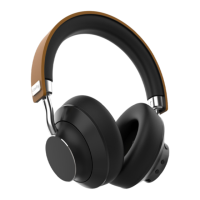

 To Next Page
 General