EasyManua.ls Logo

Clarity ALERTMASTER AL10 - User Manual

Clarity ALERTMASTER AL10
15 pages
Print Icon
To Next Page IconTo Next Page
Loading...
E
N
G
L
I
S
H
CLARITY, a Division of Plantronics, Inc.
4289 Bonny Oaks Drive • Chattanooga, TN 37406
Tel: 800-426-3738 • Fax: 800-325-8871
E-mail: claritycs@plantronics.com • Website: www.clarityproducts.com
PRINTED IN CHINA
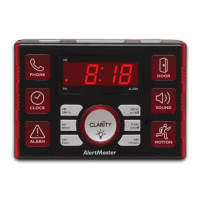
AlertMaster AL10
Visual Alert System
Clarity, a Division of Plantronics, Inc.
4289 Bonny Oaks Drive, Chattanooga, TN 37406
Tel: 800-426-3738 Fax: 800-325-8871
E-mail: claritycs@plantronics.com Website: www.clarityproducts.com
©2010 Clarity, a Division of Plantronics, Inc. All rights reserved.
AlertMaster, Clarity, Clarity AlertMaster, the logo design, AL10, AL11,
AL12, AMPX, AMPXB, AMAX, AMBX, AMDX and AMSX are trademarks
or registered trademarks of Plantronics, Inc.
Rev. E (07-10)
User Guide

Questions and Answers

Summary

Important Safety Instructions

Additional Safety Notes for Canadian Users

Safety notes specific to Canadian users regarding telecommunications and equipment connection.

Package Checklist

Features Identification

Identifies and labels the various buttons, lights, and ports on the AlertMaster AL10.

Installation and Set-Up

Base Unit Installation

Instructions for setting up the main base unit of the AlertMaster AL10.

Doorbell Installation

Steps for installing the wireless doorbell transmitter.

Operations

Monitoring Functions

Explains the indicator lights and how the AL10 alerts the user.

Door Operation

Details how the Door Announcer signal activates the system and alerts the user.

Clock and Paging

Describes the alarm clock activation and the paging function of the unit.

Sound Detection

Explains the sound detection and notification features, including MIC switch settings.

Alarm Notification

Details how to use the optional Audio Alarm Transmitter for notifications.

Motion Sensor Light

Explains the use of the optional Motion Sensor for detecting motion.

Master Reset

How to perform a master reset on the AlertMaster system components.

Notification Priority

Explains the priority order of different notification signals received by the system.

Security Timer

How to use the security timer feature to simulate occupancy.

Nightlight and Dimmer

Instructions for the nightlight and adjusting the clock display brightness.

Battery Information

Information on battery usage, type, and precautions for power outages.

Channel Settings

Troubleshooting

Optional Accessories

Audio Alarm Transmitter (AMAX)

Details the Audio Alarm Transmitter accessory and its function.

Baby Sound Monitor (AMBX)

Details the Baby Sound Monitor accessory and its function.

Door Announcer (AMDX)

Details the Door Announcer accessory and its function.

Motion Sensor (AMSX)

Details the Motion Sensor accessory and its function.

Regulatory Compliance

Industry Canada Technical Specifications

Technical specifications and compliance notes for Industry Canada.

Warranty

Clarity ALERTMASTER AL10 Specifications

General IconGeneral
BrandClarity
ModelALERTMASTER AL10
CategorySecurity System
LanguageEnglish