6
English
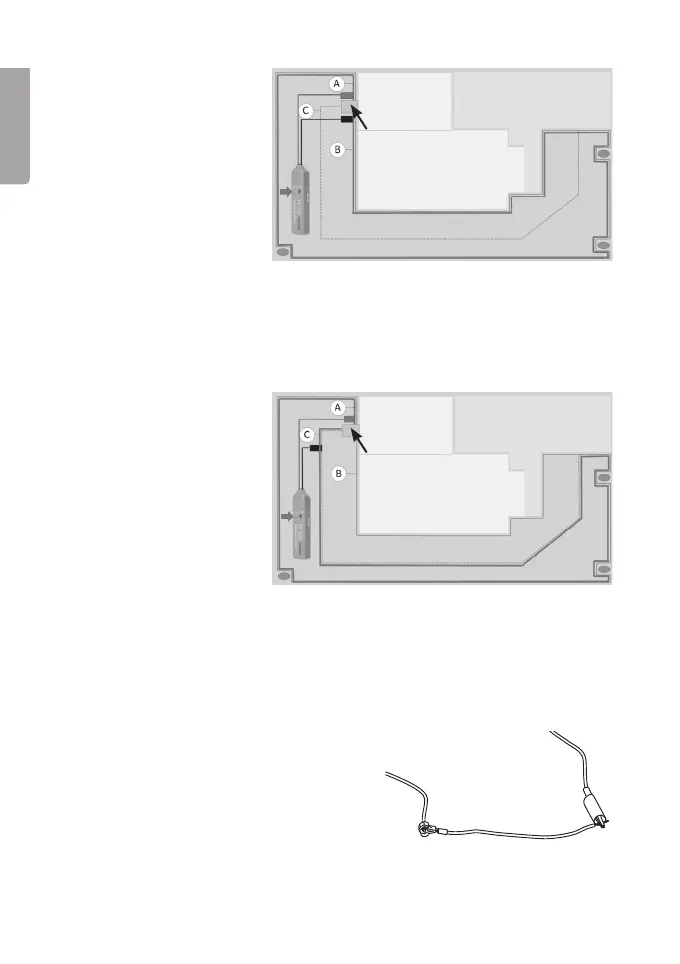
3. Attach thered
crocodile clip to
the “A” section
of theboundary
wire and theblack
crocodile clip to
the “B” section.
Settheswitch (4) to
CONT.
- Ifthe “CONT” LED indicator lights up, you know that theentire
boundary wire is intact. Inwhich case, thefault must be in
theguidewire.
- If theLED indicator does NOT light up, you know that there is fault
somewhere along theboundarywire.
4. If the “CONT”
indicator does
NOT light up
when checking
thecontinuity of
theboundary wire,
it is time to find out
in which section of
thewire thefaultlies.
Movetheblack
crocodile clip to
theguidewire.
- Ifthe “CONT” LED indicator does not light up, you know that thefault
is in the “A” section of theboundarywire.
- Ifthe “CONT” LED indicator lights up, you know that thefault must
be in the “B” section of theboundarywire.
Tip: Ifthecables are fitted with cable
terminals, you could for example
take ashort cable fitted with aspade
connector and connect it to thecable
terminal and then connect thecrocodile
clip to theother end of theshortcable.
Charging station
Garage
Residence
Driveway
Charging station
Garage
Residence
Driveway


 To Next Page