ENGLISH
77
5. To terminate the call please press the
B
/ CLEAR button (6).
Incoming Calls
In the case of incoming calls a ringing tone is heard from the
loudspeakers, and if the caller has a CLIP „Calling Line Iden-
tifi cation Presentation“-capable telephone, the caller’s number
appears in the display of the car radio. Otherwise „PHONE IN“
appears in the display.
1. To accept an incoming call, press the
M
/ TRANSFER
button (5) to confi rm. You will now hear the caller through
the loudspeakers of your car.
2. To terminate the call please press the
B
/ CLEAR button (6).
Note:
• You can transfer the call back to your mobile telephone. In
order to do so, keep the
M
/ TRANSFER button (5)
pressed („TRANSFER “ appears in the display). The
car radio activates the MUTE function. If this button is held
down again, the call is transferred back to the car radio.
• In order to reject an incoming call press the
B
/ CLEAR
button (6).
Technical data
General
Supply voltage...............................................................DC 12 V
Power consumption......................................................7 A max.
Power ...............................................................4 x 60 W PMPO
FM band
Frequency range ...................................87,5 MHz to 108,0 MHz
Effective sensitivity ............................................................15 dB
I.F. frequency...............................................................10,7 MHz
CD player
System............................................................CD Audio System
Suitable CDs.................................CD/CD-R/CD-RW/MP3 disks
Playable bit rates .................................................32 - 320 kBit/s
Number of quantising bits................................................... 1 bit.
Signal format ............................... Sampling frequency 44,1 kHz
Signal-to-noise ratio..............................................50 dB (1 kHz)
Number of channels .......................................2 stereo channels
Housing dimensions ........................ 178 x 50 x 157 (W x H x D)
This device has been tested according to all relevant current
CE guidelines, such as electromagnetic compatibility and low
voltage directives, and has been constructed in accordance with
the latest safety regulations.
Subject to technical changes without prior notice!
Troubleshooting
Before going through the checklist please make all the
connections fi rst. If you still have questions after going through
the checklist, please consult your local customer service
representative.
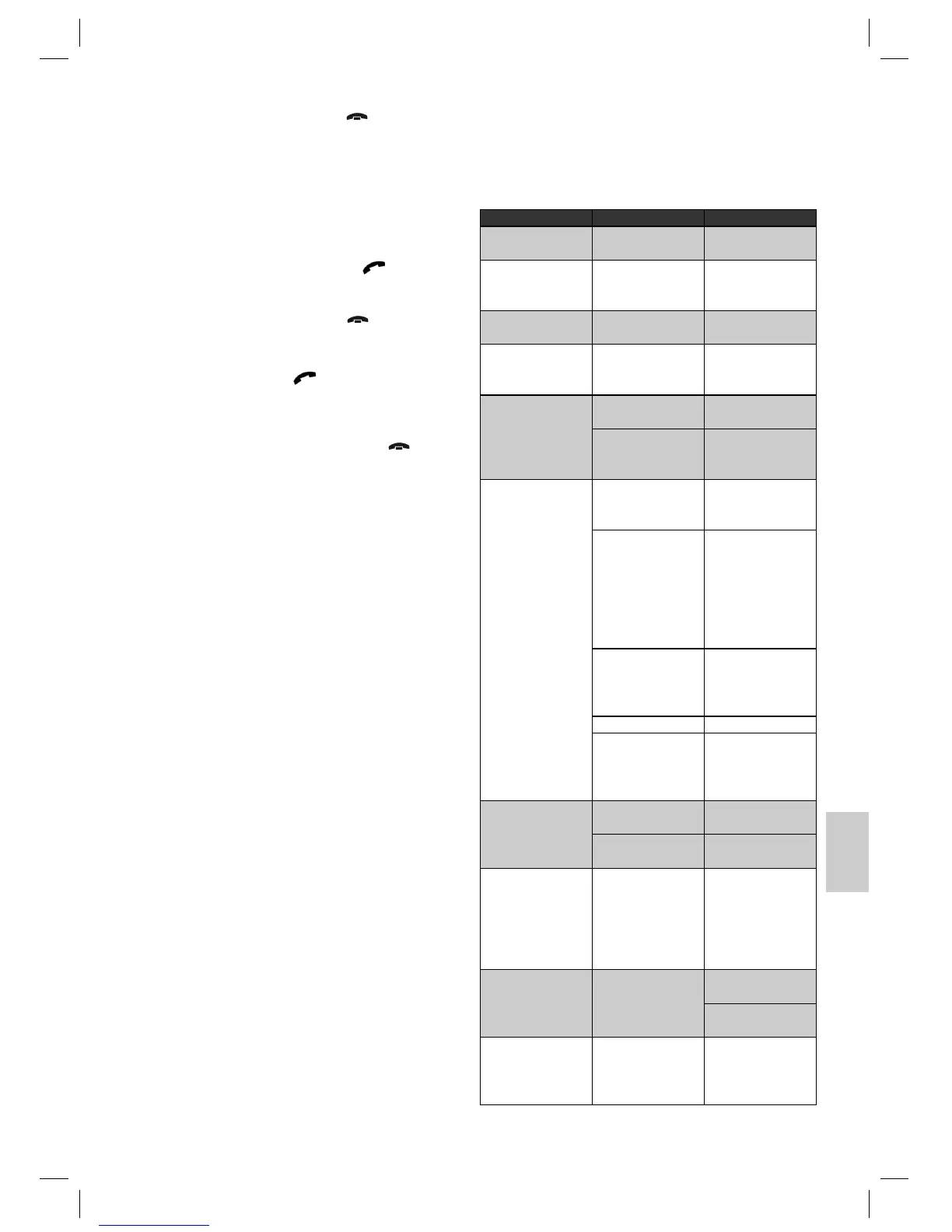
Fault Symptoms Cause Solution
Whistling sound from
the loudspeakers.
Feedback Do not set the volume
too high.
CDs are drawn only
half way into the CD
tray.
The transport screws
have not been
removed.
Remove the transport
screws.
„READ ERR“ is shown
in the display.
The CD is inserted the
wrong way round.
Insert the CD right way
round.
CD cannot be selected
using the MODE
button.
There is no CD
inserted.
Insert a CD.
The CD does not play
back after being inser-
ted into the device.
The volume control is
set too low.
Turn up the volume.
The device has
not been correctly
connected.
Check the +12V and
earth connection.
CD works intermittently
(dropouts).
The surface of the road
is uneven.
Wait until the road
becomes smoother
before playing the CD.
The device is not fi rmly
installed.
Install the device fi rmly.
Ensure that the rear at-
tachment is used if the
vehicle does not have
any suitable retainer
for the rear section of
the device.
The CD is damaged. Try another CD. If this
works correctly, the
fi rst CD is probably
damaged.
The CD is dirty. Clean the CD.
The device may have
been installed in the
vehicle at the wrong
angle.
Please note that a
maximum inclination
of 20° degrees should
not be exceeded!
No function. The ignition is switched
off.
Turn the ignition key to
„ON“ or „ACC“.
One or more fuses
have blown.
Replace the fuse by
another 15 A fuse.
Device cannot be
switched on or off via
the ignition.
Incorrect connection
(each car manufacturer
wires the ISO con-
nection in the vehicle
differently).
Please contact your
car workshop or a
vehicle specialist for
connection adapters
may specifi cally for
your model.
The device does not
work correctly (EJECT,
LOAD, PLAY).
The microcomputer
has been interfered
with by electromagne-
tic fi elds.
Remove the CD and
reinsert it.
Switch the device off
and on again.
No radio reception. The antenna cable is
not connected.
Insert the antenna
cable fi rmly into the
antenna socket of the
device.
05-AR 736 CD_MP3_NEU 77 18.09.2006, 11:02:28 Uhr


 To Next Page