EasyManua.ls Logo

CLAUSING 5910 Series - Tool Post Slide Positioning

Default Icon
40 pages
Print Icon
To Next Page IconTo Next Page
To Previous Page IconTo Previous Page
Loading...
I I
il
I
'~ j
. U
I
q
r:
:.1
II
n
. ·1
{_,
'i
I
u
ci
i
..
15
·1
~
d
'
6.
Move
variable
speed
control
dial
to
spindle
speed
desired.
7.
Engage
carriage
controls
- -
longitudinal
power
feed
lever
for
feeds,
half-nuts
for
threading.
8.
With
tool
in
position,
make
a
"trial
run"
without
touching
work
to
make
sure
the
setup
is
right.
NOTE:
When
threading,
be
sure
threading
dial
is
engaged
with
lead
screw.
Set
clutch
kickout
to
avoid
interfering
with
threading
cut.
FOR
CLUTCH
and
BRAKE
MODELS - -
be
sure
clutch
is
disengaged
(handle
in
down
position)
before
start-
ing motor.
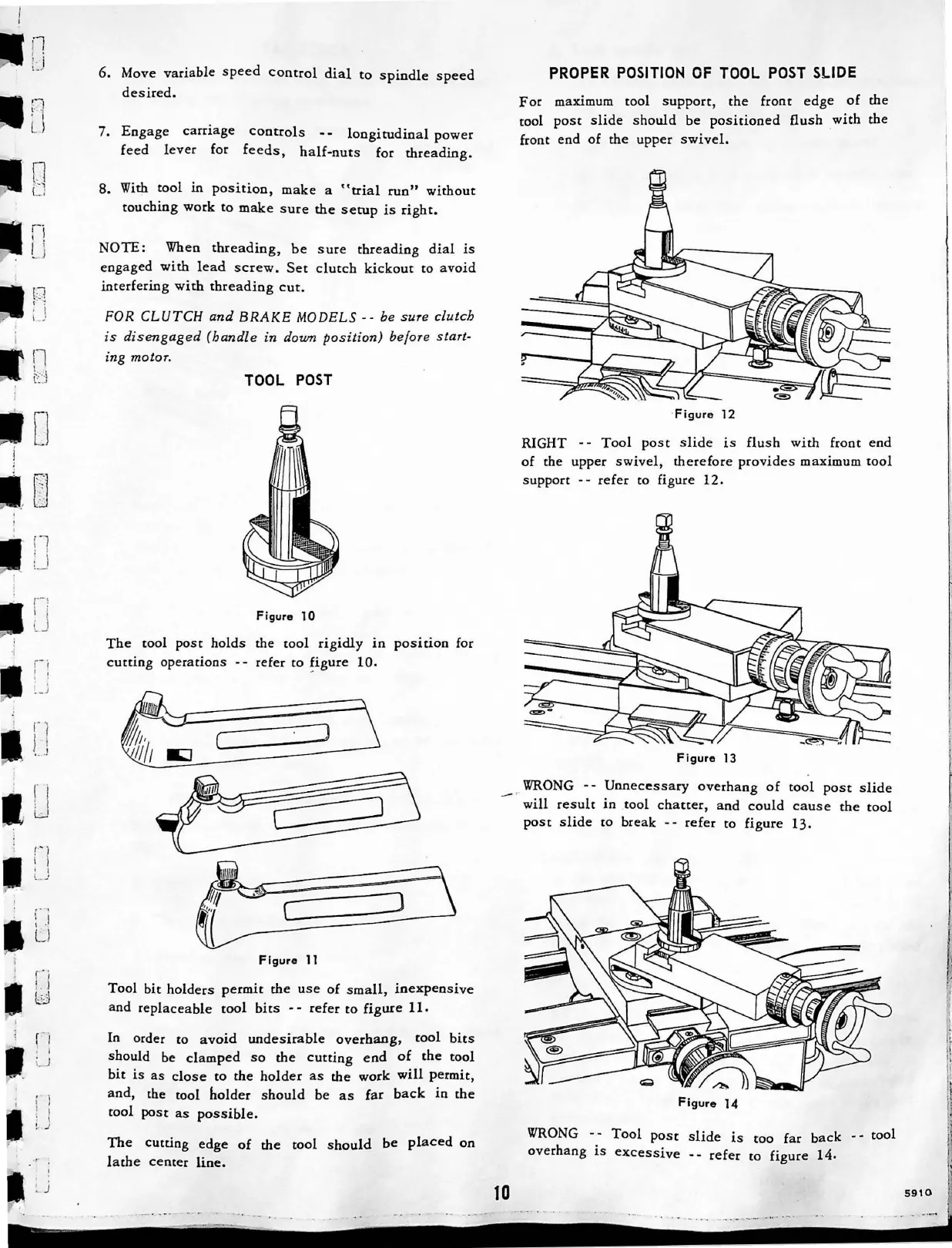
TOOL
POST
Figure
l 0
The
tool
post
holds
the
tool
rigidly
in
position
for
cutting
operations
refer
to
!igure
10.
Figure
11
Tool
bit
holders
permit
the
use
of
small,
inexpensive
and
replaceable
tool
bits
- -
refer
to
figure
11.
In
order to
avoid
undesirable
overhang,
tool
bits
should
be
clamped
so
the
cutting
end
of
the
tool
bit
is
as
close
to
the
holder
as
the
work
will
permit,
and,
the tool
holder
should
be
as
far
back
in
the
tool
post
as
possible.
The
cutting
edge
of
the
tool
should
be
placed
on
lathe
center
line.
PROPER
POSITION
OF
TOOL
POST
SLIDE
For
maximum
tool
support
,
the
front
edge
of
the
tool
post
slide
should
be
positioned
flush
with
the
front
end
of
the
upper
swivel.
·
Figure
12
RIGHT - -
Tool
post
slide
is
flush
with
front
end
of
the
upper
swivel,
therefore
provides
maximum
tool
support
--
refer
to figure
12.
Figure
13
_
,.
WRONG
- -
Unnecessary
overhang
of
tool
post
slide
will
result
in
tool
chatter,
and
could
caus
e
the
tool
post
slide
to
break
- -
refer
to
figure
13.
10
Figure
14
WRONG
Tool
pose
slide
is
too
far
back
- -
tool
overhang
is
excessive
- -
refer
to
figure
14.
...
..
...
...
,...
_
..
...... .
5910
I
IL
!

Related product manuals