Getting Started
English - 20 -
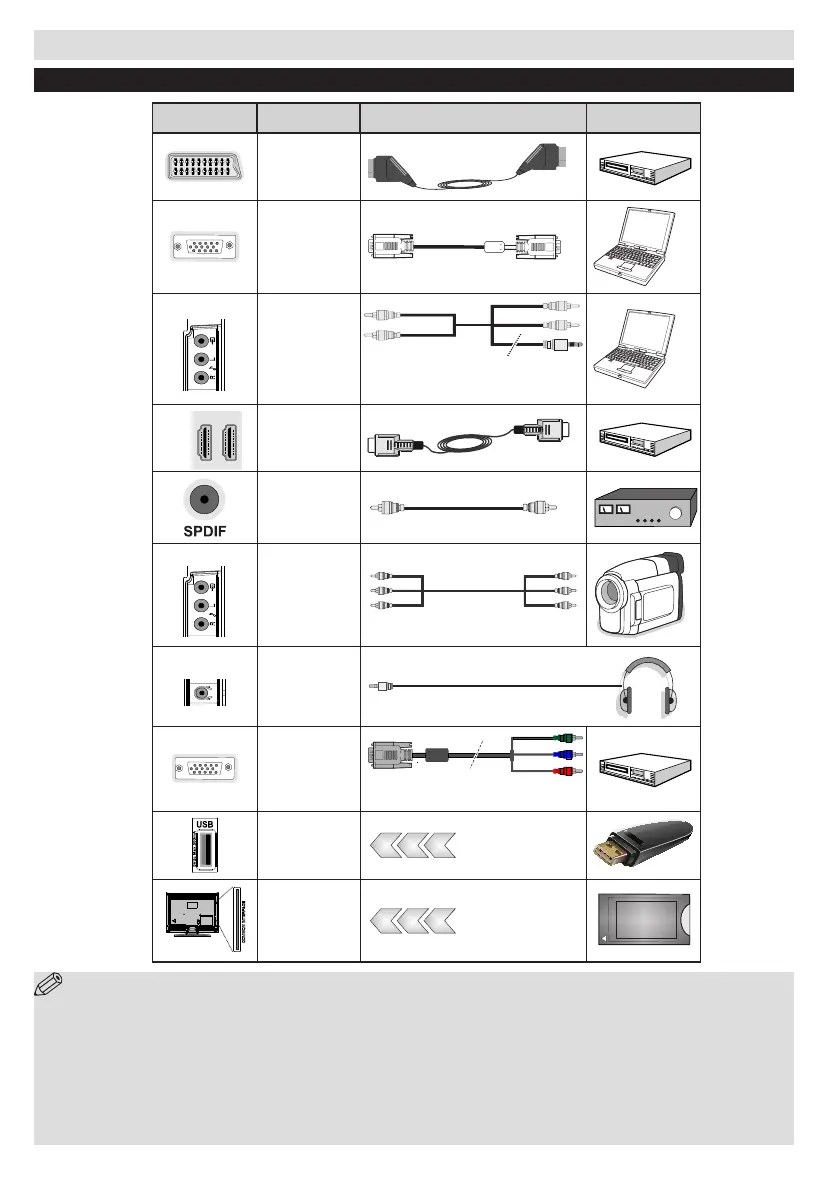
NOTE: When connecting a device via the YPbPr or Side AV input, you must use the connection cables
to enable connection. See the illustrations above. | You can use YPbPr to VGA cable (not supplied) to enable
YPbPr signal via VGA input. |You cannot use VGA and YPbPr at the same time. | To enable PC audio, you will need
to use the supplied SIDE AV CONNECTION cable’s WHITE & RED inputs. | If an external device is connected via
the SCART socket, the TV will automatically switch to AV mode.| When receiving DTV channels (Mpeg4 H.264)
or while in Media Browser mode, output will not be available via the scart socket. | When using the wall mounting
kit (optional), we recommend that you plug all your cables into the back of the TV before mounting on the wall. |
Insert or remove the CI module only when the TV is SWITCHED OFF. You should refer to the module instruction
manual for details of the settings.
Connections
Connector Type Cables Device
Scart
Connection
(back)
VGA
Connection
(back)
SIDE AV
PC/YPbPr
Audio
Connection
(side)
Side Audio
YPbPr or PCConnection Cable
(Not supplied)
HDMI
Connection
(back)
SPDIF
Connection
(back)
SIDE AV
Side AV
(Audio/Video)
Connection
(side)
HEADPHONE
Headphone
Connection
(side)
YPbPr Video
Connection
(back)
PC to YPbPr Connection
Cable (Not supplied)
USB
Connection
(side)
CI
Connection
(side)
CAM
module


 To Next Page