36
Assembly Instructions Cont’d
The side wall panels will be connected to the back wall by connecting together the installed brackets. There
are “+” brackets and “-” brackets on the side of each panel. The side walls will be installed as follows:
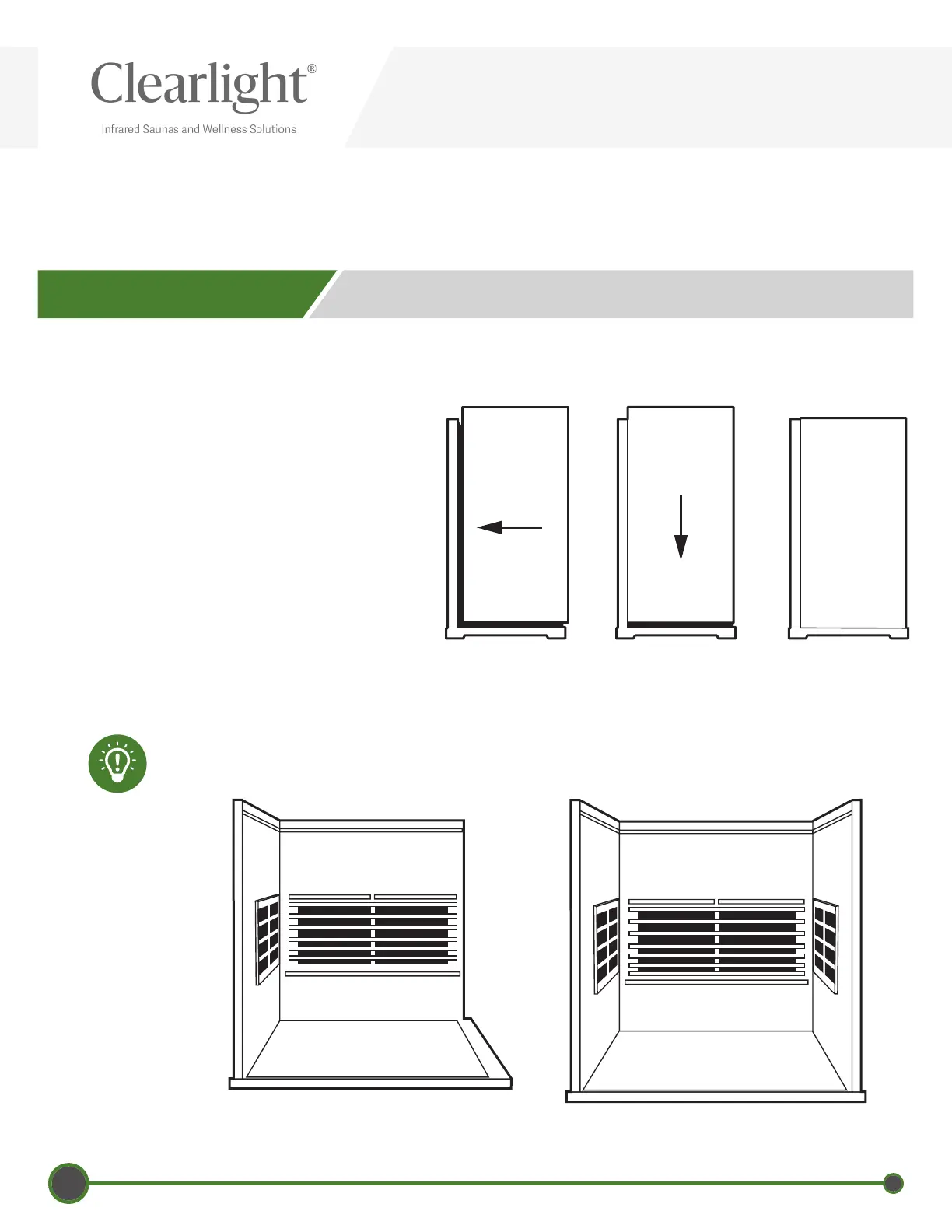
1. Place the left side wall in the slot in the
oor. Lift the side wall up about 4” (10cm)
higher than the backwall panel (See Picture
1).
2. Place the side wall panel against the back
wall (See Picture 2), then slide down side
wall panel until the two panels are equal
height. (See Picture 3).
3. If the panels are not equal height or there
is an obvious gap between the two panels,
this means they are not propery attached
and you should try again.
4. Repeat the steps above for the right side
wall panel.
4 - CONNECTING SIDE WALLS
Left Side Wall Installed
Right Side Wall Installed
Picture 1 Picture 2 Picture 3
If the panels still seem too tight to come down all the way, try backing
o the bracket screws by one half turn with a Phillips head screwdriver.


 To Next Page