QSG-0110-001 v1.0 November 2020
Installation GuideBMA VESA-Mount Bracket
Information in this document is subject to change without notice.
© 2020 ClearOne
Note: ClearOne makes no claim that the information contained herein covers all details, conditions or variations,
nor does it provide for every possible contingency in connection with the installation or use of this product.
Step 3 - Attach the BMA to a Mount
To connect a third party VESA mount, make sure that the mount supports a 100 mm x 100 mm hole pattern. Follow the
installation instructions for that mounting system.
or
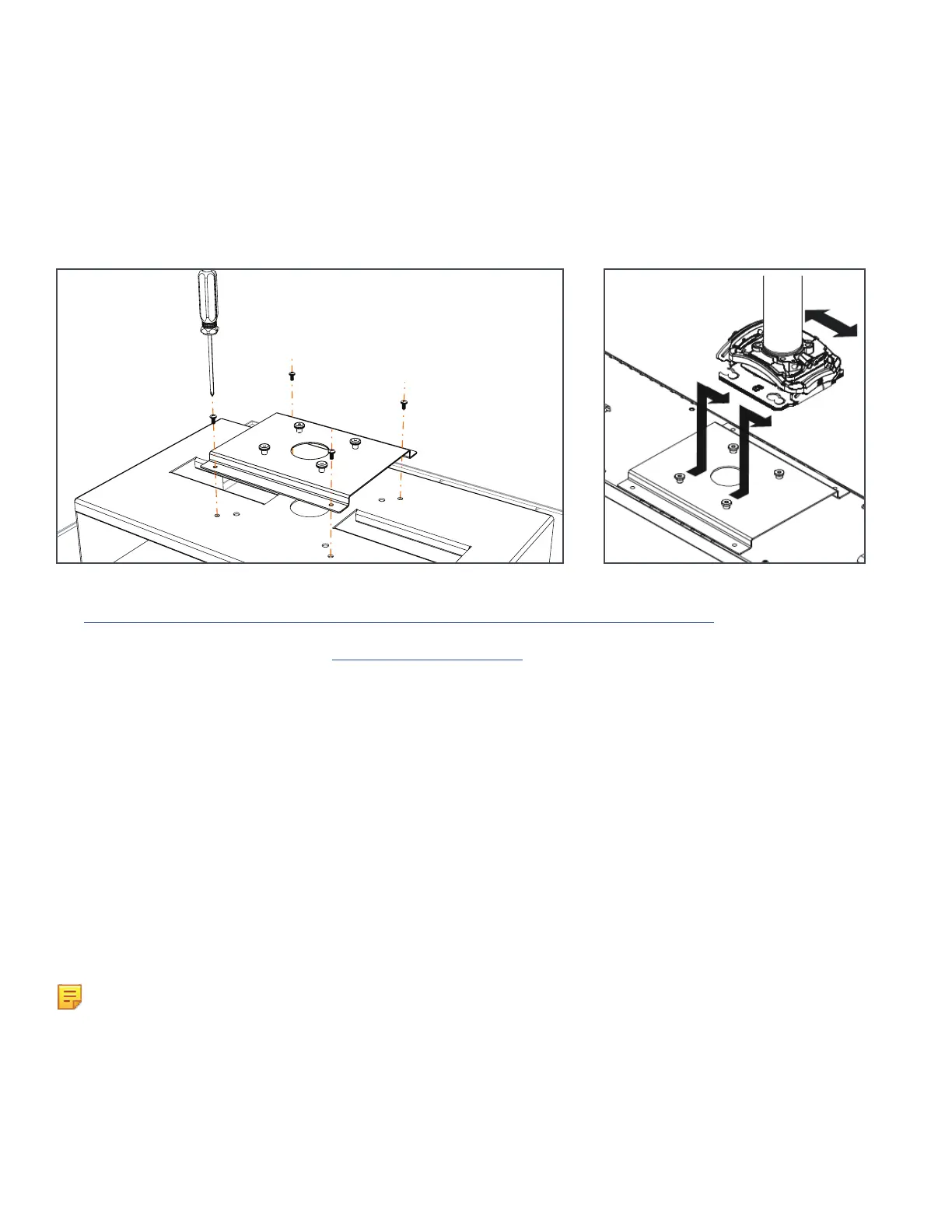
To attach a ClearOne BMA 2 ceiling mount, first use the remaining M3 components to attach the BMA2 interface plate to
the VESA-Mount bracket.
Then attach the entire assembly to the BMA2 pole mount as shown in the illustration below from the BMA 2 Ceiling
Mount Installation Guide.
The BMA 2 Ceiling Mount Installation Guide is available at:
https://www.clearone.com/sites/default/files/2019-05/QSG_BMF2_Installation%20Guide.pdf
or from the ClearOne Resource Library, www.clearone.com/rl-home
In the search box, enter “BMF2 Ceiling”.
Specifications
Weight
• 24 inch: 1.37 lbs (619 grams)
• 600 mm: 1.27 lbs (575 grams)
Material: Aluminum


 To Next Page
 Loading...