
 Need help?
Do you have a question about the ClearSounds ANS3000 and is the answer not in the manual?
Essential safety precautions for operating the ANS3000 answering machine to reduce risks of fire, shock, and injury.
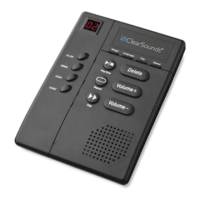
Identifies and describes all buttons, indicators, and ports on the ANS3000 answering machine.
Lists all components included in the ANS3000 package for user verification.
Provides step-by-step instructions for connecting the ANS3000 to telephone lines and power.
Details the installation and function of an optional backup battery for power outages.
Instructions for mounting the ANS3000 answering machine using the provided bracket.
How to turn the ANS3000 answering machine on and off.
Procedure to select the desired language for voice prompts on the ANS3000.
Instructions for setting the current day of the week for message timestamps.
How to configure the number of rings before the ANS3000 answers calls.
Guides for recording, playing, and selecting outgoing messages for the ANS3000.
Instructions on playing, saving, and deleting incoming messages on the ANS3000.
How to record and play short personal memos using the ANS3000.
Procedure for adjusting the playback volume of messages and prompts.
How to adjust the playback speed of recorded messages.
Instructions on how to access and operate the ANS3000 remotely via phone.
Guide to changing the default Personal Identification Number (PIN) for remote access.
Information regarding the ANS3000's compliance with FCC rules and regulations.
Details the ANS3000's compliance with Industry Canada technical specifications.
 General
| Type | Digital Answering Machine |
|---|---|
| Recording Time | Up to 30 minutes |
| Caller ID | Yes |
| Volume Control | Yes |
| Speakerphone | Yes |
| Remote Access | Yes |
| Amplification | Up to 40dB |
| Visual Message Waiting Indicator | Yes |
| Tone Control | Yes |
| Message Playback | Yes |
| Display | LCD |
| Power Source | AC Adapter |
| Battery Backup | Yes |
| Maximum Recording Time | 30 minutes |
| Weight | 1.5 pounds |
| Accessibility Features | Amplified sound, tone control, visual indicators |

 To Next Page