EasyManua.ls Logo

ClearView HD4112 - Operating Instructions; Controls and Components Overview; Initial Startup and Configuration

ClearView HD4112
14 pages
Print Icon
To Next Page IconTo Next Page
To Previous Page IconTo Previous Page
Loading...
HD4112 Manual Rev. 2
Manual Rev 1.0
2 3 7
1 4 5
9 10 8 11
3. OPERATING INSTRUCTIONS
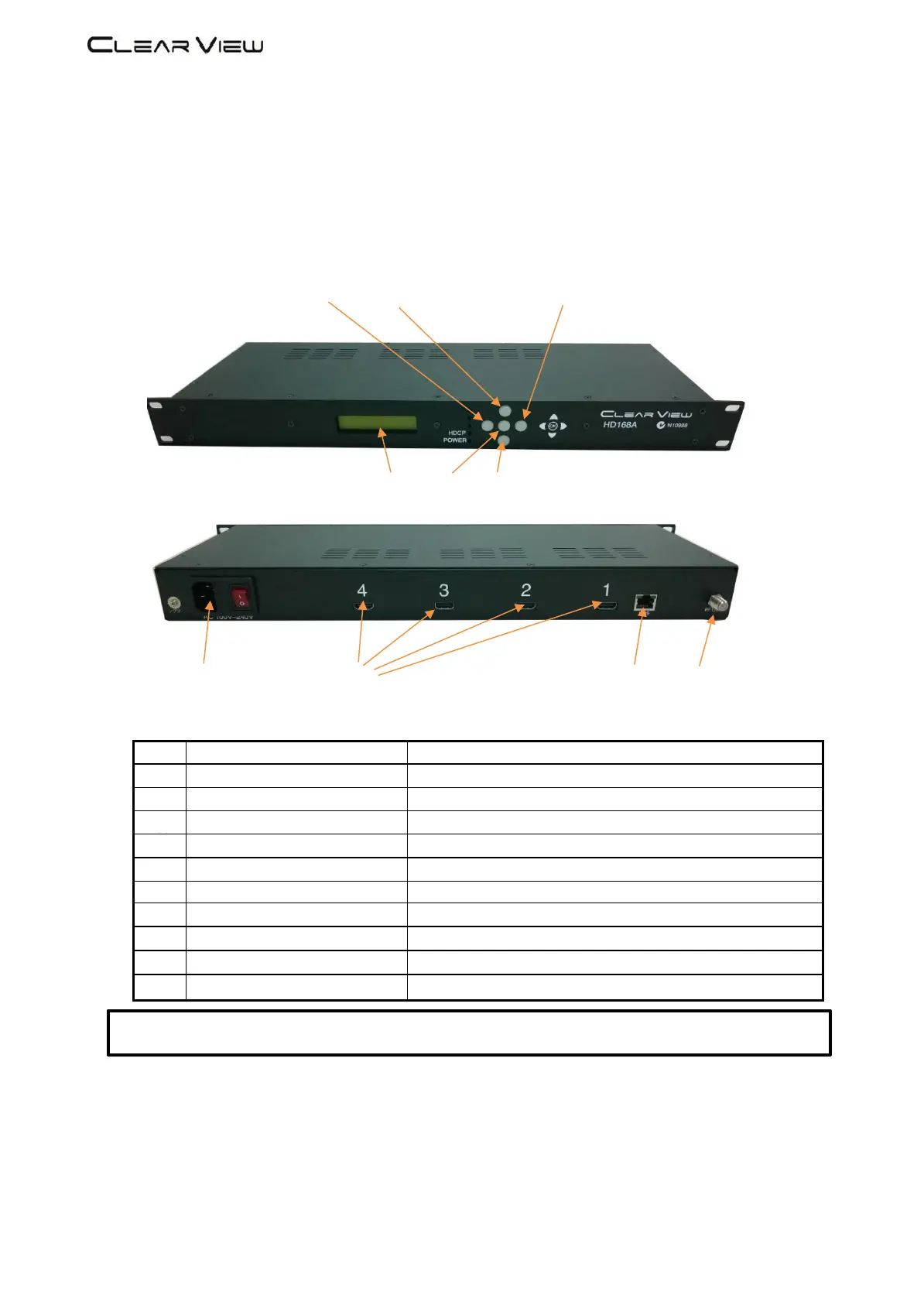
3.1 Description of controls and components
HD168A
Description
1
LCD Display
Configuration and system status
2
Key PAD / Left
Exit from previous menu.
3
//
?
5
Key PAD / Up
Move between menu selections.
4
Key Centre
OK Button to select item
5
Key PAD / Down
Move between menu selections.
7
Key PAD / Right
Move between menu selections.
8
Ethernet Port
RJ-45 Chrome
9
0
0
AC input
AC 100 to 240V / 50~60Hz
10
HDMI Inputs
Up to 1080p resolution
11
RF output
“F-Female 75Ω
ATTENTION!
FOR THIS CONFIGURATION YOU SHOULD USE OUTPUT FREQUENCIES DIFFERENT FROM THE ONES THAT YOUR TV IS CURRENTLY USING