4
5
SVENSKA
NORSK
Spesikasjoner
Synsfelt: 140°
Videooppløsning: Full HD 1080p
Nattsyn: IR LED, opptil 10 m rekkevidde
Lagringsplass: Micro-SD-kort (maks. 128 GB, selges separat))
Tilkobling: 2,4 GHz wi
IP-klassisering: IP65
Batterier: 2x oppladbare 21700, 9600 mAh (innebygd)
Batteritid: 3 måneder
Driftstemperatur: 20° til 50 °C
Mål: 101x64x59 mm
Frekvensområde: 2412-2472 MHz
Effektiv utstrålt effekt: Maksimum 20 dBm
Innhold
1x kamera, 1x USB-ladekabel, 1x magnetfeste, 1x skruefeste, 6x skruer, 1x manual.
Mobile app
1. Find and install the app ‘Smart Life - Smart living’ on App Store or Google Play.
2. Register an account in the app or log in to an existing one.
3. Press “Add device” in the app, go to “Security & sensor” and choose
“Cleverio CC-300”. The app searches for devices nearby.
4. Turn on the camera and make sure the status indicator
is ashing. Press “Next” in the app.
5. Enter the details for your 2.4 GHz wi.
6. A QR code shows in the app. Place your phone in front of your camera and
let it scan the code. When you hear the camera beep three times, press “I
heard a prompt” in the app. You can now control the camera in the app.
Factory reset
Press and hold the Reset button for 5 seconds to reset the camera's internal settings.
Note! The camera will still be connected to your device and visible in the app. Remove it
from the app separately to let future users install it in their own app and account.
Safety information
Do not open or modify the camera in any way. This should only be done by a qualied
technician due to the risk of electric shocks or short circuit.
Simplied EU Declaration of Conformity
Kjell & Company hereby declares that this device is in compliance with the essential
requirements and other relevant provisions of Directive 2014/53/EU. Full text of the EU
declaration of conformity is available at www.kjell.com/51645.
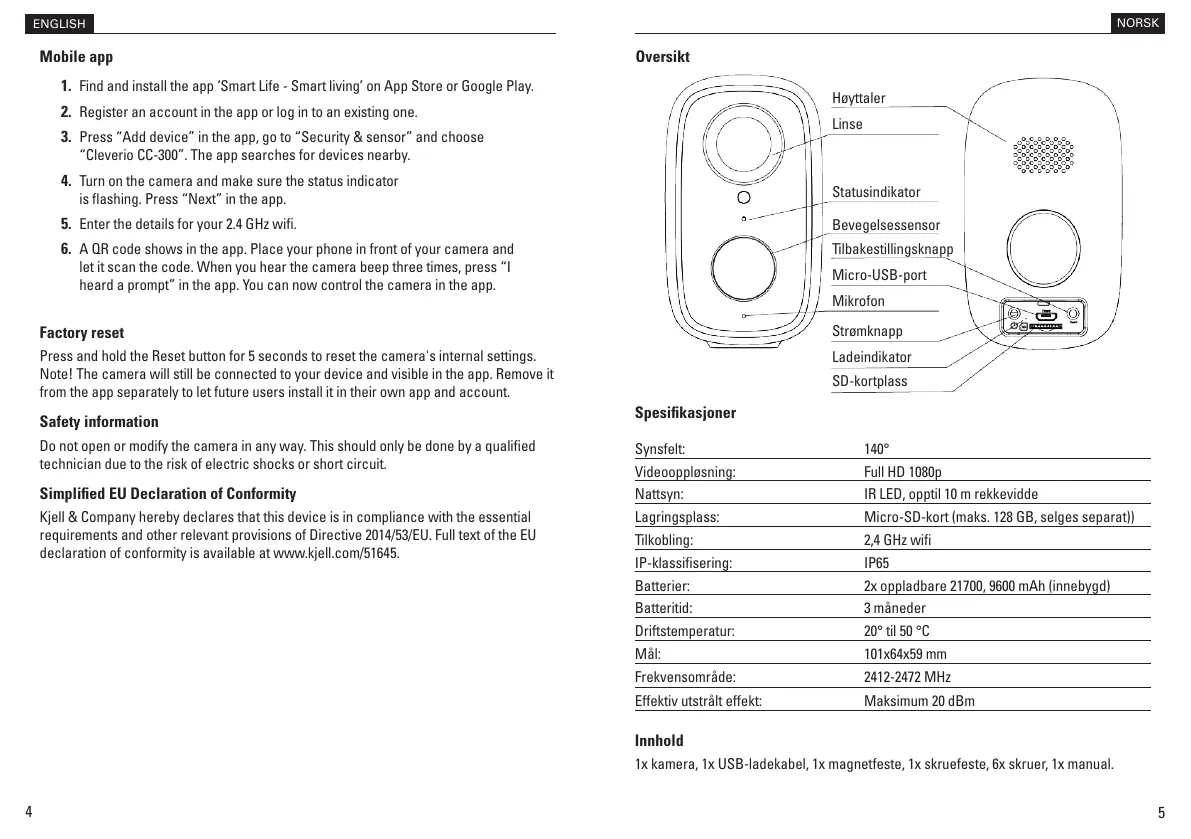
Høyttaler
Linse
Statusindikator
Bevegelsessensor
Tilbakestillingsknapp
Micro-USB-port
Mikrofon
Strømknapp
Ladeindikator
SD-kortplass
Oversikt
ENGLISH


 To Next Page
 Loading...