EasyManua.ls Logo

Cleverio GP-100 - User Manual

Cleverio GP-100
5 pages
Print Icon
To Next Page IconTo Next Page
Loading...
Outdoor remote socket
GP-100
User guide
Item: 50990
EN
NO SV
Question and Answer IconNeed help?

Do you have a question about the Cleverio GP-100 and is the answer not in the manual?

Overview

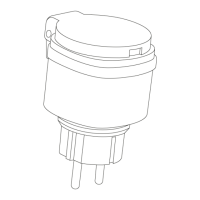
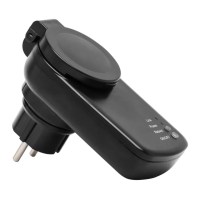
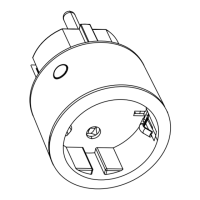
The Cleverio GP-100 is an outdoor remote socket designed to provide wireless control over connected electrical devices. It functions as a receiver that can be paired with a remote control or a smart home controller (both sold separately) to switch appliances on and off remotely.

Function Description:

The GP-100 remote socket allows users to wirelessly control outdoor electrical devices. When plugged into a wall socket, it automatically enters a 30-second pairing mode, indicated by a flashing LED. During this period, it can be linked to a compatible remote control or a smart home controller.

For pairing with a remote control, the user selects a channel on the remote and presses the ON button within the 30-second window. A successful pairing is indicated by the remote socket's LED turning solid red and emitting a clicking sound. Once paired, the ON and OFF buttons on the remote control can be used to toggle the connected device. The remote control's LED lights up when a command is sent and remains lit for a short period, requiring the user to wait for it to turn off before sending a new command to ensure proper communication. Multiple GP-100 sockets can be paired to the same channel on a single remote control, allowing for synchronized control of several devices.

When pairing with a smart home controller, the user initiates a device search within the controller's interface during the GP-100's 30-second pairing mode. Upon detection, the socket can be added to the controller, with a solid red LED on the socket confirming successful pairing. This integration allows for more advanced control and automation possibilities through the smart home system.

The device also supports a factory reset function. By unplugging and re-plugging the socket, then pressing the OFF button on a paired remote control or within the smart home controller interface within 30 seconds, the GP-100 will reset. The LED indicator will flash to confirm the reset, signifying that it is ready to be paired with a new remote control, channel, or controller. It is also advised to remove the connection from the smart home controller interface after a reset.

Important Technical Specifications:

  • Frequency: 433.92 MHz
  • Range: Up to 25 metres (This range can vary significantly due to environmental factors like concrete walls, electrical, or electromagnetic interference).
  • Max. load: 3000 W
  • IP rating: IP44 (Indicates protection against solid objects larger than 1mm and splashing water from any direction, making it suitable for outdoor use).
  • Memory slots: 6 (Suggests it can store up to 6 pairing configurations).
  • Effective Radiated Power: -5.30 dBm
  • Working temperatures: Suitable for temperatures from -20°C and up.

Usage Features:

  • Outdoor Use: Designed with an IP44 rating, making it suitable for outdoor environments and protected against splashing water.
  • Wireless Control: Enables remote switching of electrical devices, enhancing convenience and accessibility.
  • Multiple Pairing Options: Compatible with both dedicated remote controls and smart home controllers, offering flexibility in control methods.
  • Multi-Device Control: Allows multiple GP-100 sockets to be controlled by a single channel on a remote control.
  • LED Indicator: Provides visual feedback on pairing status and operational state.
  • Clicking Sound: Auditory confirmation of successful pairing.

Maintenance Features:

  • Reset Functionality: Easy factory reset procedure to clear existing pairings and prepare for new configurations.
  • No User Serviceable Parts: The device should not be opened or modified by the user. Any repairs or modifications must be performed by a qualified technician to avoid electric shocks or short circuits.
  • Environmental Considerations: Designed for use in wall sockets only, not extension cords. Avoid stacking multiple units or placing two receivers in close proximity to prevent interference.
  • Safety Guidelines:
    • Do not use with equipment requiring constant supervision due to fire risk (e.g., flat irons).
    • Ensure sockets are completely disconnected to prevent voltage output.
    • Only for use in dry areas (despite IP44, general safety advises against use in constantly wet conditions).
    • Refer to the manufacturer's website (www.kjell.com/50990) for an updated manual and EU Declaration of Conformity.

Cleverio GP-100 Specifications

General IconGeneral
BrandCleverio
ModelGP-100
CategoryAccessories
LanguageEnglish