UK Instruction Sheet Template – V1.4 – Updated: 09/03/2022
Installation:
The L10 Cleverfit Pro can be installed either Ceiling or Wall Mounted. The L10 Cleverfit Pro uses a “slide
connect bracket base” that is mounted and wired into position first. The main body can be installed once
the base is wired or later to avoid damage during the construction phase. Please follow the steps below
to install the L10 Cleverfit Pro Exit:
• Disengage the slide connect bracket from the exit body, using flat screwdriver.
• Position the base in the mounting position.
• Using the bracket as a guide, mark 2 holes for mounting and one for mains access. Then install the
bracket using appropriate fixings (not supplied).
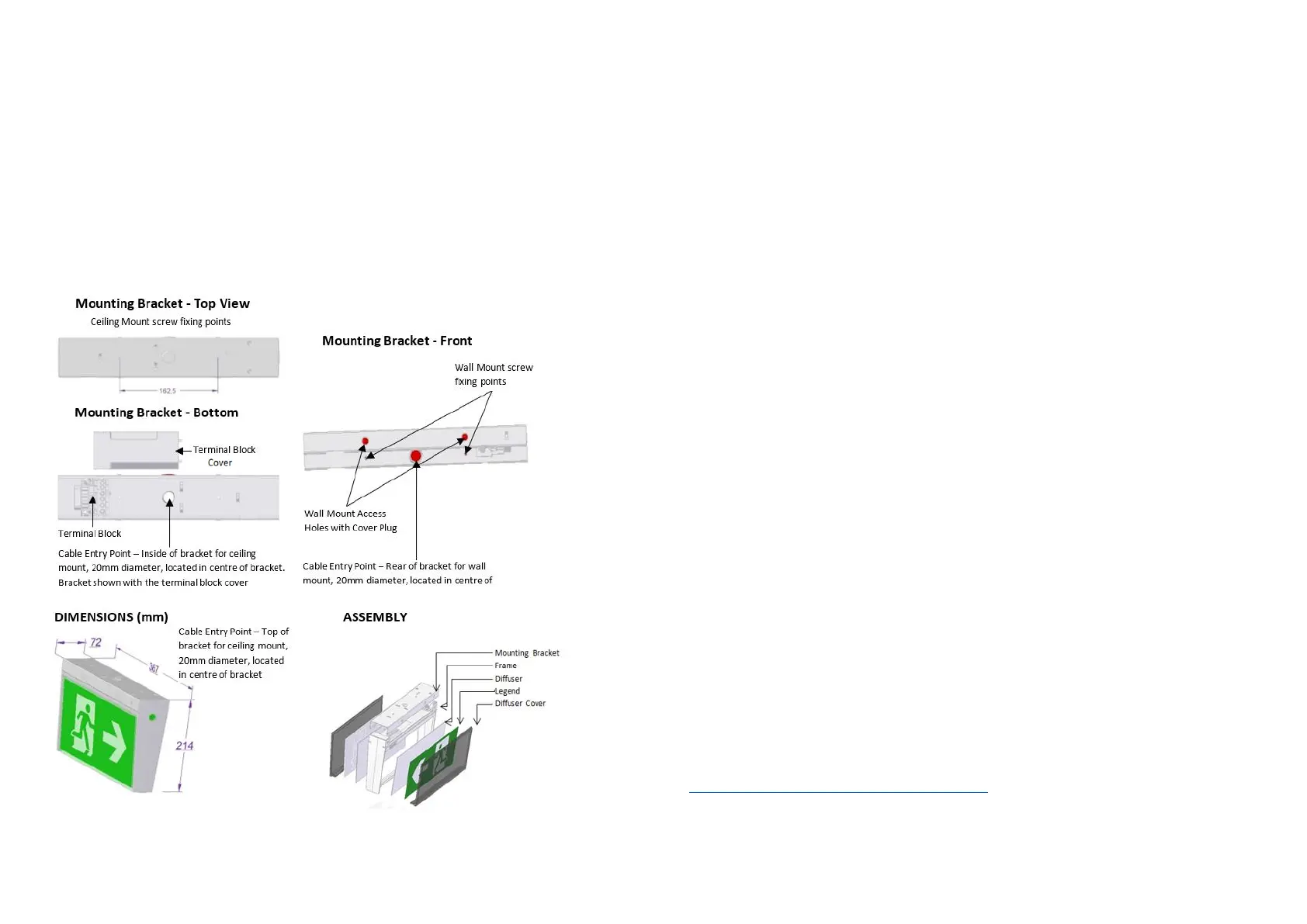
• Configure all the mounting parts and cable entry points as below (if required) and engage the body
into the slide connect bracket.
• Connect mains and fit check Terminal Block Cover.
• then that the L10 Cleverfit Pro Exit is Operational.
• If the CTP capabilities are activated, please affix the CTP Status Label to a visible surface.
• If flexible wiring is connected to this luminaire and is within arm's reach, the wiring shall be
effectively fixed to the wall to reduce the risk of strangulation.
Note:
This luminaire (with reinforced insulation between control/LED terminal and AC supply) contains non-user
replaceable light source and battery - to be replaced (if required, refer installation instructions for battery
replacement) by Clevertronics service personnel/agents or a registered electrician.
Battery Replacement:
1. Prior to any work, isolate the power to the luminaire that requires battery replacement
2. Remove fitting from mounting bracket.
3. Remove Emergency Driver cover from top and disconnect the battery connector.
4. Remove battery from holder (Cut cable tie).
5. Replace battery (secure with a new cable tie) and connect to Emergency Driver.
6. Reinstall the fitting onto the mounting bracket.
Testing Procedure:
When the unit is connected to the un-switched active, it must be allowed to charge the battery for at
least 24 hours. The emergency lamp only illuminates during a power fail. Conduct the following tests:
• The emergency lamp must illuminate for at least 180 min after disconnection from the mains. If the
unit fails to illuminate for the requisite time, remedial action must be taken to repair the situation
and once completed, the unit must pass a subsequent test.
• Press and hold Test Button or switch Off Mains Supply, check that the emergency lamp is On.
• Release the Test Button or Switch On Mains Supply, check that the emergency lamp is Off (Non-
maintained operation).
Trouble Shooting:
Below are a list of common problems and their possible causes.
Fault: The Green LED Test Switch indicator is not illuminated.
Check: A.C. is connected and is turned on.
Battery is connected
Test Switch for damage.
Fault: Lamp does not illuminate in emergency mode.
Check: A.C. is connected.
Lamp is correctly inserted.
Battery is connected
Fault: Lamp illuminates in emergency mode, but only stays on for a short period.
Check: Battery has been allowed to charge for at least 24 hours.
Battery for damage.
Caution:
On many building sites, power circuits may be cut off in an uncontrolled and repetitive basis during
construction. As a result, any Exit & Emergency Units, on these circuits, will have their batteries
discharged or “cycled”. The Li-ion battery in the Exit & Emergency Unit has been selected to give
excellent long life performance in a controlled IEC 60598-2-22 testing environment. Excessive battery
cycling will reduce through-life performance and may lead to premature battery failure. Battery warranty
claims, as a result of such abuse, are specifically EXCLUDED from Clevertronics warranty terms.
Warranty:
For Product Warranty information and Terms and Conditions of Sales please refer to our website
https://clevertronics.co.uk/product-warranty-statement/



 To Previous Page
 Loading...