INSTALLATION AND OPERATING INSTRUCTIONS 3
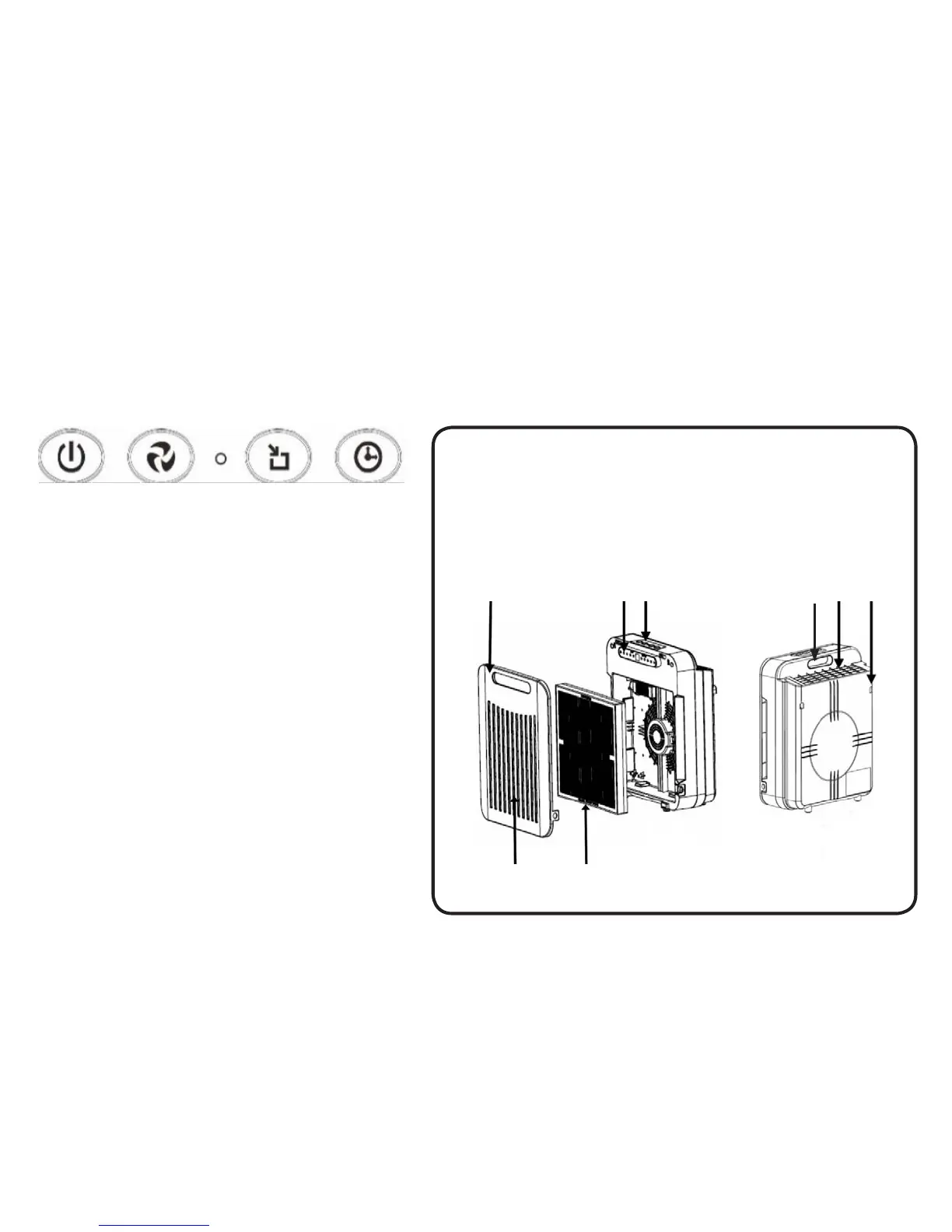
COMPONENT IDENTIFICATION
POWER
Turns unit ON/OFF
SPEED
Allows selection for desired fan speed setting: SLEEP,
LOW, MEDIUM and HIGH
AUTO MODE
Operates in a loop cycle on these settings: HIGH speed
for 2 hours - MEDIUM speed for 2 hours - LOW speed for
2 hours
TIMER
To set automatic OFF timer at 1,4,8 hour settings
I. Front Cover
2. Air Inlet
3. Triple Layer Filter
(Initial Filter, HEPA filter and
active carbon filter)
4. Display Panel
5. Control Buttons
6. Handle
7. Air Outlet
8. Wall Mounts
CONTROL PANEL/BUTTONS
2 3
1 4 5 76 8


 To Next Page