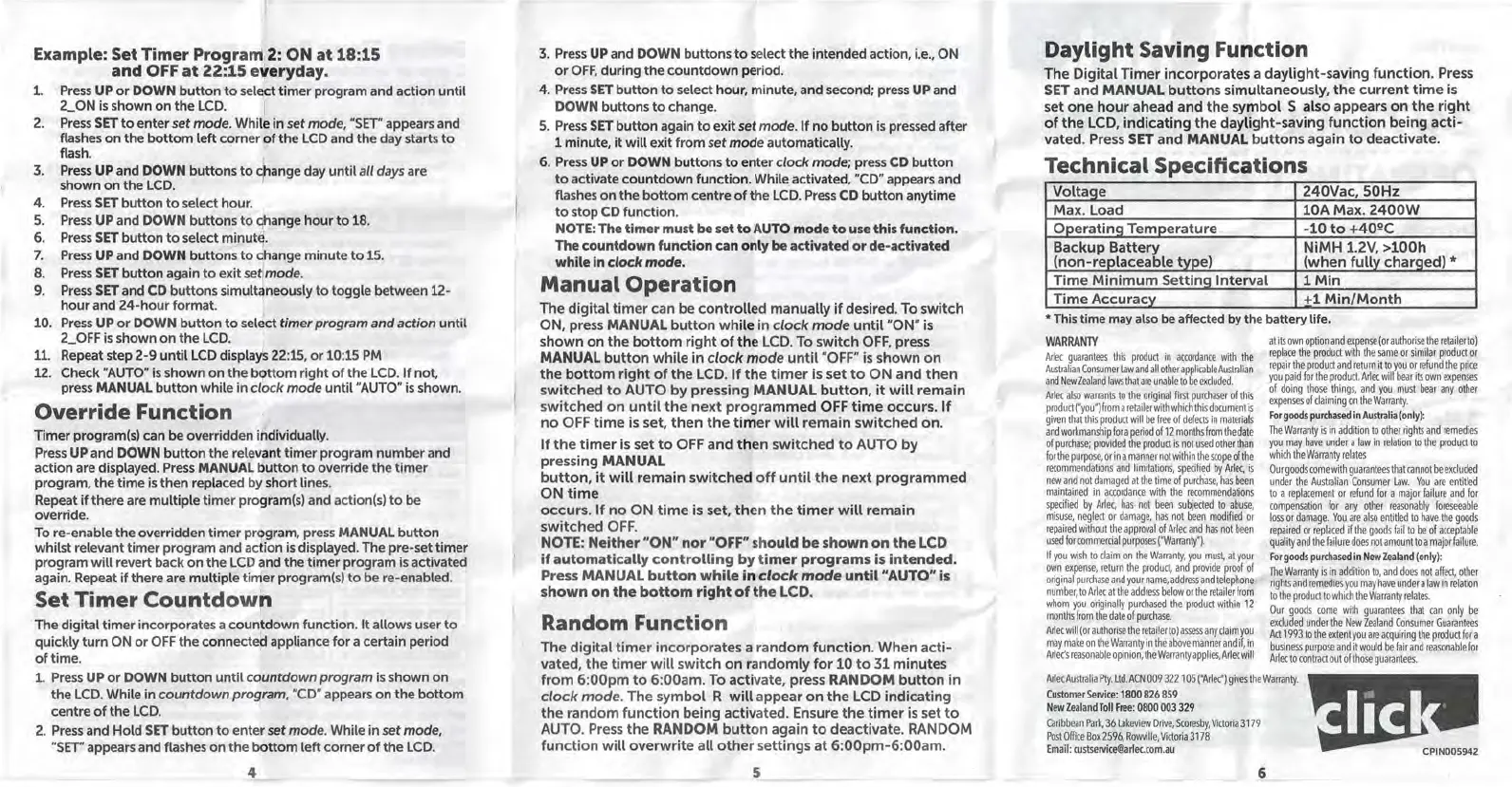
Example: Set Timer Program 2: ON at 18:15
and OFF at 22:15 everyday.
1.
2.
3.
4.
5.
6.
7.
8.
9.
10.
11.
12.
Press UP or DOWN button to select timer program and action until
2_ON is shown on the LCD. )
Press SET to enter set
mode. While in set mode, "SET" appears and
flashes on the bottom left corner of the LCD and the day starts to
flash.
Press UP and DOWN buttons to change day until
all days are
shown on the LCD.
Press SET button to select hour.
Press UP and DOWN buttons to change hour to 18.
Press SET button to select minute.
Press UP and DOWN buttons to dhange minute to 15.
Press SET button again to exit
set mode.
Press SET and CD buttons simuldneously to toggle between 12-
hour and 24-hour format.
Press UP or DOWN button to select
timer program and action until
2 OFF is shown on the LCD.
Repeat step 2-9 until LCD displaJ 22:15, or 10:15 PM
Check "AUTO" is shown on the bottom right of the LCD. If not,
press MANUAL button while in clock mode until "AUTO" is shown.
Override Function
Timer program(s) can be overridden individually.
Press UP and DOWN button the relevant timer program number and
action are displayed. Press MANUAL button to override the timer
program, the time is then replaced by short lines.
Repeat if there are multiple timer program(s) and action(s) to be
override.
To re-enable the overridden timer program, press MANUAL button
whilst relevant timer program and action is displayed. The pre-set timer
program will revert back on the LCD and the timer program is activated
again. Repeat if there are multiple timer program(s) to be re-enabled.
Set Timer Countdowr,
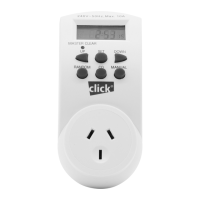
The digital timer incorporates a countdown function. It allows user to
quickly turn ON or OFF the connected appliance for a certain period
of time.
1. Press UP or DOWN button until
countdown program is shown on
the LCD. While in
countdown program, "CD" appears on the bottom
centre of the LCD.
2. Press and Hold SET button to enter
set mode. While in set mode,
"SET" appears and flashes on the bottom left corner of the LCD.
4
3. Press UP and DOWN buttons to select the intended action, i.e., ON
or OFF, during the countdown period.
4. Press SET button to select hour, minute, and second; press UP and
DOWN buttons to change.
5. Press SET button again to exit
set mode. If no button is pressed after
1 minute, it will exit from
set mode automatically.
6. Press UP or DOWN buttons to enter clock mode; press CD button
to activate countdown function. While activated, "CD" appears and
flashes on the bottom centre of the LCD. Press CD button anytime
to stop CD function.
NOTE: The timer must be set to AUTO mode to use this function.
The countdown function can only be activated or de-activated
while in
clock mode.
Manual Operation
The digital timer can be controlled manually if desired. To switch
ON, press MANUAL button while in clock mode until "ON" is
shown on the bottom right of the LCD. To switch OFF, press
MANUAL button while in
clock mode until "OFF" is shown on
the bottom right of the LCD. If the timer is set to ON and then
switched to AUTO by pressing MANUAL button, it will remain
switched on until the next programmed OFF time occurs. If
no OFF time is set, then the timer will remain switched on.
If the timer is set to OFF and then switched to AUTO by
pressing MANUAL
button, it will remain switched off until the next programmed
ON time
occurs. If no ON time is set, then the timer will remain
switched OFF.
NOTE: Neither "ON" nor "OFF" should be shown on the LCD
if automatically controlling by timer programs is intended.
Press MANUAL button while in
clock mode until "AUTO" is
shown on the bottom right of the LCD.
Random Function
The digital timer incorporates a random function. When acti-
vated, the timer will switch on randomly for 10 to 31 minutes
from 6:00pm to 6:00am. To activate, press RANDOM button in
clock mode. The symbol R will appear on the LCD indicating
the random function being activated. Ensure the timer is set to
AUTO. Press the RANDOM button again to deactivate. RANDOM
function will overwrite all other settings at 6:00pm-6:00am.
5
Daylight Saving Function
The Digital Timer incorporates a daylight-saving function. Press
SET and MANUAL buttons simultaneously, the current time is
set one hour ahead and the symbol
S also appears on the right
of the LCD, indicating the daylight-saving function being acti-
vated. Press SET and MANUAL buttons again to deactivate.
Technical Specifications
VoltaQe
240Vac,
SOHz
Max. Load
10A Max. 2400W
OoeratinQ Temoerature
.
-10 to +40°C
Backup Battery
NiMH 1.2V, >100h
(non-replaceable type)
(when fully charged)
*
Time Minimum Setting Interval
1Min
Time Accuracy
+1 Min/Month
• This time may also be affected by the battery life.
WARRANTY
Arlee guarantees this product in accordance with the
Australian Consumer
Law and all other applicable Australian
and New Zealand laws that are unable to be excluded.
Arlee also warrants to the original first purchaser of this
product ("you") from a retailer with which this document is
given that this product will be free of defects in materials
and workmanship fora period of 12 months from the date
of purchase; provided the product is not used other than
for the purpose, or in a manner not within the scope of the
recommendations and limitations, specified by Arlee, is
new and not damaged at the time of purchase, has been
maintained in accordame with the recommendations
specified by Arlee, has not been subjected to abuse,
misuse, neglect or damage, has not been modified or
repaired without the approval of Arlee and has not been
used for commercial purposes {"Warranty").
If you wish to claim on the Warranty, you must, at your
own expense, return the product, and provide proof of
original purchase and your name, address and telephone
number, to Arlee at the address below or the retailer from
whom you originally purchased the product within 11
months from the date of purchase.
Arlee will (or authorise the retailerto)assess any claim you
may make on the Warranty in the above manner and
if, in
Arlee's reasonable opinion, the Warranty applies,Arlecwill
at its own option and expense (or authorise the retailer to)
replace the product with the same or similar product or
repair the product and return it to you or refund the price
you paid for the product. Arlee will bear its own expenses
of doing those things, and you must bear any other
expenses of claiming on the Warranty.
For goods purchased in Australia (only):
The Warranty is in addition to other rights and remedies
you may have under a law in relation to the product to
which the Warranty relates
Our goods come with guarantees that cannot be excluded
under the Australian Consumer Law. You are entitled
to a replacement or refund for a major failure and for
compensation for any other reasonably foreseeable
loss or damage. You are also entitled to have the goods
repaired or replaced if the goods fail to be of acceptable
quality and the failure does notamountto a major failure.
For goods purchased in New Zealand (only):
The Warranty is in addition to, and does not affect, other
rights and remedies you may have under a law in relation
to the product to which the Warranty relates.
Our goods come with guarantees that can only be
excluded under the New Zealand Consumer Guarantees
Act 1993 to the extent you are acquiring the product for a
business purpose and it would be fair and reasonable for
Arlee to contract out of those guarantees.
Arlee Australia Pty. Ltd. ACN 009 311 105 ("Arlec") gives the Warranty.
Customer Service: 1800 826 859
New Zealand Toll Free: 0800 003 329
Caribbean Park, 36 Lakeview Drive, Scoresby, Victoria 3179
Post Office Box 1596, Rowville, Victoria 3178
Email: custservice@arlec.com.au
6


 To Previous Page
 Loading...