EasyManua.ls Logo

CLIMASET FP Series - User Manual

CLIMASET FP Series
14 pages
Print Icon
To Next Page IconTo Next Page
Loading...
FPseries
3 / 3x / 3-ir / 3x-ir
To be used with:
Horizontal room fan coils /
Ducted fan coils
- 7 days programmable
- 3-speed fan control
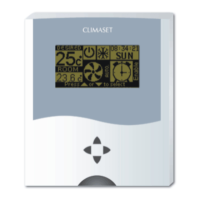
- Simultaneous indication of
room & desired temperature
- Animated screen
- Bilingual
CLIMASET
®
Interactive Controllers
Climaset is under continuous development. There is no warranty about accuracy and reliability of the contents o
f
this document. Both the described products and document contents may be chan
g
ed or withdrawn without any
previous notice. There is no responsibility for any damages or loss, even indirectly, howsoever caused.
Copyright © 2005 Climaset. All rights reserved.
Question and Answer IconNeed help?

Do you have a question about the CLIMASET FP Series and is the answer not in the manual?

Summary

Your Climaset

Wall Mounted Unit

Keys and Infrared Sensor

Identifies the buttons and the IR receiver on the wall unit for user interaction and remote control.

Screen Elements

Describes icons, indicators, and text displayed on the wall unit's primary screen for status and settings.

Using the Menu in Primary Screen

Explains how to navigate and use the menu functions displayed on the wall unit's primary screen.

To Set the Schedule Program

Guides users on setting up daily wake-up, leave, return, and sleep times for automated climate control.

Remote Controller Unit

Installing Batteries for Remote Controller

Instructions for safely opening the battery compartment and inserting new batteries into the remote.

Keys

Details the function of each button on the remote controller for adjusting settings and operating the unit.

Screen Elements

Explains the display elements and status messages shown on the remote controller's screen.

List of Status Bar Messages

Provides a reference for understanding various messages and indicators displayed on the remote's status bar.

Installation Guide

Mounting the Wall Mounted Unit

Step-by-step instructions for physically attaching the wall unit mounting plate and the unit itself.

Proper Wiring Technique for the Wall Mounted Unit

Guidance on correctly connecting the wires to the wall unit terminals for proper function.

Engaging the Wall Mounted Unit

Instructions on how to securely attach and detach the wall unit from its mounting plate.

Wall Mounted Unit Connectors

Details the function and electrical characteristics of each connector terminal on the wall unit.

Wiring Diagram

Visual schematics illustrating the correct wiring for horizontal and ducted fan coil unit connections.

Care and Maintenance

Specifications

Overview

The Climaset FP series (models 3/3x/3-ir/3x-ir) are interactive controllers designed for use with horizontal room fan coils and ducted fan coils. These devices aim to maximize energy savings while maintaining a comfortable room temperature. Each model includes a wall-mounted unit, with an optional remote control available for the 3-ir/3x-ir models.

Function Description:

The wall-mounted unit serves several key functions:

  • Room Temperature Measurement: Accurately measures the current room temperature.
  • User Interaction: Allows users to adjust set points for desired temperature and fan speed.
  • Remote Controller Interaction (FP 3-ir/3x-ir only): Receives commands from the optional remote controller.
  • Fan Coil Interaction: Adjusts the fan speed of the connected fan coil unit to achieve the desired conditions.

Important Technical Specifications:

Wall Mounted Unit:

  • Temperature Sensitivity: Not specified, but implied to be precise enough for comfort control.
  • Display Resolution: Not specified.
  • Backlight: Not specified.
  • Dimensions (Width, Length, Height): Not specified.

Remote Controller:

  • Max. Effective Distance: 16 meters.
  • Max. Viewing Angle: 30 degrees.
  • Display Resolution: Not specified.
  • Dimensions (Width, Length, Height): Not specified.
  • Battery Type: Two AAA-size 1.5-volt alkaline, lithium, or NiCad batteries. Mixing battery types is not recommended.

Operating Conditions:

  • Temperature: Not specified.
  • Humidity: Not specified.

Electrical Characteristics (Wall Mounted Unit Connectors):

  • Phase (Input): AC220V/50Hz
  • Null (Input): Null
  • Fan High Speed Terminal (Output): AC220V/50Hz
  • Fan Medium Speed Terminal (Output): AC220V/50Hz
  • Fan Low Speed Terminal (Output): AC220V/50Hz

Usage Features:

Wall Mounted Unit:

  • 7-Day Programmable Schedule: Allows users to define specific "wake up," "leave," "return," and "sleep" times for each day of the week, optimizing energy use.
  • 3-Speed Fan Control: Offers high, medium, and low fan speed settings.
  • Simultaneous Temperature Indication: Displays both the current room temperature and the desired set temperature.
  • Animated Screen: Provides visual feedback, such as schematic fan blades proportional to the selected fan speed.
  • Bilingual Interface: Supports English and a local language for menu functions.
  • "Auto" Mode (FP 3x/3x-ir only): Automatically selects the appropriate fan speed based on the temperature difference between the room and the desired set point. This "smooth approach" feature reduces fan speed as the room temperature approaches the desired level.
  • Power On/Off: A dedicated "Power" key controls the unit's on/off status.
  • Infrared Sensor (FP 3-ir/3x-ir only): Receives commands from the remote controller.
  • Menu Navigation: "Up" and "Down" keys scroll through menus, while "Right" and "Left" keys adjust values within menu items.
  • Schedule Settings: Users can enable or disable the schedule program. If disabled, the thermostat controls the air conditioner based solely on temperature.
  • Time and Day Adjustment: Allows setting the current hour, minute, and day for accurate program execution.
  • Season Setting: Users must select "summer" or "winter" mode for proper operation. In "summer," the AC turns on if the room is hotter than desired; in "winter," it turns on if colder than desired. Incorrect setting can prevent the AC from starting.
  • Bypassing Off Periods: Users can set "leave" and "return" times to be the same to bypass the off period, or "return" and "sleep" times to be the same to bypass the working period between them, useful for holidays or office environments.

Remote Controller (FP 3-ir/3x-ir only):

  • "Up" and "Down" Keys: Increase or decrease the desired temperature.
  • "Right" and "Left" Keys: Increase or decrease the adjusted fan speed. Pressing "Right" at maximum fan speed activates "Auto" mode (FP 3x/3x-ir only). Pressing "Left" at minimum fan speed turns the unit off.
  • "Send" Key: Transmits settings to the wall-mounted unit. A beep confirms receipt of commands.
  • "Wake up" Key: Activates the remote controller from "sleep" mode.
  • Auto Power Off: The remote controller enters "sleep" mode after 3 minutes of inactivity to conserve battery.
  • Status Bar Messages: Provides feedback on actions, such as "Temp. raised," "Fan spd. dropped," "Power turned on," and "Auto selected."
  • Single Remote Control: All remote controllers use the same code, allowing one remote to control multiple wall-mounted units.

Maintenance Features:

  • Battery Installation: Requires two AAA-size 1.5-volt batteries. Users are advised to install new batteries of the same type and ensure correct polarity.
  • Cleaning: Do not use detergents or chemicals to clean the Climaset, as this may damage internal electronic parts.
  • Environmental Care: Designed for residential comfort; avoid storing in hot, cold, dirty, or dusty environments.
  • Physical Handling: Do not drop the remote controller. Keep the Climaset dry to prevent irreparable damage to electronic parts.
  • No User-Serviceable Parts: Users should not attempt to open any part of the Climaset. For service, contact a local dealer.
  • Warranty: Warranty obligations may be affected by improper care and maintenance.

CLIMASET FP Series Specifications

General IconGeneral
BrandCLIMASET
ModelFP Series
CategoryAir Conditioner
LanguageEnglish