EasyManua.ls Logo

Climax KP-23B-EL - User Manual

Climax KP-23B-EL
4 pages
Print Icon
To Next Page IconTo Next Page
Loading...
1
REMOTE KEYPAD (KP-23B-EL / KP-23B-EL-F1) Jul-5-2016
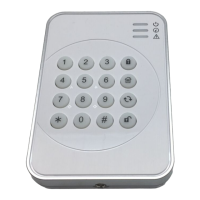
z Identifying the Parts
1. Active LED
2. Status LED
3. Fault Display LED
4.
Arm Key
5.
Home Key
6. Χ Key
- Check Control Panel Status
7. Disarm Key
- to move back one step
8. # Key
9. ¿ Key
- Enter KP Pin Code + ¿ Key to enter Test Mode
10. Send Learning Code
- Press both # and ¿ keys together to Send Learning
Code
11. Medical Alarm (if enabled)
- press both 7 and 9 to trigger medical alarm
12. Fire Alarm (if enabled)
- press both 4 and 6 to trigger fire alarm
13. Panic Alarm (if enabled)
-press both 1 and 3 to trigger panic alarm
14. Battery Insulator
15. Mounting Holes
16. Tamper Swtich
<NOTE>
&
A short beep will sound along with key pressing to indicate that the button pressed is valid.
& 4 continuous beeps will sound indicating mistake and the user should repeat the process again.
z LED Indicator
z Active LED (Blue/Amber):
z Blue LED on 5 seconds: the system is in Normal Operation Mode.
z Blue LED flashes for 5 seconds: low battery in Normal Operation Mode.
z Amber LED on: the system is in Test Mode.
z Amber LED flash: low battery in Test Mode.
z Status LED (Blue/Red):
z Red LED on: the system is in Away Mode
z Red LED flash: the system is in Home Mode.
z Blue LED on: activation of Disarm Mode.
z Blue LED flash: failure due to the following reasons:
¾ No response sent by the control panel within 4 seconds.
¾ Control Panel User PIN code was incorrect.
Question and Answer IconNeed help?

Do you have a question about the Climax KP-23B-EL and is the answer not in the manual?

Summary

Identifying the Parts

Keypad Part Descriptions

Descriptions of the physical parts of the remote keypad, including keys and indicators.

LED Indicator

Active LED (Blue;Amber) Status

Details the meaning of the Active LED states (Blue/Amber) for operation and battery status.

Status LED (Blue;Red) Status

Explains the Status LED states (Blue/Red) for system mode and fault conditions.

Power

Battery Operation and Replacement

Information on using the EL123AP battery, detecting low battery, and replacement procedure.

Power Saving Feature

Test Mode

Entering and Exiting Test Mode

Instructions for activating and deactivating the keypad's Test Mode.

Test Mode Functions

Details on the specific functions and commands available within Test Mode.

Tamper Protection

Installation Procedures

Adding Keypad to Control Panel

Steps to learn the remote keypad into the control panel system.

Setting Keypad PIN Code

Procedure to change the default keypad PIN code.

Mounting Remote Keypad

How to Set System Mode

Arm;Home with PIN Code

Instructions for arming/homing the system using a PIN code.

Arm;Home without PIN Code

Instructions for arming/homing the system without a PIN code.

Dual-key Alarm Function

General Operation

Fault Conditions

Appendix

Reset to Factory Default

Procedure to reset the remote keypad to its factory default settings.

Climax KP-23B-EL Specifications

General IconGeneral
ModelKP-23B-EL
CategoryKeypad
MaterialPlastic
BacklightYes
HumidityUp to 85% non-condensing